Home Blog Page 21

5 Residential Architecture Trends to Follow When Building a Home

In areas such as fashion, makeup and even interior design, various trends seem to come and go with each passing season. However, architecture is an area that doesn’t seem to be as easily affected by passing trends. That being said, if you are building a house, there are some architectural features you may want to pay special attention to. These features mostly revolve around some of the architectural elements that seem to be quite popular currently but whose popularity will only continue to grow. Let’s see what are some of the best residential architecture trends you should be focusing on when designing a house.

Consider the open floor plan

Consider the open floor plan

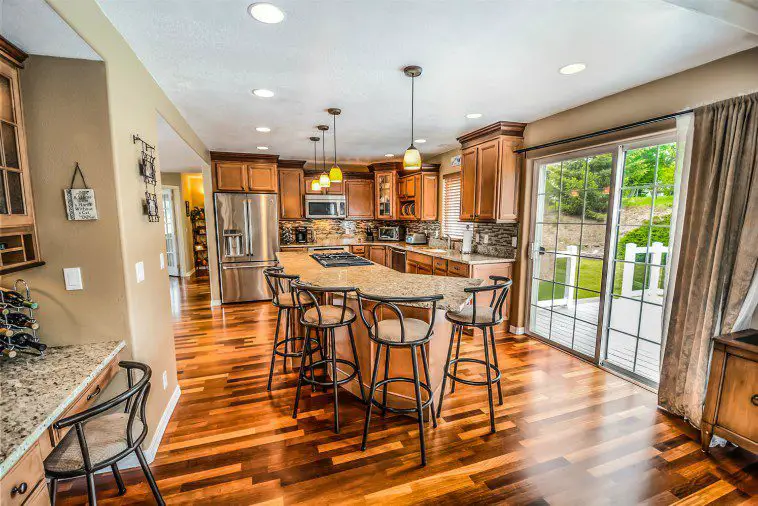
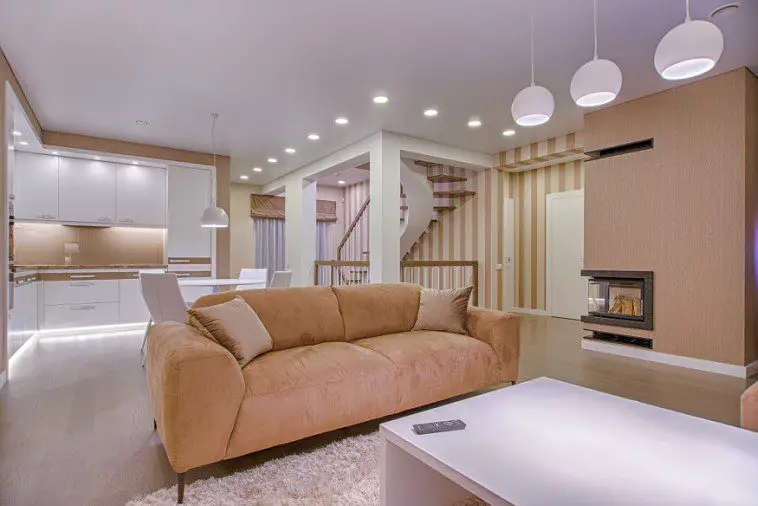
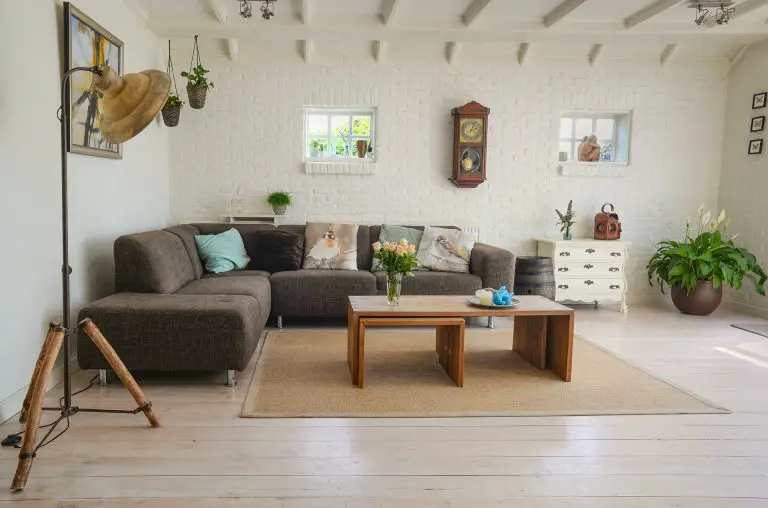
The open floor plan seems to be one of the hottest residential architecture trends for quite some time now. This beautiful architectural feature is in pretty high demand among home buyers. So, no matter if you are building your future home or you’re simply creating a property you intend to sell, make sure you don’t overlook this popular trend. Properties that feature an open floor plan offer plenty of flexibility to their future owners. Here, the only thing you really need to consider is just how open you want your space to be. Discuss your plans with the contractors and see how open you can go.

Go with multiple master suites

Furthermore, since you have the chance to create the house of your dreams, you should look into the option of creating master suits instead of simple bedrooms. This type of layout will make far more sense, especially for bigger families as every bedroom will have an en suite, which will significantly boost the functionality of the space. Furthermore, these types of rooms tend to instantly look and feel more luxurious. When you really think about it, why shouldn’t you create a luxury hotel experience in your home if you already have a chance to do so?

Make the space feel luxurious

Make the space feel luxurious

On a similar note, you certainly don’t want to create a home that feels too bland and dull. Instead, your new property should ooze with luxury and style wherever you turn. That’s why, when designing your new home, you should turn to professionals and look into properties designed by luxury mansion builders. By drawing inspiration from such properties and getting help from true experts in order to include all the features you’ve found particularly interesting, there’s really no way you can go wrong when creating the plans for your new home.

Focus on sustainability

Another important aspect of your future home you should pay attention to is your new home’s sustainability. This may not seem too important to you now, but if you ever decide to sell your new home, sustainability will play a huge part in determining the price. Simply put, future homeowners feel more inclined to choose properties that are sustainable, energy-efficient and eco-friendly. Additionally, they won’t even mind paying a bit more for such a property as they’re aware of all the benefits it brings. To ensure that your home is more sustainable and energy-efficient, consider building it up instead of out. What this means is that taller homes are generally considered to be more efficient than wider, single-level homes. Furthermore, you should also pay attention to the structure of the property. For example, even though the majority of homes are built with wooden construction frames, a structural steel frame is a way better option. Not only are these significantly lighter – believe it or not – but they’re also far more eco-friendly as they’re commonly produced from recycled steel.

Use basement and attic space wisely

Use basement and attic space wisely

In the end, when building your home, make sure you show some love to your attic and basement. These areas people usually leave looking raw and seemingly unfinished as they most commonly use them as additional storage. But if you’re already building your home from scratch, you can choose to adapt these areas as well. The attic can easily be turned into a functional loft later on, so why not do it now? When it comes to the basement, you can choose to turn it into a gaming room, wine cellar, workshop, creativity hub or a good old traditional man cave. By adapting these areas of your home and turning them into functional areas right off the bat, you’ll eliminate the need to have your home under construction on a later date. Besides, if you’re already building your home make sure you fill it with all the functional features.

These were just some of the hottest residential architecture trends you should keep in mind when building your home. Implementing them in your house’s design will not only provide you with a beautiful and functional living space you can enjoy for many years to come. They can actually boost the value of your property significantly if you ever decide to sell it.

How Does a Roomba Robot Vacuum Cleaner Work?

For nearly 20 years, Roombas have been working hard to make our homes tidy. Made by iRobot, Roomba robotic vacuum cleaners use sensors to detect walls and items in a room, becoming smarter the more frequently they clean. And as Parks and Rec taught us, they make for great DJs, too.

In the age of smart TVs, smart refrigerators, and soon-to-be smart cities, the Roomba is probably the robot we know the best (Sorry, Rosey!). You’re likely familiar with an iRobot Roomba and may even own one already. But how does a Roomba actually work? What’s the secret science behind how it magically avoids walls and furniture? If you’ve ever wondered how a Roomba “thinks”, well, you’re in luck. We’ll discuss the robotic programming behind the cleaning patterns of a Roomba, as well as provide an in-depth look at its special features that tidy up dirt and dust. Finally, we’ll show you the latest and greatest improvements recent Roomba models have been given over the years.

The Jetsons had Rosey, but now you have a cute little buddy, who maybe just as smart — and arguably a lot cuter!

How does a Roomba work?

Just as humans have values we live by, there are set rules of Roomba. These rules determine how the Roomba functions. For example, the robot vacuum might start in the middle of a room, vacuuming in an outward spiral pattern to clean a concentrated area, rather than moving in a straight line. It then heads to the walls of a room.

As CNET notes: “Roboticists call these rules “behaviors,” and they are simple things like if you hit a wall, turn away from it.”

Roombas move entirely independently, and rely on different features (we’ll get to that later) in order to move around. Their patterns of movement are so seemingly preternatural that it’s easy to think your Roomba is alive. And humans being the pack animals we are, many Roomba owners have named their Roombas, just like you would a living, breathing pet.

There are four main parts to Roomba: sensors, bump, wheels, and brushes. These parts work in tandem to tackle tile, hardwood floors, carpet, and anything in between.

Robot vacuums can thank ants for their creation – the initial patent iRobot filed in 2002 references ants as an inspiration for Roomba. Though ants don’t have much brain capacity, they have a similar set of behaviors that help dictate their actions.

Diving Into Roomba Sensors

Diving into Roomba Sensors

Roomba’s most innovative features are its sensors, which help as it navigates around a house. How do all of these sensors work to let Roomba operate smoothly and efficiently?

Infrared waves, also known as infrared (IR) light, are a part of the electromagnetic spectrum. Though humans can’t see IR light, we can sense it as heat. Common uses of infrared include night vision (the ability to detect objects in dark environments), as a tool for predicting weather patterns, and as tracking technology.

A photoelectric cell (or photocell) emits a visible or infrared light beam from its light-emitting element. A reflective-type photoelectric sensor can then detect the light beam that the target reflects. Another sensor measures the change in light quality.

A Roomba contains both infrared sensors and photocell sensors, which work in combination to clean a room. The infrared sensor at the very front of the Roomba allows the vacuum to bounce light off an object to detect its presence, even if it’s cleaning after dark and there’s limited natural light. A Roomba measures how long it takes for an emitted infrared beam to bounce back to the photocell sensors, which provides more precise object detection. In essence, the photocells measure changes in light levels, while the infrared sensors can detect changes in motion.

Features of newer Roomba models

Features of newer models

After nearly two decades on the market, Roombas have seen upgrades over the years. Newer models offer several advantages over older ones.

Battery life/power is also more efficient with newer Roombas. iRobot products are powered by rechargeable ion or NiHM batteries (with newer models adopting ion batteries), which can usually last for about 90 minutes before recharging. However, as they are entirely self-charging, Roombas are smart enough to head towards a charging station when their battery life is running low, and will dock as they regain a charge.

Though newer Roombas can function without WiFi, the iRobot Home app available on the iPhone and Android app stores adds extra convenience for newer models. After connecting to your home network, you can program a cleaning schedule through your smartphone, as well as learn more info and set up behavioral rules for your Roomba, such as actions to take when the dustbin is full.

It’s not only our vacuums that are getting smarter. Connect your Roomba to the same network as your Google Home and you can delegate scheduling a cleaning session to your smart home. Also available to Amazon’s Alexa, you can tell Google Assistant to “start”, “continue”, and “stop” cleaning and your Roomba will resume those functions and return to home base when it’s done.

Since their first launch in 2002, Roombas have helped revolutionize the robot vacuum industry. iRobot and other companies are continuing to innovate and grow our robot helpers. And vacuums aren’t the only innovation worth watching. With the internet of things growing at such a rapid pace, in 10 years, we’ll be able to turn on our Roombas from our driver-less, completely automated cars. Okay, maybe, not 10 years, but we’ll continue seeing automation and technology developing in new ways to improve our lives at home.

For an animated look at how all the Roomba sensors work, check out our guide at The Zebra.

How To Deep Clean & Disinfect Your iPhone Without Damaging It

In the recent weeks we’ve all been stepping up our general household and personnel hygiene, one of the most frequent recommendations being to wash our hands often and thoroughly.  This is a great first step, but you probably handle your phone before and after washing your hands as well, transferring germs to and from your phone each time. So its best to give your mobile device a wipe down at least once or twice a day too. Cleaning your iPhone is not as simple as giving it a spray of disinfectant as harsh chemicals may permanently damage the oleophobic coating on the display, and older, non-water resistant models may be susceptible to moisture ingress. So here’s a useful guide to clean and disinfect your iPhone while minimising the risk of damaging it.

It is important to note that using harsh chemicals to disinfect your iPhone, especially those containing bleach, will damage the coating on your iPhone’s screen. Apple’s official recommendation is to use either 70% alcohol wipes or Clorox disinfecting wipes. These are the only disinfectants or cleaning products which you should use on your iPhone.

If you enjoy this article, you may also want to find out about these Things You Should Be Cleaning But Probably Don’t.

What You Need To Clean Your iPhone

How To Properly Clean Your iPhone

Start by removing your iPhone’s cover and lay them down onto one of the microfibre cloths. If you’ve got a cover which is not designed to be easily removed, then rather clean the outside of the cover and use the cotton swabs (as mentioned below) to clean along the edges. Repeated removal of covers which are not designed to be removed may damage them and cause them to become loose around your iPhone. Also, don’t remove your tempered glass screen protector,  if installed.

Carefully and gently remove any dirt or lint which has been caught in your iPhone’s lightning port or in your microphone and speaker grills with a toothpick. It is important to be very careful when working in and around the lighting port. Only use the toothpick to gently lift dirt or lint out of the port, do not scrape, scratch or rub the inside of the port or you risk damaging the terminals.

Use a Clorox wipe or a 70% rubbing alcohol wipe and give your iPhone and cover a wipe down to clean and disinfect it. Be thorough and make sure that you wipe down the front and back surfaces as well as around the sides. Don’t use a lot of pressure and be especially careful when wiping down the screen. Never press the wipe or cloth down over the speaker grills, buttons or microphone ports as you risk forcing moisture into the openings and into your iPhone which may permanently damage it.

Use a cotton swab with a small amount of rubbing alcohol from a wipe to get in around the buttons, switches and grills. Again, it should be slightly damp, not soaked in alcohol or you risk getting moisture into your iPhone.

Once done, wipe your iPhone and cover down with the dry cloth on which they have been resting and replace the cover.

If your iPhone case or cover has any signs of advanced wear, deep scratches or cracks then you’ll want to throw it away and get a new one. Cracks and crevices are great hiding places for germs.

You’ve now successfully managed to clean and disinfect your iPhone, leaving it germ free.

What are some of the other personal and household items which you’ve found important to keep clean? Let us know in the comments section below.

Share This Guide

How To Deep Clean & Disinfect Your iPhone Without Damaging It

5 Awesome Raspberry Pi Projects Which We Love

If you’ve got a Raspberry Pi and you’re wondering what to build with it, here are some great ideas. We’ve found 5 of our favourite Raspberry Pi projects which vary in complexity, so there’s something for you to start with and a few to really challenge your Pi abilities.

Pi Powered Productivity Tracker

Raspberry Pi Productivity Tracker

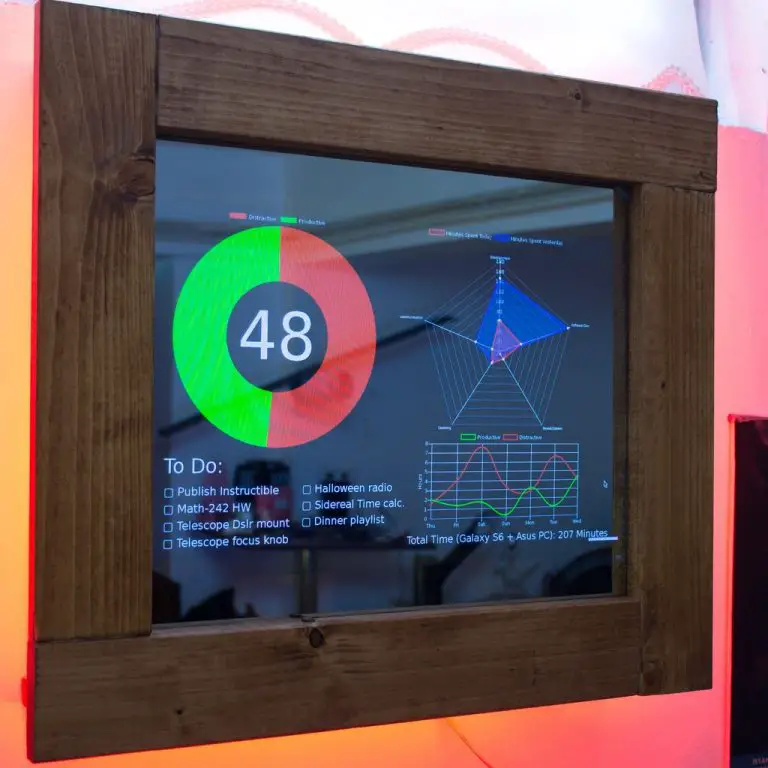
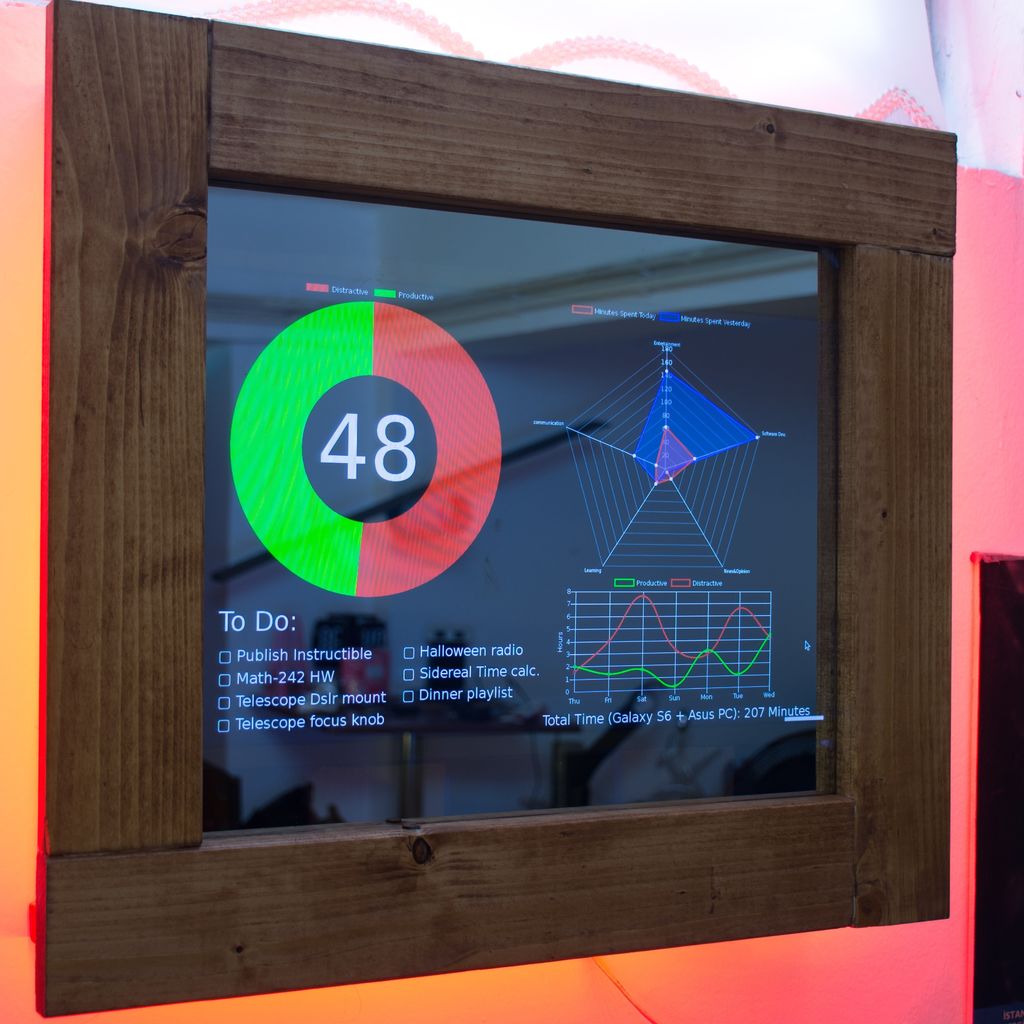
This Raspberry Pi based productivity tracker by Gocivici collects productivity data from your PC and mobile phone to display a chart showing the percentage of time you’ve spent on productive activities for the day, your to do list, a radar graph showing the time spent using certain categories of programs and a weekly productivity overview.

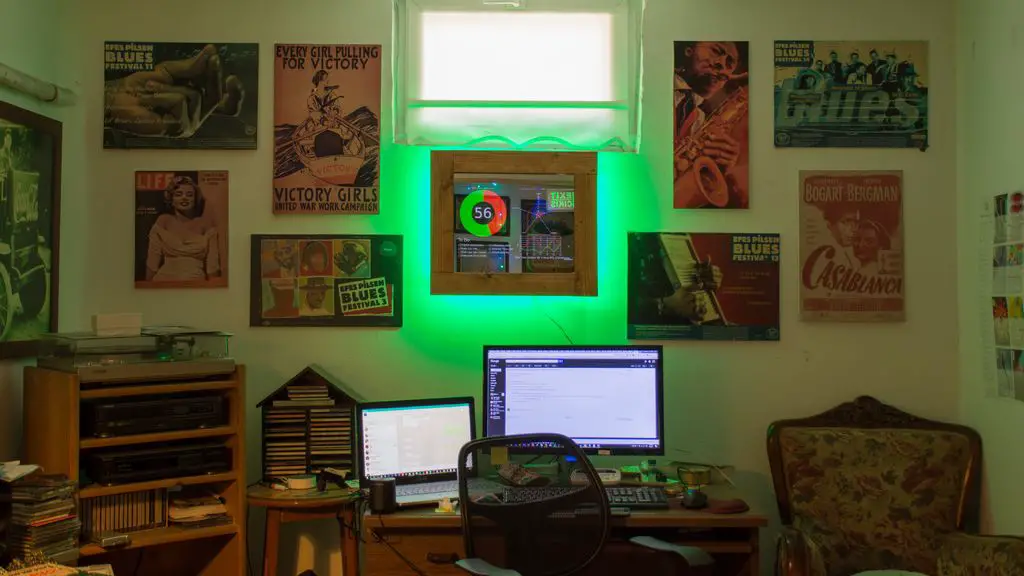
Raspberry Pi Productivity Tracker On Wall, Green Ambient

It also features a bright ambient backlight which illuminates the wall in green when your productivity is over 50% and goes red when your productivity falls below 50%. It’s a great motivational tool! Or a device to keep an eye on you if you need to practise a bit more self control.

Picroscope

Picroscope

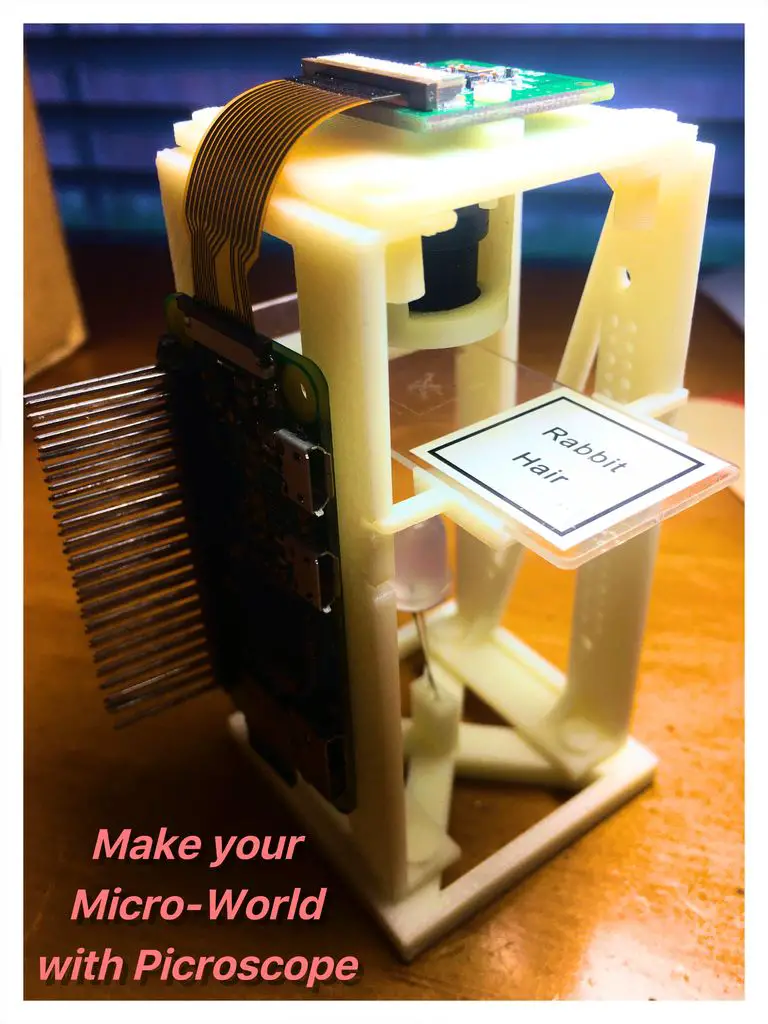
If you haven’t guessed from the title, the Picroscope is a Raspberry Pi based digital microscope by RiksEddy which enables you to learn about microbiology, optics and DIY electronics all in a single project.

This is a great project if you’re on a budget as it makes use of a Pi Zero (the cheapest of the Pis) and only requires a few other inexpensive components and some 3D printed parts.

The magnification is achieved using a cheap CCTV lens and lens holder and produces amazingly clear results, like this image of rabbit hair:

Rabbit Hairs Through Picroscope

MudPi – An Automated Indoor & Outdoor Garden System

Automated Indoor & Outdoor Garden System

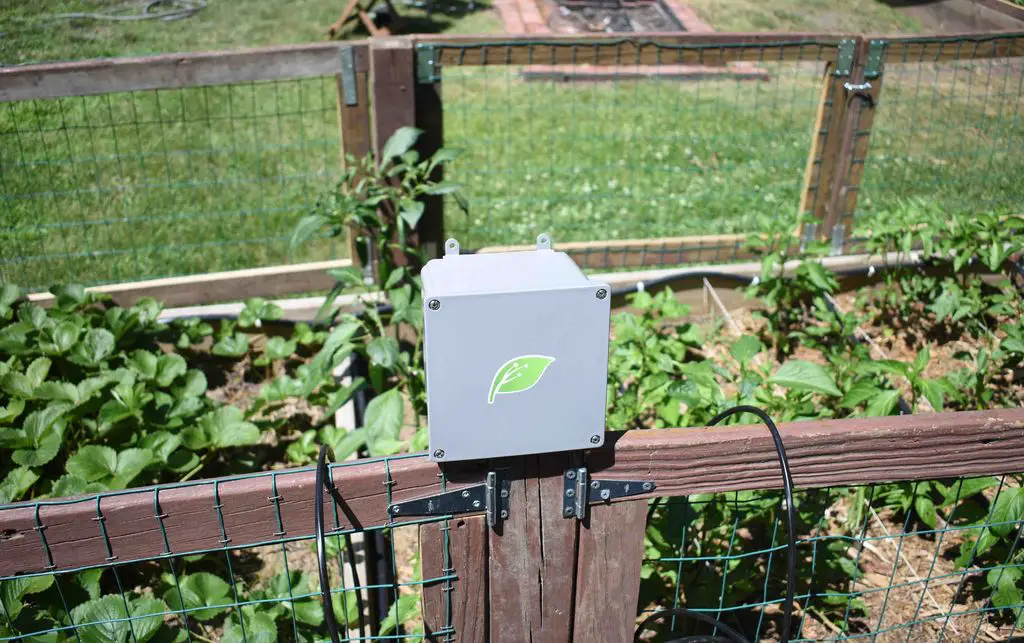
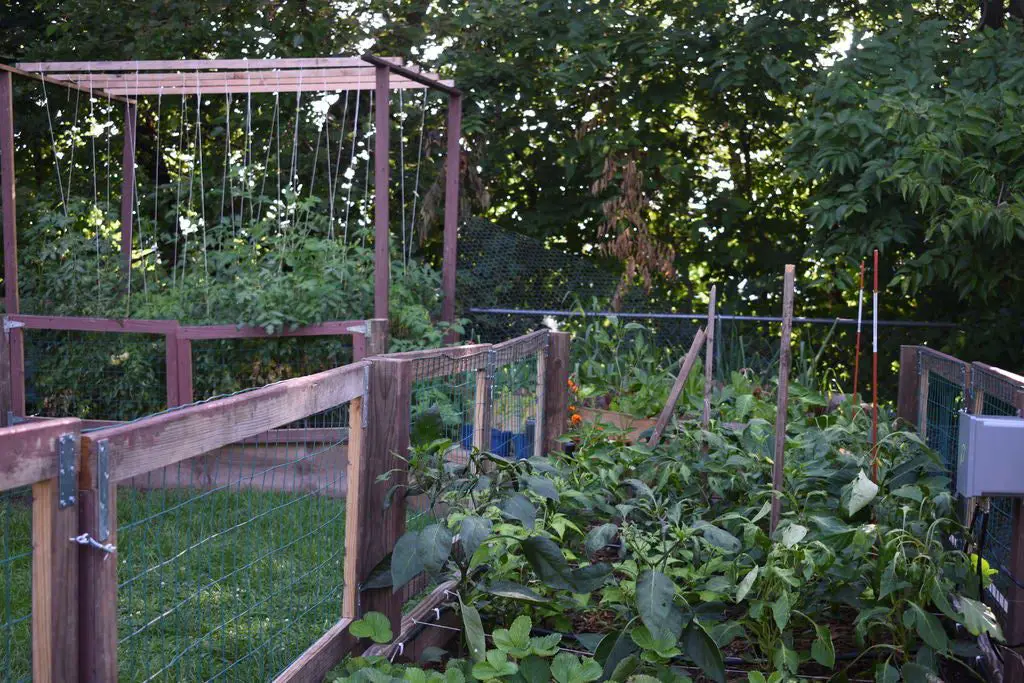
This automated indoor and outdoor garden system by Mudpi is great for people who like gardening but who either don’t have the time or don’t remember to maintain it properly.

The system monitors the outdoor temperature and humidity as well as the moisture levels in the soil and automatically waters your plants.

Automated Indoor & Outdoor Garden System Watering Plants

The best part is that it can be connected up to the internet to allow you to monitor your garden from a web page or through an app on your mobile phone.

Pi-Hole Ad Blocker

Pi-Hole Ad Blocker

The Pi-Hole Ad Blocker by Puffball101961 is a really awesome ad blocker for your home or small office network. The Raspberry Pi runs software called Pi-Hole and PADD to block ads and a display connected to the front of the Pi displays statistical data on the number of ads blocked, and the Pi-Hole’s IP address.

This is quite a nice starter project as you’ll learn a lot about programming your Pi without having to worry too much about additional IO and electronics hardware.

Raspberry Pi Laser Scanner

Raspberry Pi Laser Scanner

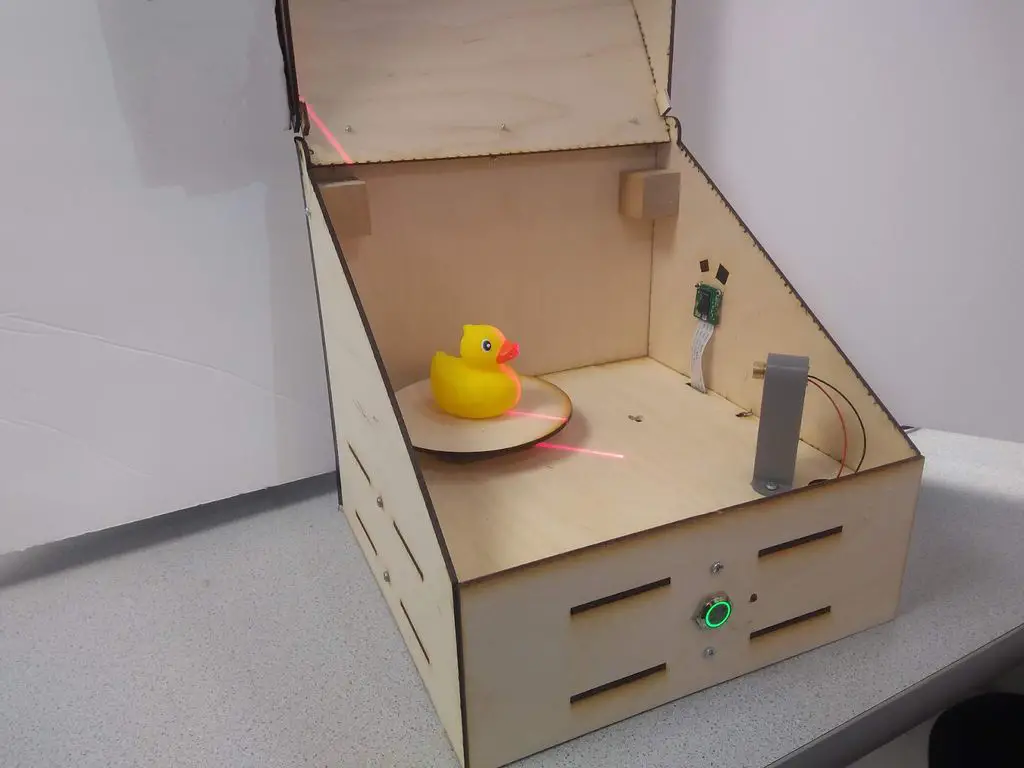
We’ve seen a couple of 3D scanners for Raspberry Pi’s which are photo or video based, but this cool 3D scanner makes use of a laser line and a clever algorithm to convert the line data into a 3D model which is then emailed to the user, meaning it can be a complete stand alone system.

Raspberry Pi Laser Scanner Model

The end results are still a bit rough but this is mostly to do with the post processing. 3D scanning software has come a long way in the past few years and there are a number of free or affordable software packages available to convert imagery into 3D models with continually improving results.

Let us know in the comments section below which one of these Raspberry Pi projects you’d like to try first.

Make Your Own Solar Powered Mendocino Motor

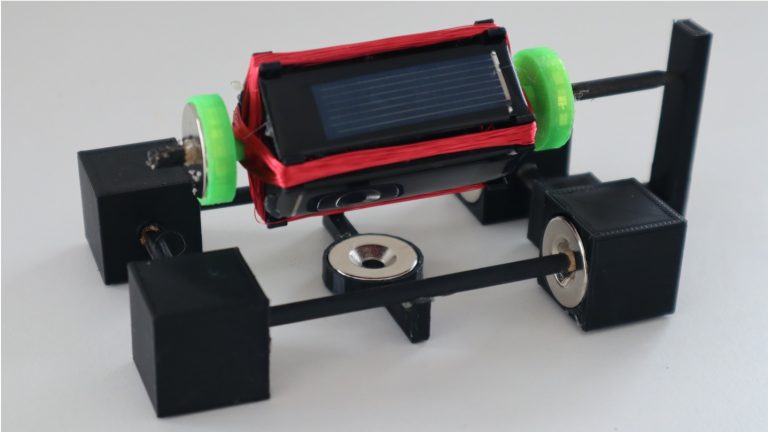
A Mendocino motor makes an intriguing desktop toy. The magnetically levitated rotor and lack of any batteries or power supply add to the allure. While they look quite sophisticated, Mendocino motors are actually one of the most simple forms of brushless motor. They rely on solar panels mounted directly onto the rotor and connected in opposite polarities to automatically reverse the current flowing through the windings, thereby negating the need for a commutator or any electronic control circuit. We’ll discuss this in a bit more detail further along.

Due to the relatively small size of the solar panels which are able to be mounted onto the rotor, this motor doesn’t produce much power and you won’t be able to connect it up to drive something useful. Some people have added a small fan to the end of the rotor, which looks quite nice, but also doesn’t really produce much air movement.

Here’s my video of the build and the Mendocino motor in operation, read on for the parts list and instructions.

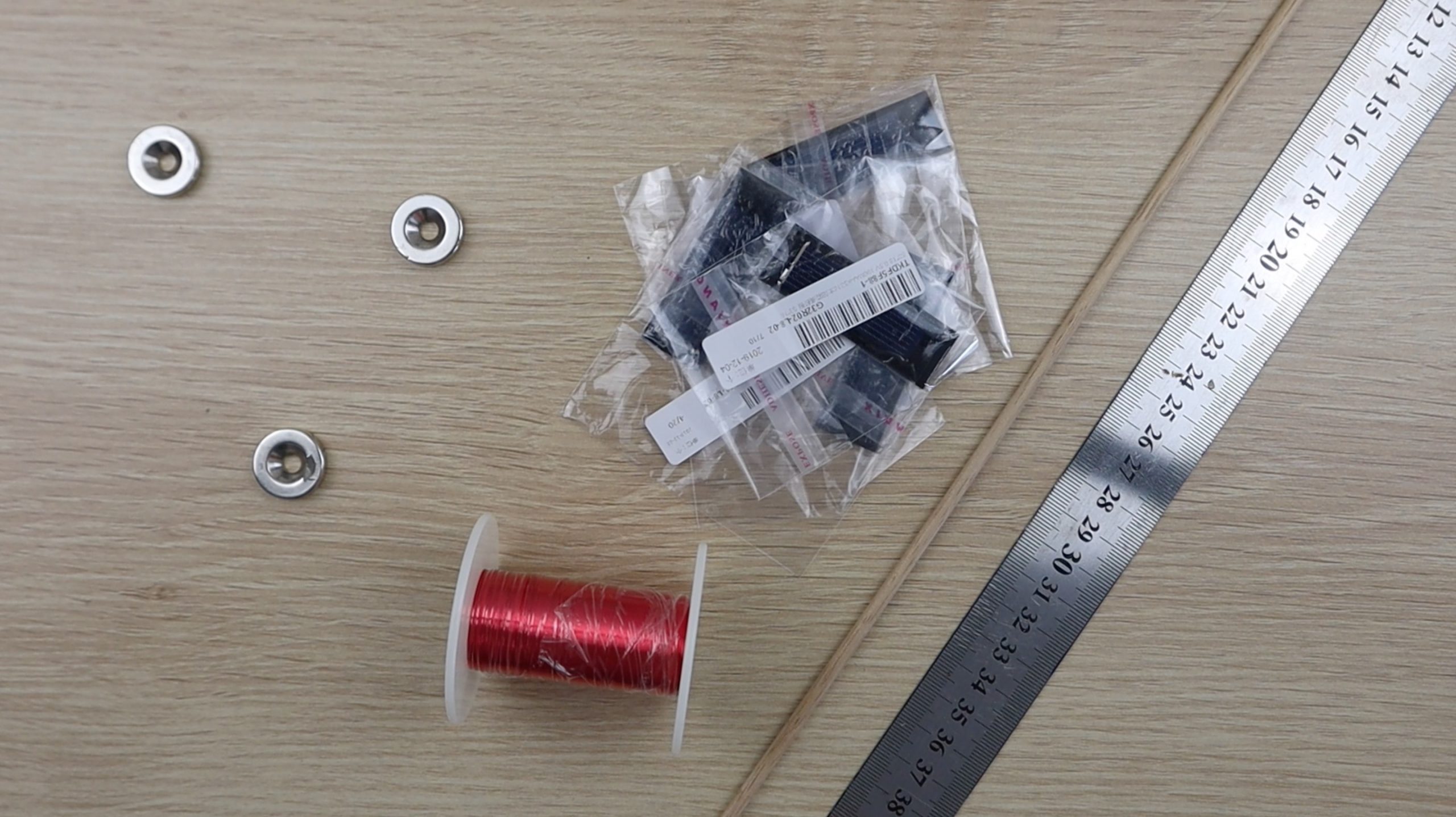
What You’ll Need To Build Your Own Mendocino Motor

In addition to these, you’ll also need to 3D print some plastic components for the frame and rotor. You could also make these components out of cardboard or wood if you don’t have a 3D printer.

You’ll also need some basic tools such as a ruler, pencil or marker, craft knife, side/wire cutters and a soldering iron.

components required

How To Build Your Mendocino Motor

We’ll build the Mendocino motor in three stages, first building the base, then the rotor and windings and then finally testing the rotor and finishing off the motor.

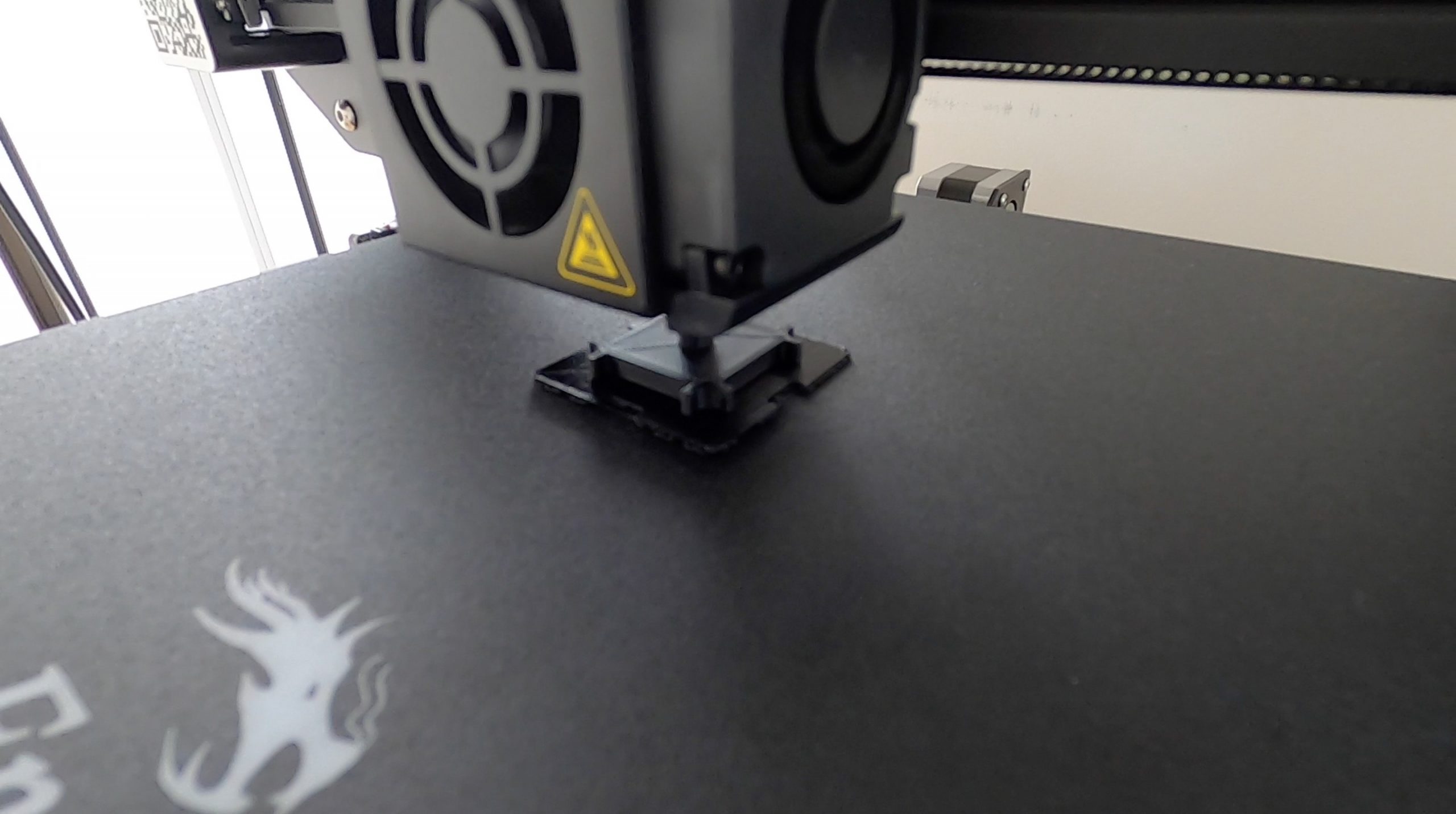
Start off by 3D printing all of the components in the download folder – 3D Print Components.

You’ll need the following quantities:

  • 4 x Base Corner Blocks
  • 1 x Bottom Magnet Holder
  • 2 x Rotor Half
  • 2 x Rotor Magnet Holder
  • 1 x Rotor Reaction Support

I printed the components in black and green PLA at 195°C and 15% infill. The green PLA was only used for the rotor magnet holders, just to give the motor a bit of colour. You can use any colour or combination of colours of PLA or ABS for the components.

3d printing components

Assemble The Base Frame

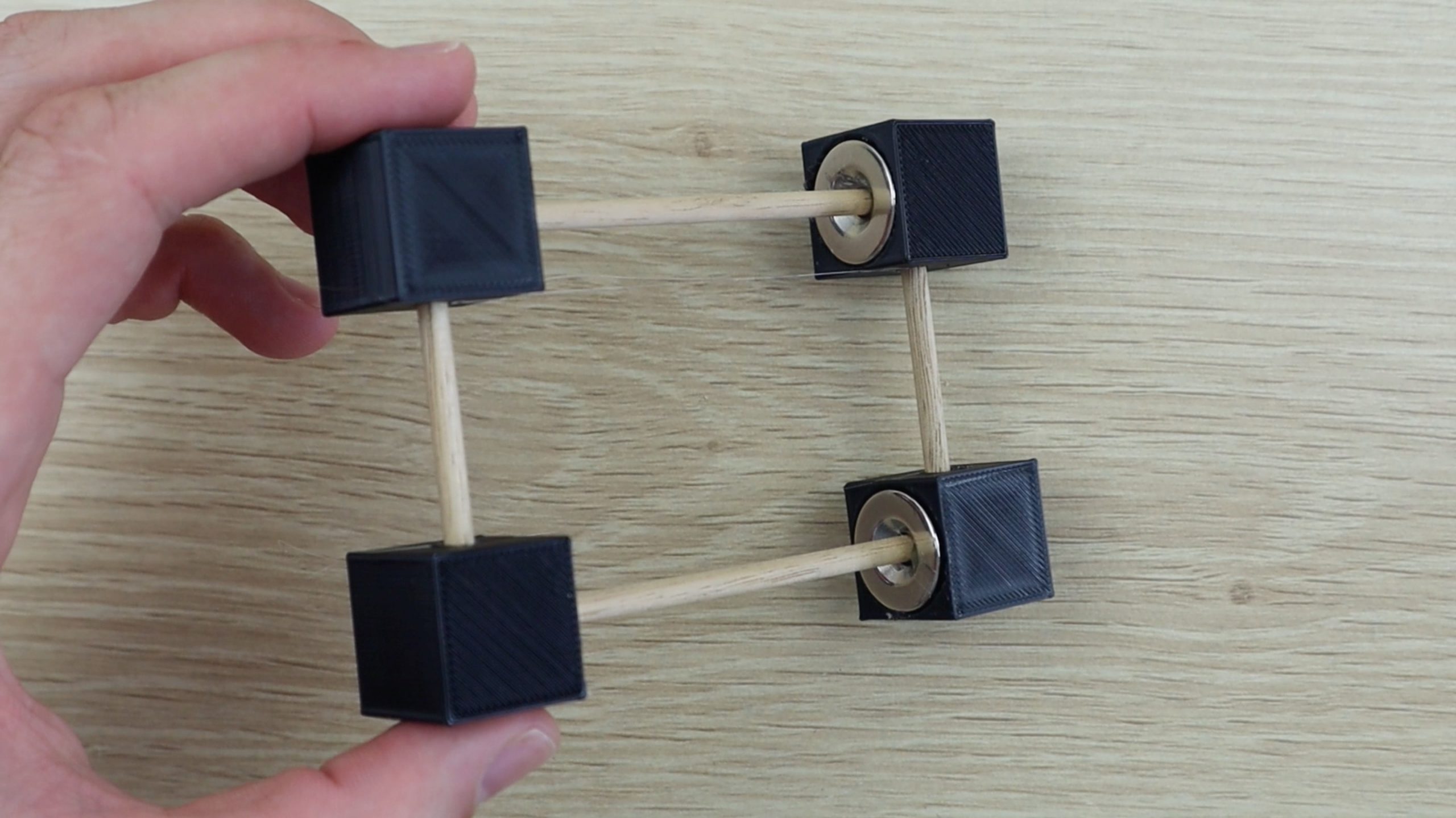
Start off by measuring and cutting the dowel for the base, you’ll need two lengths of 9.5cm (3.75″) and two lengths of 5cm (2″).

Glue a magnet into the first corner block with the flat side inwards and then glue one of the longer dowels into the centre.

assembling the motor base

Next glue a magnet into a second corner block in the same orientation and then glue this block onto the same length of dowel. Make sure that the holes on the side of the two corner blocks face in the same direction. Also make sure that the magnets are facing each other with the same polarity, i.e. the two flat sides facing outwards (they should repel each other).

Repeat the process to make the second base length.

Next, glue one of the shorter dowels into each of the corner blocks on one length and then push the other ends into the second length. Don’t glue these into place yet, as you still need to install the rotor reaction support.

the completed mendocino motor base

If you’re using the same components as I’ve used then you’ll want to glue the rotor reaction support into place during this step as well. I didn’t do so as I had to measure the floating height of the completed rotor once it was complete in order to design the reaction support to the correct height and distance away from the base.

Assemble The Rotor

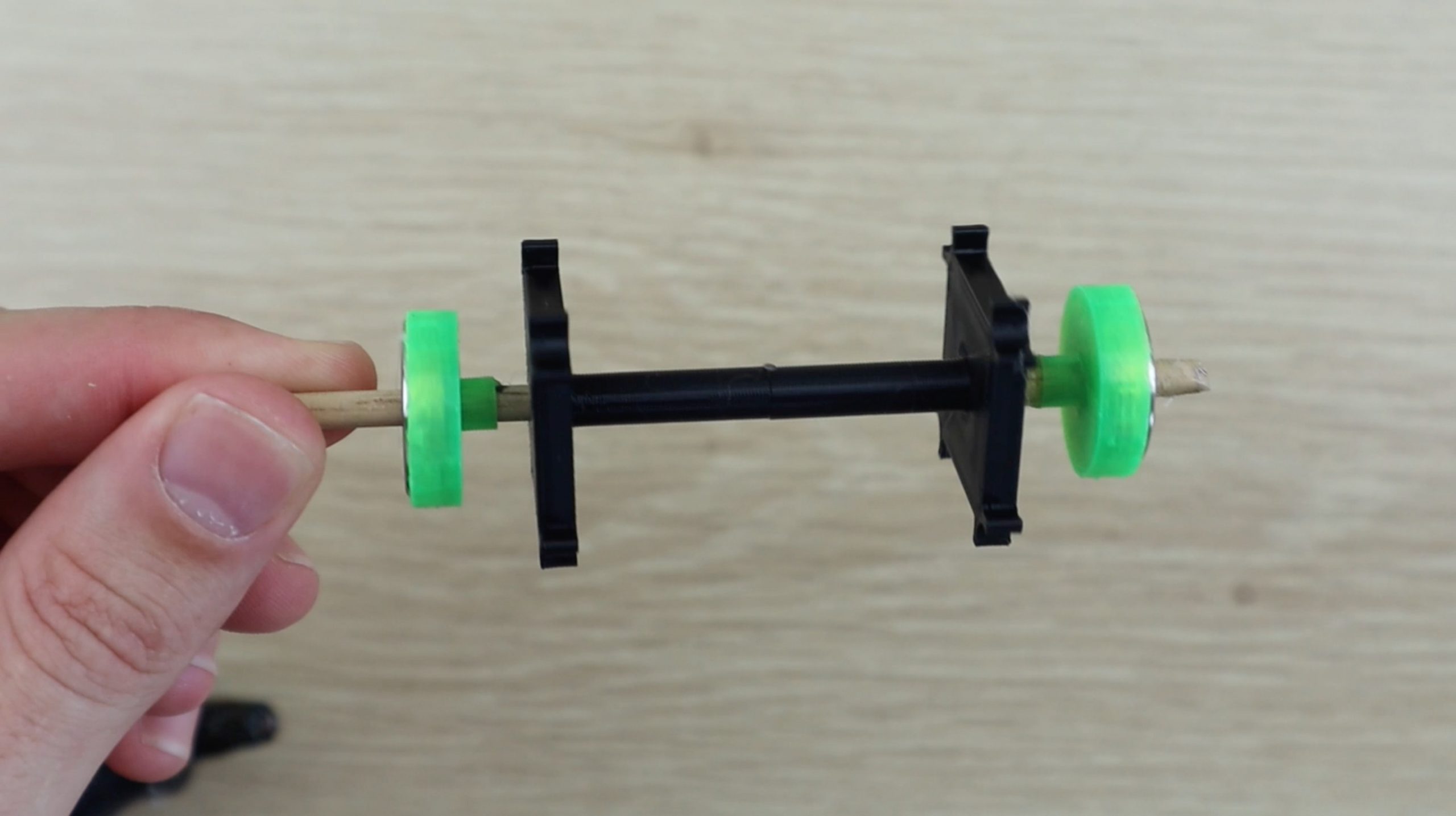
Next, measure a 12cm (4.75″) length of wooden dowel for the rotor. Cut one end square and use a craft knife to sharpen the other end to a point in order to minimise the contact area with the reaction support, minimising friction.

Mark the wooden dowel at 2cm (0.75″), 5cm (2″) and 8cm (3.25″) as guides for gluing the 3D printed rotor components into place.

Glue the rotor components into place as shown below. The magnets go into the magnet holders on both sides with the flat side facing outwards (away from the centre). Again, these two magnets are assembled wit the same poles facing each other (they repel each other).

the plastic rotor components

It may help to watch the video at this stage to make sure that your orientations and positions are correct.

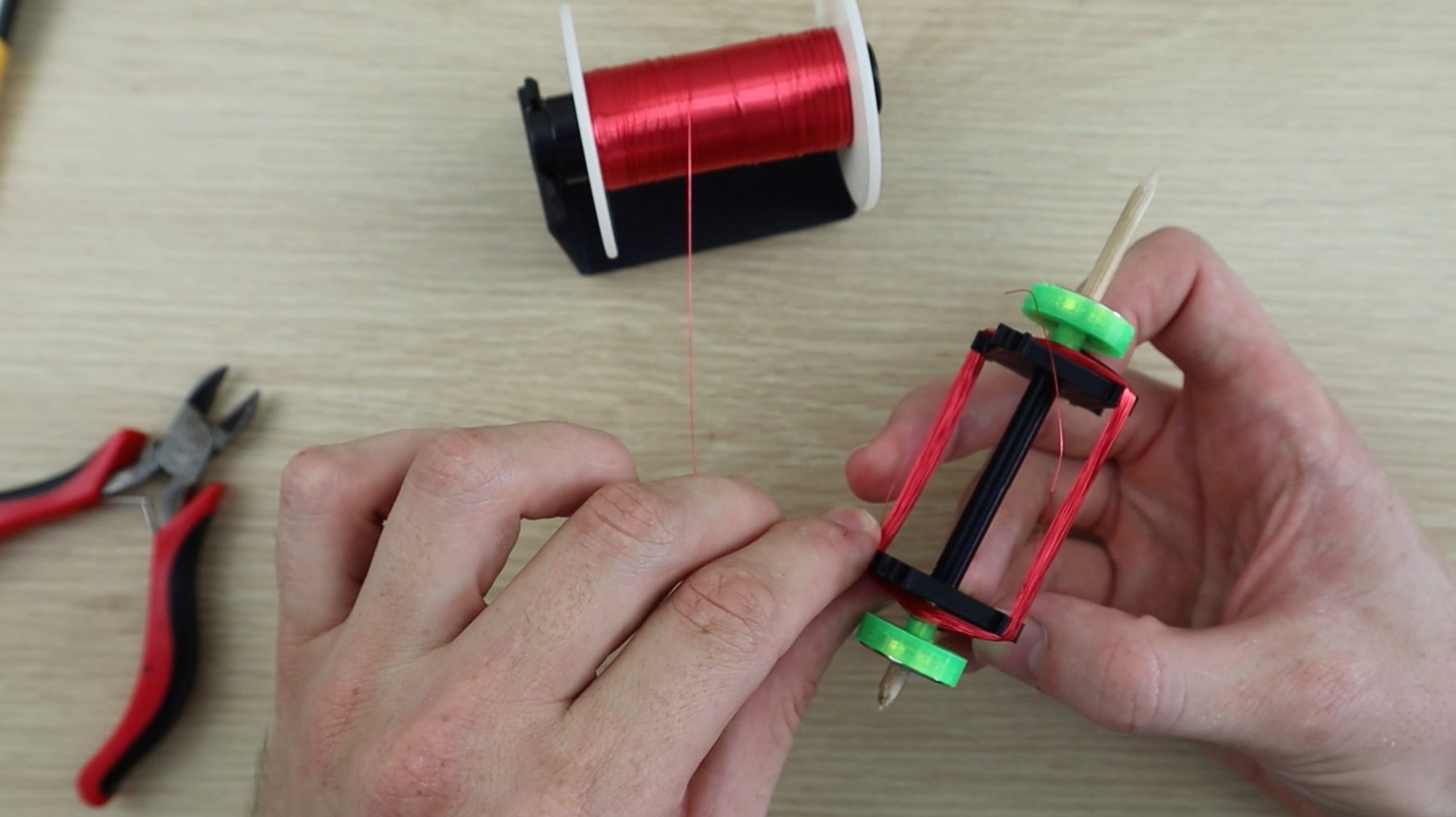
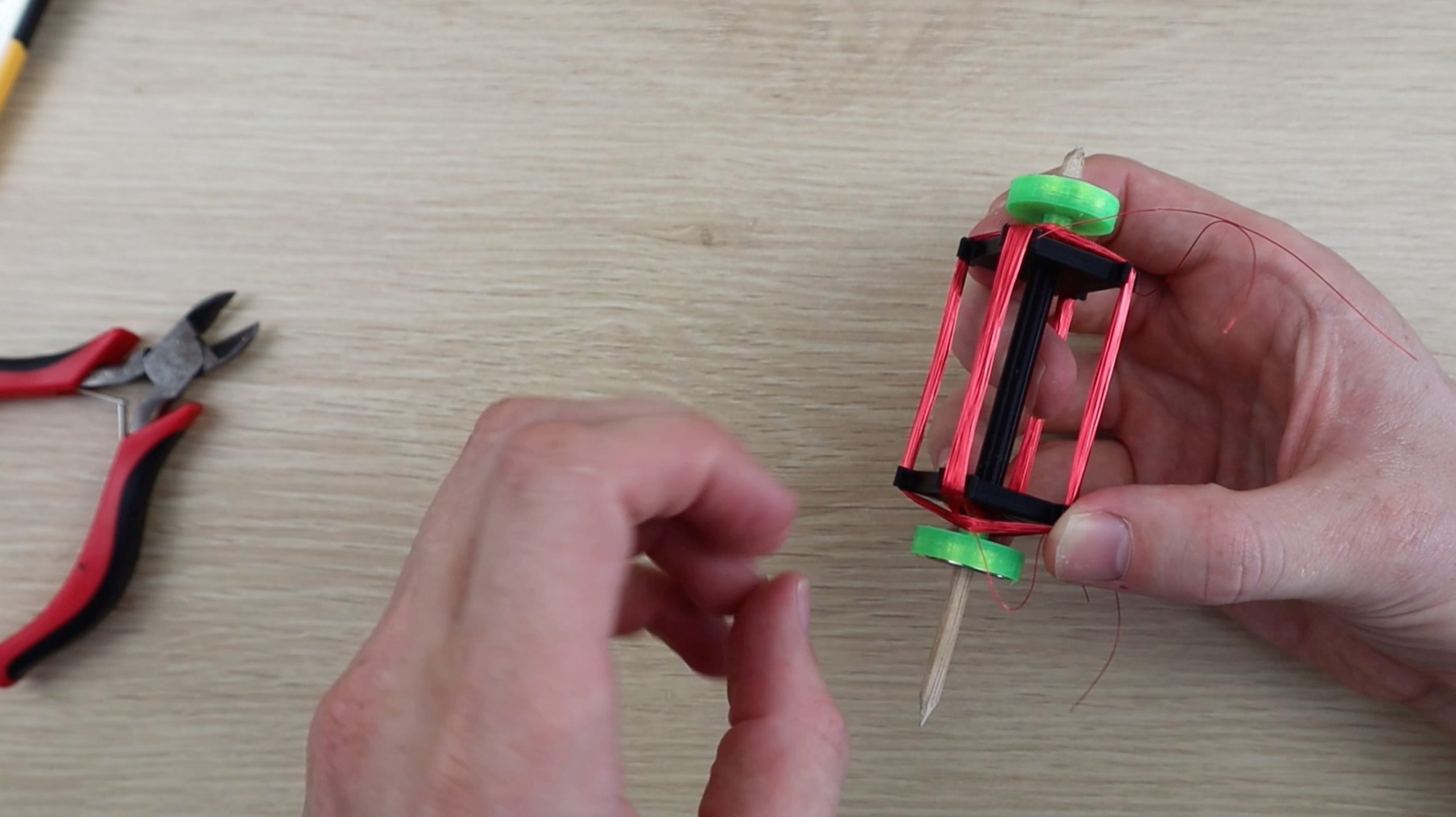
Once the plastic components are assembled, you can start making the windings. You’ll need to wind around 60-100 turns of wire for each of the two windings. Make sure that you change the rotor shaft side after every ten or so windings so that the rotor stays reasonably well balanced.

making the rotor windings

Once the first winding is complete, leave a lead on the end for connecting it to the solar panel, and then start the second winding. Make sure that you wind the same number of turns onto the second winding.

completing the rotor windings

When your two windings are complete, use your craft knife to scrape some of the plastic coating off of the ends of the winding leads, so that you can make a good solder connection.

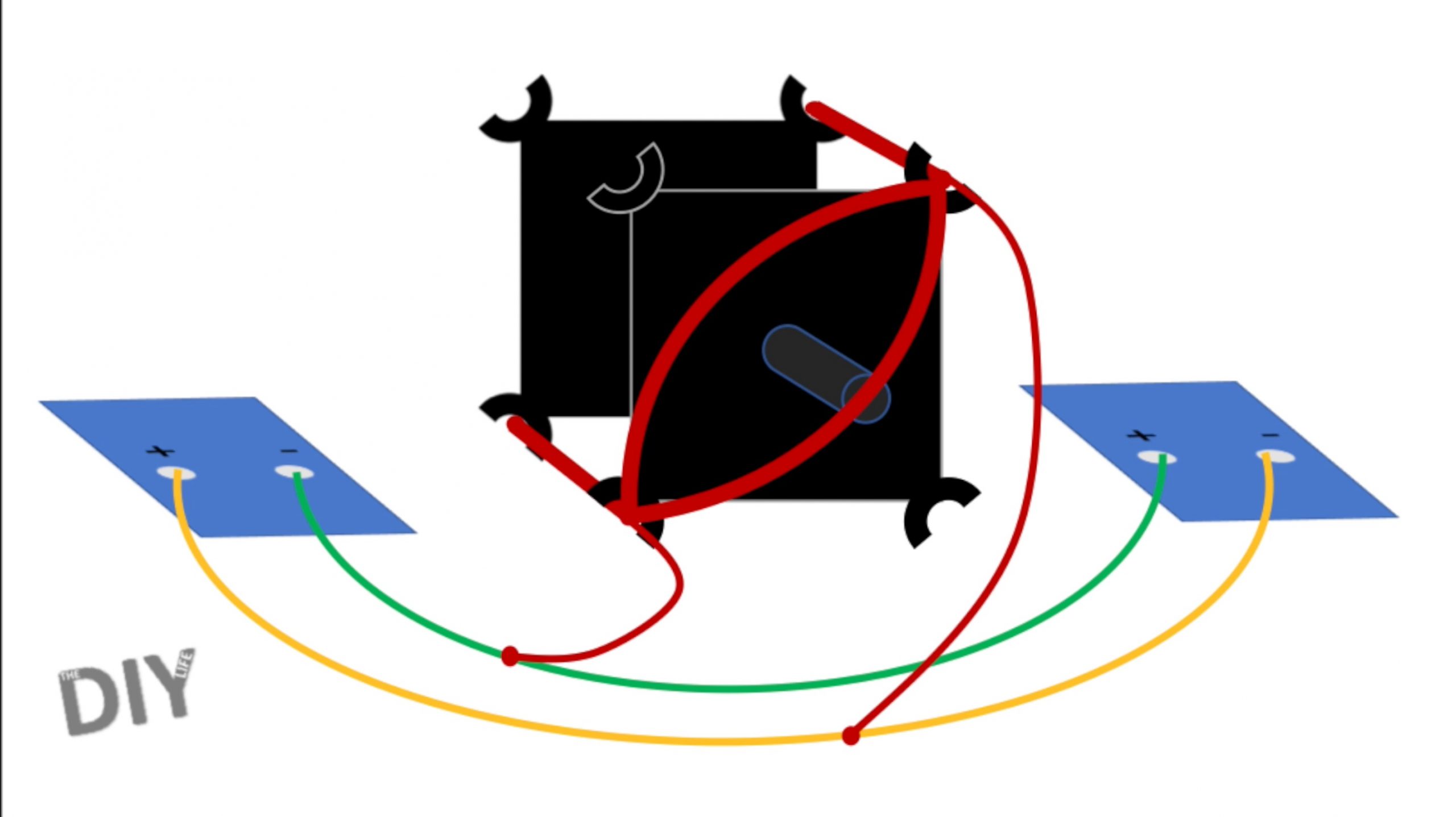
Then solder each winding as shown in the below diagram. The positive and negative terminals of opposite solar cells are soldered together and the two leads of the windings are soldered to each of these leads.

mendocino motor wiring diagram, solar panel connections

Repeat this for both sets of windings. Don’t worry about which way around the windings are connected, you’ll test this in the next step and make any changes if required.

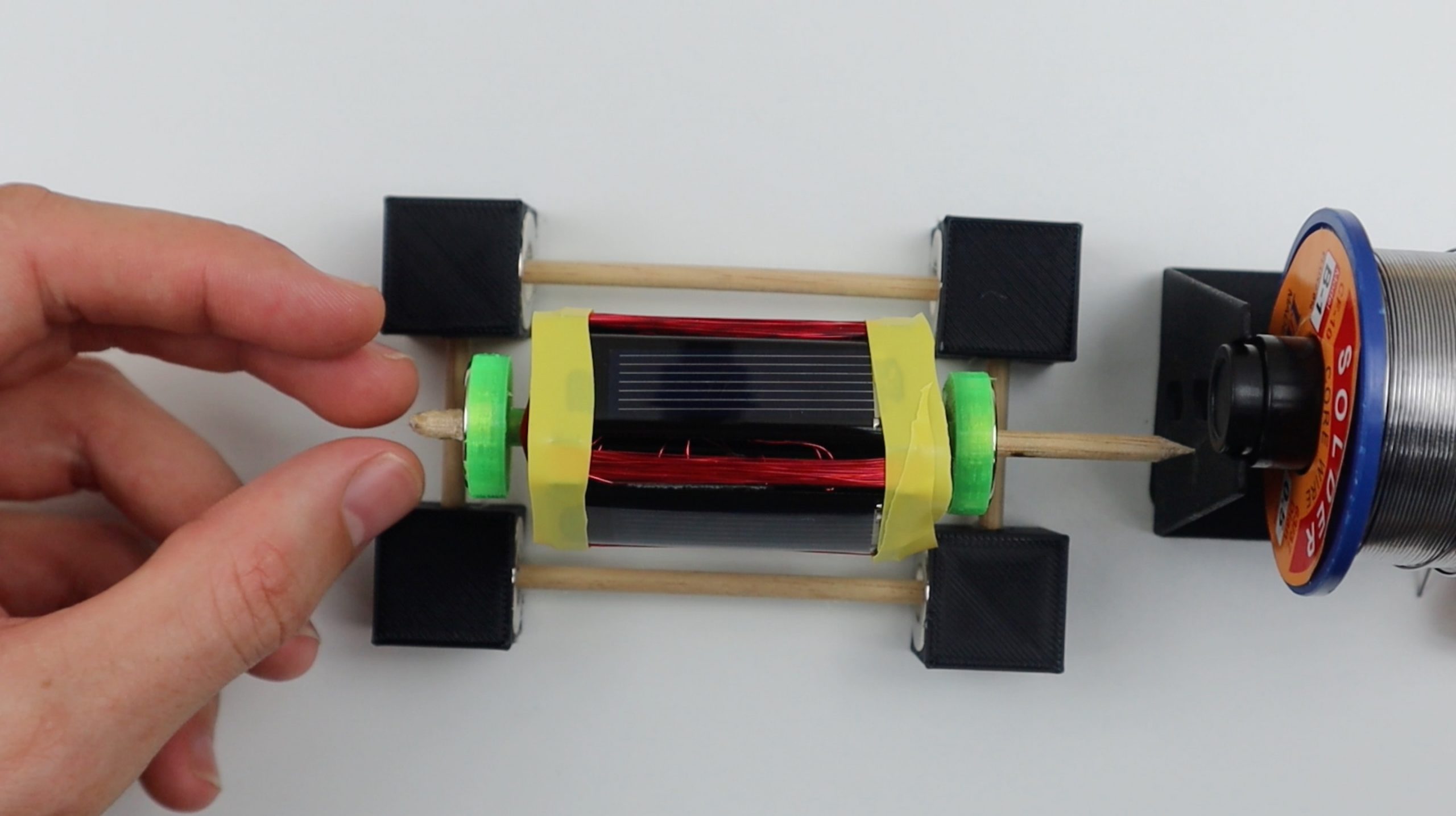
Use some thin tape or an elastic band to temporarily hold the solar panels in place while you test the rotor and connections.

How Does A Mendocino Motor Work?

In principle, this motor produces torque by relying on one panel, the one on the opposite side of the straight section of the rotor winding which is overhead the stator magnet, producing current in the winding due to a directional light source. The current produces a magnetic field around the winding which opposes the stator magnet’s field and causes it to move away from the magnet. Because all of the components are mounted on the moving rotor, this cause the panel to move out of the light, stopping the flow of current, and the next panel into the light, producing current in the next winding. The panels are connected in opposite polarities such that current always flows in the same direction relative to the stator magnet, producing torque in the same direction. When viewed from the winding’s point of view, current is constantly changing directions, depending on which panel is under the light. This is a very simple way of replacing the need for a commutator or electronic control circuit, although it doesn’t produce much torque due to the cell’s low power to weight ratio.

You can read up a bit more on how Mendocino motor’s work on their Wikipedia page.

Testing Your Rotor & Soldered Connections

Now you’ll need to test your rotor. Glue the stator magnet into place on a flat surface and then place the base centred over the magnet. You can use the 3D printed magnet holder if you’d like.

testing the motor direction

I then used the roll of solder as a temporary reaction point as I needed to measure the floating height of the rotor in order to design a 3D printed reaction arm. You can use the 3D printed one if your components are identical.

Float the rotor on the bearings. You may need to make some adjustments to the positions of the magnets in order to get it to float correctly. The rotor magnets should be almost directly overhead the base magnets but slightly towards the reaction point, so that the magnetic force keeps the rotor pushed up against the reaction point. This step can be quite frustrating to get right. If you’re using different magnets then you’ll need to play around with the base magnet width spacing as well to ensure that you find the “sweet” spot where the rotor is suspended high enough that nothing touches the base and that the base magnets are far enough away from each other that the rotor is stable.

Now you need to check that your panels are wired correctly. Each pair of solar panels will produce a torque in one direction. You need to make sure that both sets are producing this torque in the same direction or your motor won’t turn. Start with one winding directly overhead the stator magnet in a dark area and shine a light onto the top panel (opposite this winding). You should notice the winding gently deflect away from the magnet in one direction. Make a note of the panel and this direction. Then rotate the rotor 90 degrees so that the next winding (half of the second winding) is overhead the stator magnet. Repeat the process with the light and make sure that the rotor deflects in the same direction. If it does, then you’re good to balance the rotor and glue the panels into place. If they deflect in opposite directions then you’ll need to swap the winding connections on one set of panels. This can be done on either set,  and you’ll just need to swap the two winding connections around. Don’t change the connections between any of the solar panels or on the second winding. If nothing happens in this step, then you’ll need to check your winding connections again or potentially add more windings to your rotor.

Next check your rotor balancing. Your rotor should turn freely and shouldn’t have any significant heavy spots which it tends to fall to. You most likely won’t be able to get this perfect but you should minimise any heavy spots as far as possible. This can be done by gluing small pieces of solder onto the inside face of the panel opposite to the heavy side until it is properly balanced.

You can then glue the solar panels into place. This may need to be done in conjunction with the rotor balancing step as an iterative process as you’ll change the balancing by adding glue and removing the tape, but this will also limit your access to the back of the panels to add more solder.

Finally, glue the rotor reaction support into place and glue the remaining connections on the base if you haven’t done so already. You can also glue your stator magnet into the magnet holder and onto the base in order to make the whole motor portable.

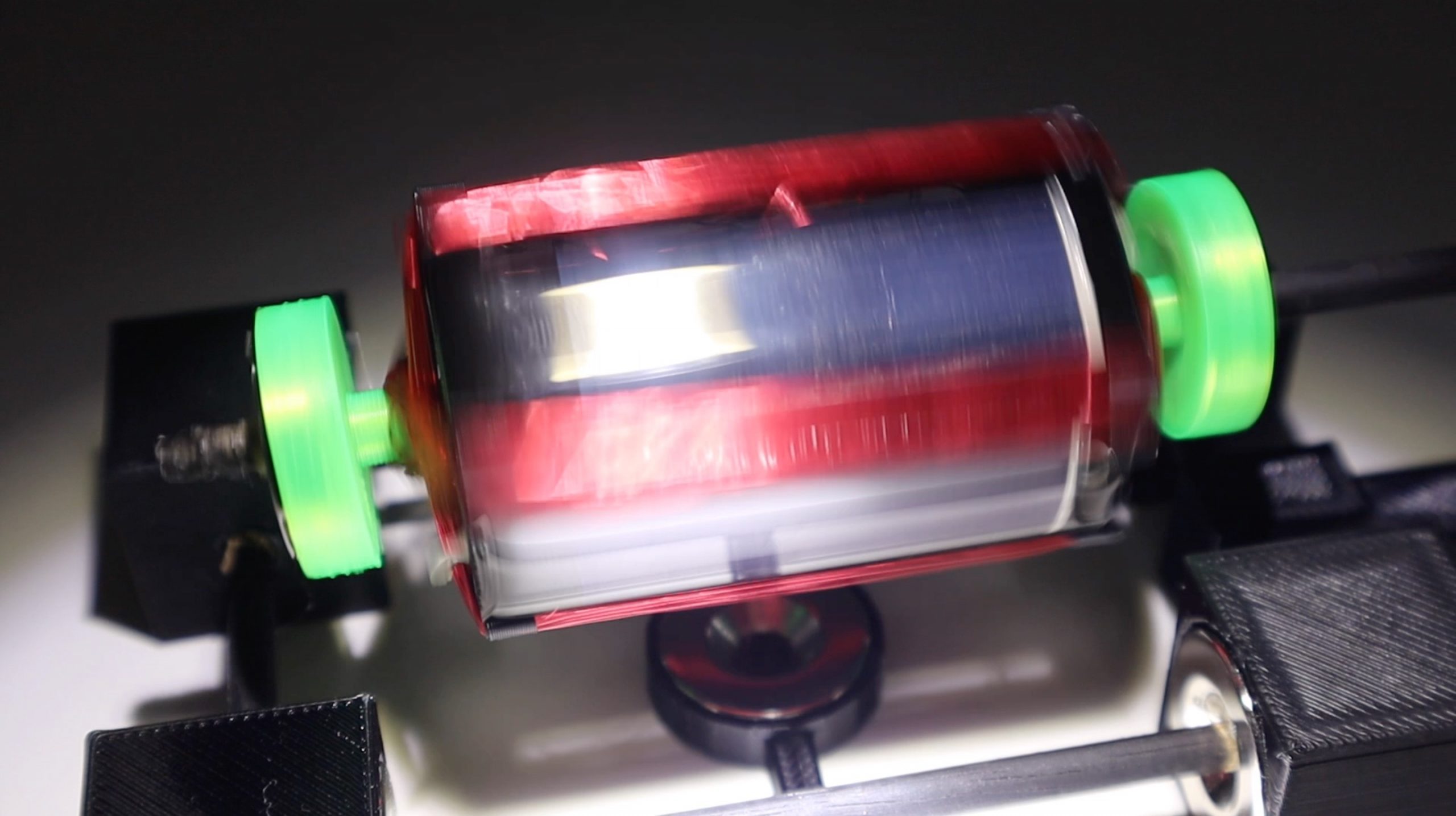
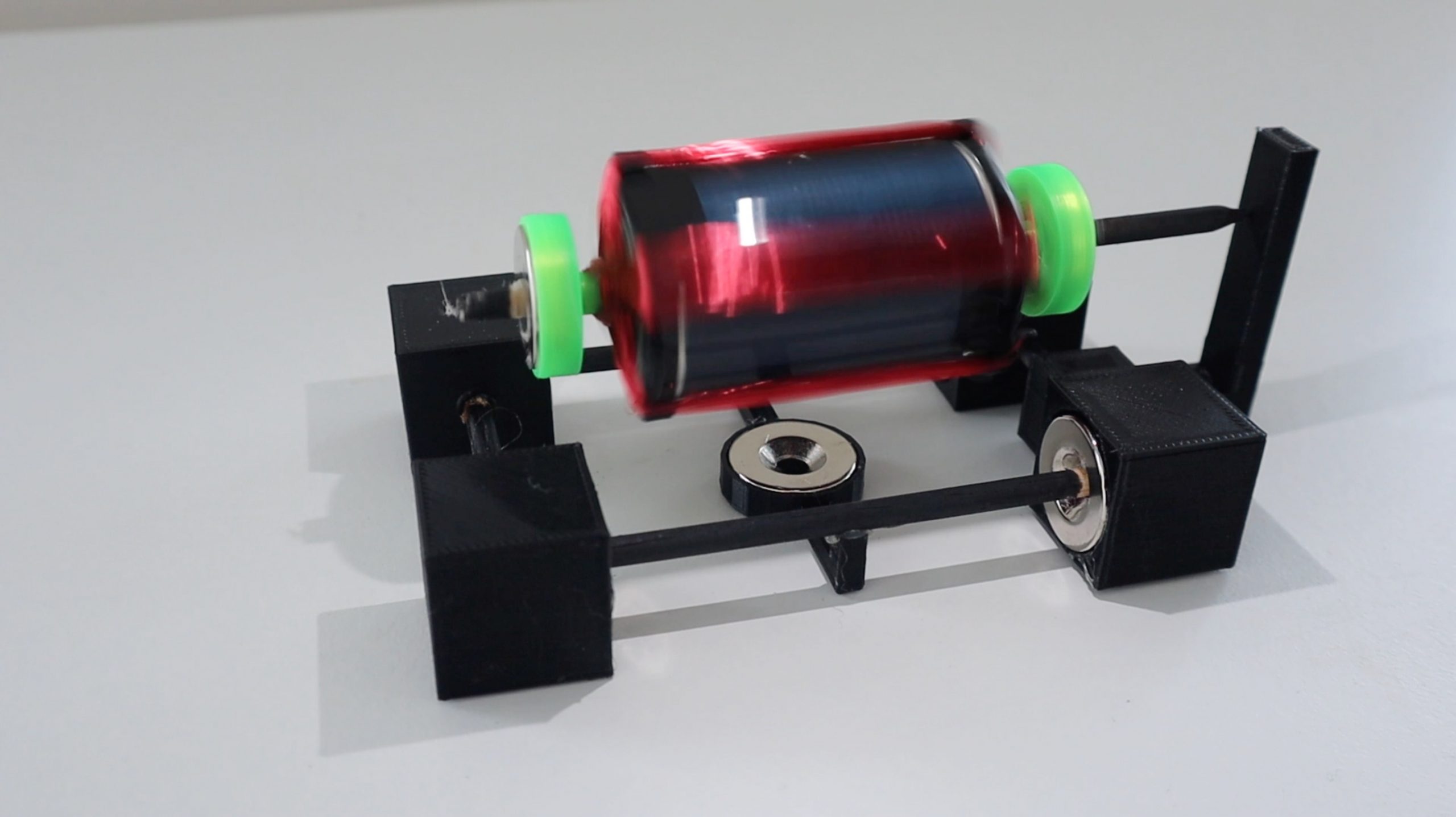
You should now be able to run your Mendocino motor. The motor will run best in a dark area with a directional light source shining down on it at about 30 degrees off vertical. You’ll need to play around with the light source a bit to get it into the correct position to produce the most torque and therefore the highest speed. You may also need to adjust the balancing again if it turns too quickly and becomes unstable.

running the motor

mendocino motor running

The balancing of my Mendocino motor in the video is not great at lower speeds and could do with a bit more time spent adjusting it.

Should You Try Virtual Staging When Selling Or Renting Out Your Home?

If you ask any good Real Estate Agent, they’ll tell you that an empty house is much harder to sell or rent out than a furnished one. Virtual staging is becoming a popular tool for the real estate industry and private sellers/renters due to its ease of use and attractive pricing with potential for significant returns. The International Association of Home Staging Professionals carried out a survey which showed that, on average, a staged home sold for 17% more than a non-staged home and often sold more quickly too.

So let’s have a look at what it is and how you can use it to your advantage.

What Is Virtual Staging?

Let’s start a couple of years ago. Real Estate companies quickly realised that well decorated and furnished homes sold for better prices and sold faster than empty ones, and the same was true for rentals. So they put together dedicated teams of home stagers and photographers who’s job it was to decorate and prepare a home for sale. This was an expensive process, involving moving large volumes of furniture, and was quite time consuming. So, naturally, this process was reserved for higher end homes where the expected return was worth the additional cost and effort.

Fast forward to the dawn of apps and the powerful digital processing available on modern mobile devices and we’ve now got the opportunity to stage an empty home  digitally, by artificially placing images of furniture and decor into 3D scans or photographs of rooms in our homes. And it’s amazingly affordable! As always, there are a couple of free apps available, but these can be quite limited. Better options include staging onto images which you’ve taken, typically costing around $20-$50 per room, and professional photographs, 3D scans and staging which can cost around $70-$150 per room. This may seem expensive, but it is substantially cheaper than physical staging. And, considering that you could increase your home’s value by 17%, the returns would far outweigh these staging costs. Even for entry level homes.

If you’re thinking about selling your home soon, here are some critical upgrades to make to your home before selling to ensure that you get the best return.

How Can You Use Virtual Staging When Selling Or Renting Your Home?

There are a couple of options available, depending on your budget and time allowance.

The quickest and cheapest would be through an app. There are a number of home design and home staging apps available for free or small fees, such as Design Home. These offer various levels of home staging tools and guidance, but you’ll essentially do all of the work yourself and you’ll have the most control over the final product. Provided of course that the app gives you enough options for furniture and decor. Some of the free and cheaper ones offer quite limited image databases.

If you’ve got a higher budget, you could make use of professional staging services, like that from Box Brownie. You take photos of your empty rooms and send the photos through to them to virtually stage. This service typically costs around $20-$50 per room (depending on the company and level of service required) and usually takes two to five days to complete.

The results are fantastic, have a look at these examples from Box Brownie:

Box Brownie Staged Home 1

Box Brownie Staged Home 2

The last and most expensive option is to make use of a professional service which would send their own crew to your home and take their own photographs and 3D scans of each room. These services typically produce a 3D virtual tour of the home which can be viewed online through a browser or even with Virtual Reality goggles. These are great for very high end homes which are typically on the market for much longer periods of time.

Is It Legal?

There is some debate around the legality of virtual staging, with people accusing Real Estate Agents of misrepresentation and intentionally misleading buyers. As with most technology, there are always people who take it too far.

The key takeaways of these debates are:

  • Virtual staging is a great tool, but it should be limited to the addition of furniture and decor. The scans or images should not be digitally enhanced to remove or cover up flaws in the property, such as cracks in walls, discolouration or staining, marks on carpets etc.
  • Virtual staging should never be used to remove or alter permanent fixtures such as light fixtures, outlets or light switches, or to cover up power lines and cables.
  • Where marks or cracks are covered by furniture, it’s a good idea to make the unedited image available as well so that any potential defects are clearly conveyed to the potential buyer.
  • All of the images which have been virtual stages should be clearly stated as such to the potential buyer or renter.
  • It’s a good idea to include a set of unaltered/unstaged images in the set as well, this will give potential buyers a clear understanding of the current condition of the home.

Have you tried home staging or virtual staging? Let us know in the comments section below.

6 Small Laundry Room Design Ideas To Make The Most Of Limited Space

Every home needs a laundry area but not every home has enough space for a full sized laundry room. Most modern apartments only have a small closet or an area in a passage or the kitchen dedicated to doing the laundry, and that’s all you really need. Here are some great tips and ideas to get the most functionality out of your small laundry room or area, maximising space efficiency.

Built In Laundry Closet

Small Laundry Room Built In Closet
Source

You don’t need a whole room for your laundry, but most people don’t want their laundry area to be visible either. This solution tackles both problems by making use of a storage cupboard or old closet to conceal your laundry area. Any closet deep enough to accommodate your washer and dryer will do. A plumber and electrician may need to be called in to put outlets and drains into the closet.

Ironing Board Cabinet Or Drawer

Ironing Board Cabinet
Source
Ironing Board Drawer
Source

A great additional to a kitchen renovation project is an ironing board cabinet or drawer. The cabinet can be designed to blend in with your other cabinets and offers a functional ironing space with shelves for your other laundry equipment and an outlet for your iron.

A Laundry Cupboard In Your Kitchen

A Laundry Cupboard In Your Kitchen
Source

By stacking your washer and dryer, you minimise the floor space required for your primary laundry appliances. This means that they could even fit into a kitchen cupboard, similar in size to your refrigerator area. When closed, it’ll look like your pantry.

Build Your Laundry Into Your Bathroom

Bathroom Cabinet Laundry
Source

For really compact apartments, the best solution is often to build your washer into a cupboard in your bathroom. You’ve already got plumbing close by, so it won’t be an expensive addition and your towels and linen will benefit from the handy storage space above the washer.

Build A Multi-Purpose Laundry Island

Laundry Island
Source

Just like a kitchen island, a laundry island is a multi-purpose and portable space for you to tackle all of your laundry related tasks. It incorporates and ironing board and folding area on the top as well as storage and shelves underneath. The best part being that it can be wheeled out of the way and into a storage cupboard or your garage when not in use.

Use The Space Under Your Stairs

Under Stairs
Source

If you live in a multi level home, or one with a basement, then you’ve probably got a large wasted space under your stairs. Most people turn this into some kind of storage cupboard, but it also makes a great space for a functional laundry area as it is often the perfect depth for large appliances.

Some Inspiration For Compact Laundry Rooms or Areas

Here are some more of our favourite ideas for compact laundry rooms and spaces. Be sure to have a look at our Pinterest Laundry Board for more ideas an inspiration.

Ideas
Source
Ideas 3
Source
Ideas 2
Source

Have you built a small laundry area or room into your home? Let us know what you’ve done in the comments section below.

8 iPhone Settings You Should Know About

You use your iPhone on a daily basis, so you probably know your apps, organisers and messengers backwards. But most people don’t like playing around with their phone’s settings. We found a few of the lesser known iPhone settings which can actually be really useful in terms of protecting your privacy, making travel easier and making things quicker to reach.

Here are ten of our favourite lesser known iPhone settings which we’d like to share with you:

Do Not Disturb While Driving

Do Not Disturb While Driving

This is quite a useful safety feature if you’re on the road often and find yourself tempted with distracting notifications on your iPhone. Head to Settings -> Do Not Disturb and scroll down to Do Not Disturb While Driving. Here you’ll have to option to automatically switch your iPhone into do not disturb mode (which silences incoming calls, messages and notifications) with detected motion, or when connected to your car’s Bluetooth system or when your iPhone is plugged into your car’s Apple CarPlay system.

Limit Ad Tracking

Limit Advertising Tracking

This setting allows you to automatically opt out of receiving ads which are targeted to your interests or location. Go to Settings -> Privacy -> Advertising and use the toggle to turn it on or off. You’re also given an option to reset your advertising identifier which should erase any information which has been historically stored and used by advertisers to serve you targeted advertising.

Limit Your Location Tracking

Significant Locations

You may not be aware, but your iPhone keeps a very detailed list of all of the locations which you’ve recently been to and the ones which you frequently visit. Have a look at our previous article linked which goes into detail on all of the location information available. Fortunately, you can turn this “feature” off by going to Settings -> Privacy -> Location Services -> System Services ->Significant Locations. As you can see, it’s quite well hidden! Under this tab, you can turn the tracking on or off and see all of the tracking data which is available.

Push Calls From Other Devices

Calls On Other Devices

If you’re often around your Mac or iPad or you carry two phones (a work and personal phone), then this is a really useful feature which I’ve found myself using over and over. It gives you the option to automatically push calls to other devices signed in with your iCloud account and on WiFi so that you can answer the call on any of your devices. This way, you can leave one of your phones on your desk while you’re around the office and not have to worry about missing a call. Head to Settings-> Phone -> Calls on Other Devices to turn this option on and set which devices you’d like to receive calls on.

Text Message Forwarding

Text Message Forwarding

Similar to the above with calls, you can also allow your other devices signed into your iCloud account to send and receive text messages from your iPhone. Go to Settings -> Messages -> Text Message Forwarding to choose which devices you’d like to give access to send and receive text messages from your iPhone.

WiFi Calling

WiFi Calling iPhone Settings

WiFi calling is a great feature if you’re in an area with poor mobile network coverage, such as remote locations or in the basement of a building etc.. The call is transmitted over the WiFi network and doesn’t require any network signal to operate. It’s usually billed at the same rate as your standard calls and sometimes free, depending on your carrier. This setting can also be found under Settings -> Phone -> WiFi Calling.

Customise your Control Centre

Customise Control Centre

Your iPhone’s control centre is a quick single screen settings page allowing you to toggle your most commonly used settings on and off. Things like WiFi, Bluetooth, Music Player quick controls, Volume and some quick app launch icons. Most people have used this screen but not everyone knows that it can be customised. Head over to Settings -> Control Centre -> Customize Controls for a list of available controls and icons which can be added and removed from your Control Centre page.

Magnifier For Reading Documents

Magnifier iPhone Settings

Magnifier In Operation

This is not really a setting but its a useful tool which can be found under settings. Go to Settings -> Accessibility -> Magnifier to turn it on. This allows you to triple press the side button (on iPhone X and later) to bring up a magnifier which uses your iPhones camera to act as a magnifying glass, enlarging text or notes and displaying them on your screen to make it easier to read.

Have you got any other useful iPhone settings which you’ve found and you’d like to share? Let us know in the comments section below.

How Many Batteries Do You Need For Your Solar Installation

One of the questions which come up quite often on some of my earlier articles about solar installations is, “how many batteries will I need?”. There are a couple of factors which you’ll need to consider when working out how many batteries you will need for your solar installation, but I’ve tried to simplify it as far as possible.

To start off, you’ll need to know what size inverter you’re going to be using, you’ll need it’s rated power in watts [W]. If you’re not yet sure what inverter you’re going to be using, here is a guide on selecting the correct inverter size for your solar or backup power system.

Next you’ll need to decide which table to work with, and this depends on how significant the load on your inverter is going to be during normal operation. If you expect your inverter to be running at near it’s rated power, so the continuous load on your inverter will be close to it’s rated power output, then use Table 1. The second table, Table 2, is more realistic for household use and is calculated with a continuous load of 60% of the inverter’s rated output. If you’re unsure then rather use Table 1, it will give you a more conservative estimate.

Lastly, you’ll need to know what the capacity of your batteries are and how long you’d like them to last for. A standard 12V deep cycle battery is usually 105Ah, this figure can be found on your battery data sheet or on the label on the battery. The duration in minutes is how long you’d like your batteries to last for. So if you’re going to be using the system in the evenings, then you’d probably want power from 5pm to 10pm, for a total of 5 hours which is 5 x 60 = 300 minutes. If it’s just for a short hour or two backup then you’ll only need them to last for 60-120 minutes.

In order to use the table, you start by looking for your inverter’s power in the left column. Say ours is 1000W and we’re working in Table 1. We then move along this row until we find the number of minutes closest to the figure which we calculated in the previous step, so 300 minutes is closest to 287 minutes. We then then move up this column to the battery capacity row, in this case we get 600Ah. This means that we require 600Ah worth of battery capacity to provide 1000W of inverter power for 5 hours. If we’re using 105Ah batteries then we would need 600 / 105 = 5.7, so 6 batteries of 105Ah to provide the required power.

We can do a similar example using Table 2, for operating at only 60% of the inverter’s rated power. Let’s  use the same figures from above and say our inverter’s power is still 1000W. We then move across the row to find the closest figure to 300 minutes, which is 302. We then move up the column to find the battery capacity and find 400Ah. This means that we’ll only need 4 batteries of 105Ah if we’re only running at 60% of the inverter’s rated power, rather than the 6 calculated using Table 1 at 100% of the inverter’s rated power.

Table 1 – Operating At The Inverter’s Rated Power

how long run 100%

Table 2 – Operating At 60% Of The Inverter’s Rated Power

how long run 60%

Some additional notes on the figures calculated in the tables.

The inverter efficiency is assumed as 95% for Table 1, being a pure sine wave inverter operating at near it’s rated power output. The inverter efficiency in Table 2 is reduced to 90% as inverters are typically less efficient when producing power below their rated output.

In both cases the batteries are assumed to be discharged to 30% of their original capacity. This affects the life of the batteries, the deeper the discharge, the shorter the life of the battery. Some people prefer to design their systems to only allow for discharge to 50% or even 60% of their original capacity in order to extend the life of the batteries.

Do you have any tips, comments or suggestions? Please share them with us in the comments section below, we would love to hear from you.


Amazing Wooden Keepsake Box With 4 Digit Combination

If you’re looking for your next woodwork project and you’ve also got a fascination with puzzles and locks, then this project is definitely one you’ll want to check out. This wooden keepsake box, designed by  features a cryptic pattern on the lid which requires magnets to align four tumblers into one of nine different locations to unlock. It’s a really clever and interesting spin on a combination lock type box which is entirely made from wood and a couple of magnets. I also really like the way the magnet pins are able to be stored in the sides of the wooden box and are pushed out using the box handles.

Peter says that he intentionally didn’t put any further markings on the lid as he didn’t want it to be immediately obvious that the box requires some kind of combination in order to unlock.

You’ll need a fairly comprehensive wood working set up to be able to build the box to the level which he has, and I love the look of the final product. If you don’t feel like your wood working skills are up to this level, then you could also design a similar mechanism using 3d printed or laser cut components.

Here is his video of the keepsake box and it’s locking mechanism:

Have a look at his Instructable’s page for the full build instructions  for the wooden keepsake box along with parts lists and dimensions for all of the components. With some time and a lot of patience, as quoted by Peter, you should be able to build your own as well. You’ll also learn a lot about locking mechanisms and magnets while you’re busy with this project.

Here are a couple of pictures of the final product:

Closed Wooden Combination Puzzle Box

Wooden Combination Puzzle Box

Wooden Combination Puzzle Box With Open Lid

Have you built your own wooden keepsake box? Let us know how it went for you in the comments section below.