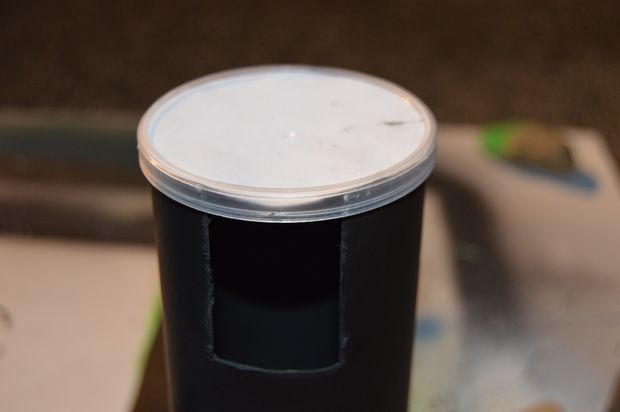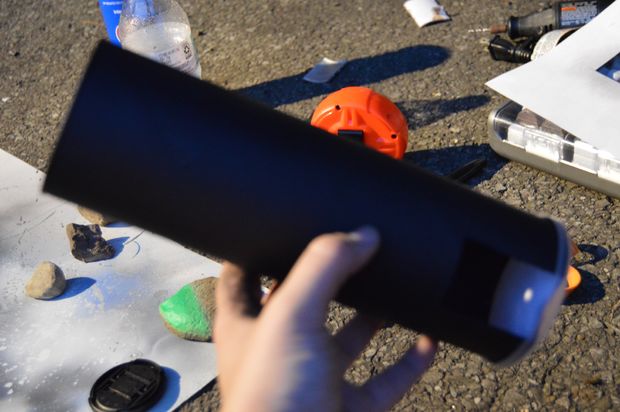
If you’ve left it too late to get a pair of safety glasses to safely view the solar eclipse, here’s a quick any easy projector you can make. The projector uses a pinhole to project and image of the sun (and eclipse) onto the lid of an old chip/pringles container, a slot on the side enables you to view it. This is also one of the safest ways to view the eclipse as you’re never looking directly at the sun!
This article is based on Solar Eclipse Pinhole Projector by Potternum1 and is modified and used under the Creative Commons 2.5 license CC BY NC SA.
What You’ll Need To Build Your Own Solar Eclipse Pinhole Projector
An Old Chip/Pringles Tube
A Sheet Of White Paper
Matt Black Spray Paint
Small Drill & Drill Bit
Scissors
Measuring Tape or Ruler
Some Newspaper To Paint On
How To Make Your Own Solar Eclipse Pinhole Projector
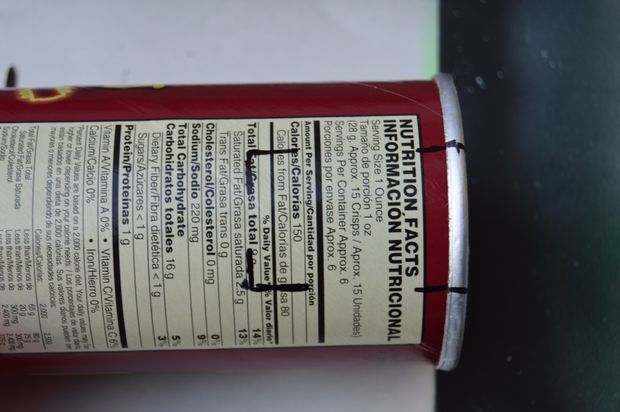
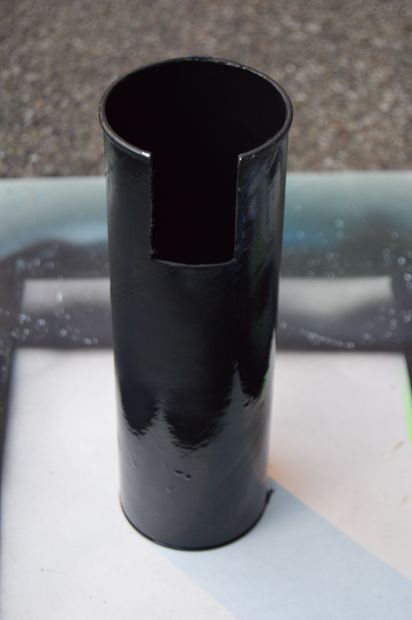
To start off, you’ll need to cut a slot into the side of the container to view the screen. Mark off a 5cm (2″) x 3.5cm (1.5″) rectangle on the side of the container near the open end.
Use a sharp pair of scissors or a dremel to cut the marked area out.
Place the empty tube on a piece of news paper and paint spray the inside black. You can also paint the outside black as well but the inside is the important part. You don’t need to paint the bottom of the tube of the lid.
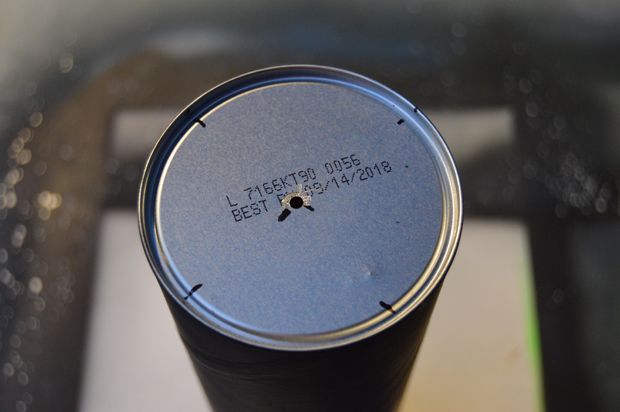
Once the paint has dried, mark the end of the tube in the centre.
Now find the smallest drill bit you have 1-2mm (3/64-7/64″) works well. Drill a small hole where you have marked the centre point. This is where the light form the sun and eclipse is going to enter your tube projector.
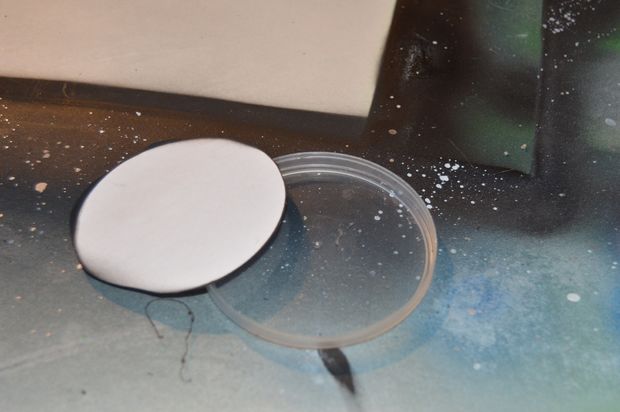
Now you need to cut a circle of white paper to fit snugly inside the lid of your tube. Place the lid onto the piece of paper and trace around the outside with a pencil then use your scissors to the circle out. Press the circle of paper into the lid and put it back onto the tube.
Your projector is now ready to be used. You can test it out with a light bulb. Your projected image will be visible on the screen through the side of the tube.
You can also experiment with different length tubes. A longer tube, such as those used for shipping drawings and documents should yield a larger image.
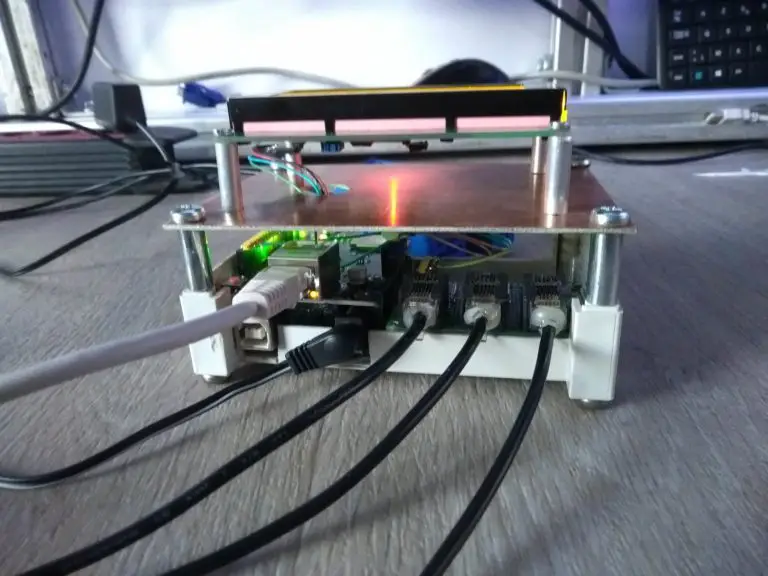
This off grid solar power information system is perfect for your van or RV. It gives you a complete view of your Van’s power consumption and solar panel generation, it also predicts how long your batteries are going to last for and how much power is being generated by your solar panels.
A quick look at the indicator lights tells you when your solar panels are charging your batteries, when they are generating more power than you are using as well as when your batteries are almost flat. An alarm sounds if your batteries are then further discharged to the point where they are at risk of being damaged.
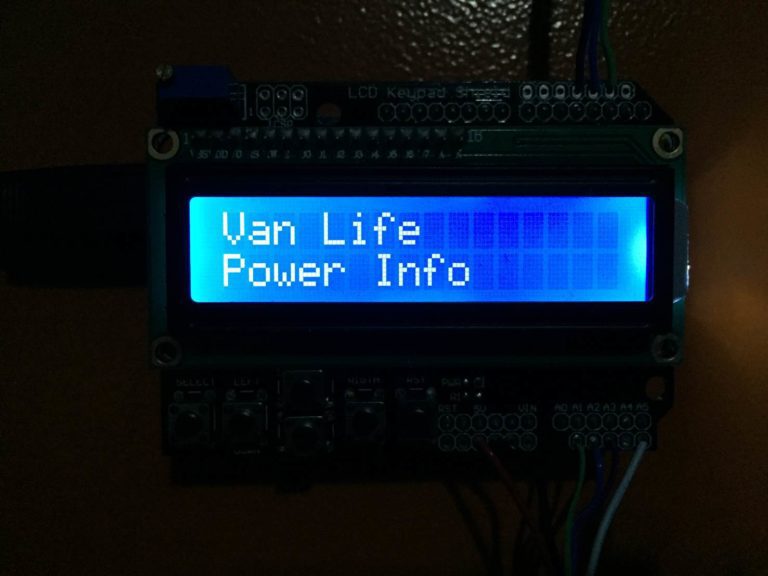
The LCD provides you with detailed information on how much power your batteries have stored, how much is being used, how much is being generated by your solar panels and how long your batteries will last for.
The circuit is really simple to assemble and doesn’t require much soldering, it can be assembled on a breadboard if you are not confident soldering. You will need to know the basics of programming an Arduino, if you haven’t done this before – here is a useful guide to getting started with Arduino. You will also need to know roughly how to connect an LCD screen to an Arduino.
What You Will Need To Build The Power Information System
The control system consists of two separate parts, the power sensing circuits and the feedback and display circuits. It may be useful to separate the two within your van if your batteries and solar panel inputs are kept away from where you’d like the information displayed. This is easily done using a length of 6 core intercom or alarm wire between the sensors and your Arduino box.
The power sensing circuits for the battery and solar panel each consists of a voltage sensor and a current sensor, these two measurements combined are required to calculate the power consumption, battery life, time left etc.
The feedback circuits provide you with information on the system and includes the LCD shield which is mounted on top of the Arduino as well as the indication LEDs and alarm.
Building The Circuits
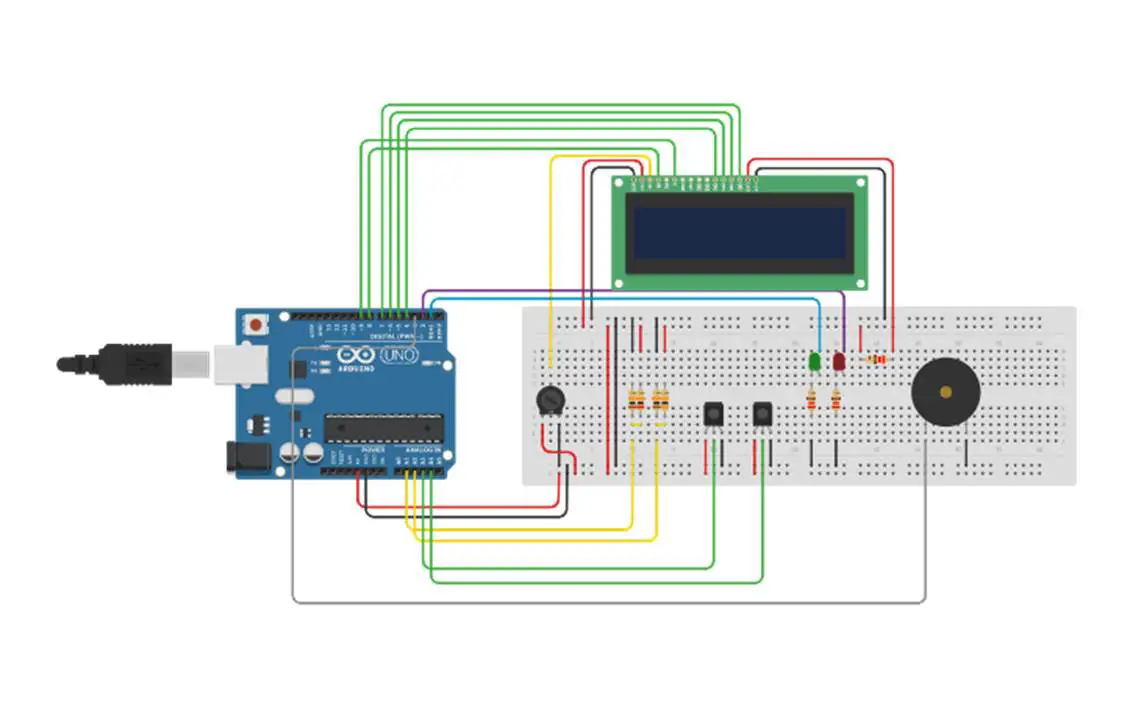
The complete circuit is shown in the diagram below. We will build the complete system up in stages in order for you to understand what each circuit is doing and how it should be connected.
Voltage Measurement Circuits
For The Batteries
The first circuit is the voltage measurement from the battery which is done through a voltage divider circuit. The Arduino’s analogue inputs can only handle up to 5V and our batteries typically have a voltage of between 11.8V when empty and 14.7 volts when charging. We therefore need to scale this voltage down to under 5V so that we don’t damage the Arduino input.
Looking at the maximum voltage of the batteries during charge, 14.7V and the Arduino input voltage of 5V, you can see that the Arduino requires roughly a third of the charging battery voltage. This means that we will need a voltage divider in the ratio 1/3 to 2/3 which in turn means that we need the one resistor to be double the resistance of the second resistor. You also want the resistors to be of a reasonably high resistance to ensure that only a small amount of current flows through them otherwise you’re simply wasting energy in the form of heat. I’ve chosen to use a 20K and a 10K resistor as these provide round values in the exact ratio I need with a high resistance.
Simply connect the resistors as shown in the circuit diagram with the centre point of the voltage divider connected to the Arduino analogue input 1 and the two legs of the bridge connected to the positive and negative terminals of the battery. Make sure you have the positive and negative on the correct side of the bridge otherwise you scale will be 0-10V instead of 0-5V which will damage the Arduino. The lower value resistor must be connected to the negative terminal of the battery and the higher value resistor to the positive terminal on the battery.
For The Solar Panels
The voltage coming from your solar panels is measured in much the same way as the battery voltage expect that the solar panels typically produce a higher voltage than your battery voltage. Most solar panels have an output voltage of 18V, this also needs to be scaled down to 5V for the Arduino’s analogue inputs.
Using the same calculation as above, the scaled voltage is now roughly a quarter of the solar panel voltage so we will need one resistor to be three times the resistance of the other resistor. If we again use a 10K resistor, we will need a 30K resistor as the second resistor to divide the voltage to give us the correct scaling.
Connect the resistors as shown in the diagram, again with lower value resistor connected to the negative lead from the solar panel, the higher value resistor to the positive solar panel lead and the centre point connected to the Arduino analogue input 2.
Current Measurement Circuits
Current Being Drawn From The Batteries
The current sensing is done using the ACS712 sensor which can measure up to 30A. This equates to roughly 350W so if you expect to have a peak power consumption of higher than 350W then you’ll need to choose a sensor which can measure higher current or alternately split up your circuits into lighting, chargers, plugs etc each with their own sensor.
The sensor connection is straightforward, it is powered directly from the Arduino using the GND and VCC/5V pins and the OUT pin is connected to the Arduino analogue input 3. The sensor terminals are then connected in series with your load onto the supply lead from your battery.
As mentioned above, you could also get more functionality out of the power meter by installing a current sensor onto each of your power circuits. For example you could have one sensor on your lighting circuit, one on your 12V charger circuit and one on your AC inverter circuit. Each of the sensors would then be connected to their own Arduino analogue input.
Current Being Supplied By The Solar Panel
As we’ve done above for the batteries, we can connect a current sensor in series with the supply from the solar panel before it goes into the solar charge controller. The output from the sensor is then connected to one of the Arduino analogue input 4.
Feedback Circuits
The feedback from the Arduino is done through an LCD which is mounted onto an Arduino shield as well as two LEDs and an alarm.
The LCD shield can simply be plugged on top of the Arduino and provides all of the functionality required to drive the LCD. The contrast may require some adjustment in order to see the text clearly on the screen.
The LCD shield uses the following pins, the rest are available for your sensors and feedback circuits:
Analogue 0
Digital 4
Digital 5
Digital 6
Digital 7
Digital 8
Digital 9
Digital 10
The LEDs are connected in series with a 220Ω resistor and are each connected to a free digital output pin. The green LED is used to indicate when the solar panels are providing more power than you are using in your van, the batteries are therefore being charged. The red LED is used as an indication that the battery is running low and you should limit your power usage or charge the battery.
The buzzer is connected to the Arduino in a similar way to the current sensors. You will need to connect the GND and VCC pins to the Arduino GND and 5V pins and the input pin to one of the unused Arduino outputs.
Your circuits are now all complete and you can move on to programming the Arduino.
Uploading The Sketch
Now you can upload your sketch onto your Arduino, if you haven’t uploaded a sketch before then follow this guide on getting started.
//Michael Klements
//The DIY Life
//7 July 2017
#include <LiquidCrystal.h>
int battVoltPin = 1; //Assign battery voltage to pin 1
int solVoltPin = 2; //Assign solar panel voltage to pin 2
int battCurrentPin = 3; //Assign battery current sensor to pin 3
int solCurrentPin = 4; //Assign solar panel current sensor to pin 4
int greenLEDPin = 1; //Assign green LED to pin 1
int redLEDPin = 2; //Assign red LED to pin 2
int alarmPin = 3; //Assign alarm to pin 3
double batteryKWH = 0;
double solarKWH = 0;
int battCapacity = 105; //The battery's usable capacity in Amp Hours
unsigned long startMillis; //Variables to track time for each cycle
unsigned long endMillis;
LiquidCrystal lcd(8, 9, 4, 5, 6, 7); //Assign LCD screen pins, as per LCD shield requirements
void setup()
{
pinMode(greenLEDPin, OUTPUT); //Define the pin functions
pinMode(redLEDPin, OUTPUT);
pinMode(alarmPin, OUTPUT);
lcd.begin(16,2); //Start the LCD, columns, rows. use 16,2 for a 16x2 LCD, etc.
lcd.clear();
lcd.setCursor(0,0); //Set cursor to column 0, row 0 (the first row)
lcd.print("Van Life");
lcd.setCursor(0,1); //Set cursor to column 0, row 1 (the second row)
lcd.print("Power Info");
startMillis = millis();
}
void loop()
{
double battVoltage = 0;
double battCurrent = 0;
battVoltage = 15*analogRead(battVoltPin)/1023; //Read the battery voltage
battCurrent = 30*(analogRead(battCurrentPin)-511)/512; //Read the battery current
double battPower = battVoltage*battCurrent;
double solarVoltage = 0;
double solarCurrent = 0;
solarVoltage = 20*analogRead(solVoltPin)/1023; //Read the solar panel voltage
solarCurrent = 30*(analogRead(solCurrentPin)-511)/512; //Read the solar panel current
double solPower = solarVoltage*solarCurrent;
if(solPower>=battPower) //If solar power is greater than power being drawn then battery is charging
{
digitalWrite(greenLEDPin, HIGH);
}
else
{
digitalWrite(greenLEDPin, LOW);
}
if(battVoltage<=12.10) //Low voltage indication
{
digitalWrite(redLEDPin, HIGH);
digitalWrite(alarmPin, LOW);
}
else if (battVoltage<=11.95) //Low voltage alarm
{
digitalWrite(redLEDPin, HIGH);
digitalWrite(alarmPin, HIGH);
}
else
{
digitalWrite(redLEDPin, LOW);
digitalWrite(alarmPin, LOW);
}
double battPercentage = 100*((battVoltage-11.9)/(12.7-11.9)); //Calculate battery percentage remaining
double battTime = (battCapacity/battCurrent); //Calculate battery time remaining
endMillis = millis();
unsigned long time = endMillis - startMillis;
batteryKWH = batteryKWH + (battPower * (time/60/60/1000000)); //Calculate battery kWh used since start
solarKWH = solarKWH + (solPower * (time/60/60/1000000)); //Calculate solar panel kWh generated since start
startMillis = millis();
delay (4000);
lcd.clear(); // Start updating display with new data
lcd.setCursor(0,0);
lcd.print("Battery");
delay (1000);
lcd.clear();
lcd.setCursor(0,0); // Displays all battery data
lcd.print(battVoltage);
lcd.print("V");
lcd.setCursor(9,0);
lcd.print(battCurrent);
lcd.print("A");
lcd.setCursor(0,1);
lcd.print(battPower);
lcd.print("W");
lcd.setCursor(9,1);
lcd.print(batteryKWH);
lcd.print("kWh");
delay (4000);
lcd.clear();
lcd.setCursor(0,0); // Displays all battery capacity data
if(solPower>=battPower)
{
lcd.print("Battery");
lcd.setCursor(0,1);
lcd.print("Charging");
}
else
{
lcd.print("Remaining ");
lcd.print(battPercentage);
lcd.print("%");
lcd.setCursor(0,1);
lcd.print("Time ");
lcd.print(battTime);
lcd.print("hrs");
}
delay (4000);
lcd.clear();
lcd.setCursor(0,0);
lcd.print("Solar Panel");
delay (1000);
lcd.clear();
lcd.setCursor(0,0); // Displays all solar panel data
lcd.print(solarVoltage);
lcd.print("V");
lcd.setCursor(9,0);
lcd.print(solarCurrent);
lcd.print("A");
lcd.setCursor(0,1);
lcd.print(solPower);
lcd.print("W");
lcd.setCursor(9,1);
lcd.print(solarKWH);
lcd.print("kWh");
}
The code is fairly simple and follows the standard Arduino sketch format. I will run through the simple things briefly and go into a bit more detail on the lines which do calculations to be displayed on the screen.
The first portion, lines 7 to 21 simply create the variables used in the code, assigns values (mostly pin numbers) and sets up the LCD pin arrangement. The battCapacity variable will need to be adjusted to suite your setup as this is the usable capacity of your battery. For example, if you have a 130 amp hour battery and you want to be able to discharge it to 20% then you have 104 amp hours of usable capacity.
The setup loop is run once when the Arduino is powered up and defines the pin modes as well as starts up the LCD communication time keeping millis function.
The loop function is then run continuously and does the calculations and updates the LCD each cycle.
The code first takes voltage and current measurements from the battery circuit and then from the solar circuit. In both cases the code is similar. The battery voltage measurement (line 41) takes a reading from the analogue pin and then scales the 0-1023 input to a 0-15V reading as this is the output our voltage divider provides.
The battery current measurement (line 42) takes a reading from the analogue pin, removes half of the scale because the current sensor reads 2.5V for zero current. and then scales the 0-511 input to a 0-30A reading as measured by the sensor.
The same two lines are repeated for the solar circuit with a scaling of 0-20V for the solar voltage measurement.
Power is then calculated for each circuit as the product of voltage and current.
The code then checks to see if the battery is charging, if the battery voltage is running low and if the battery voltage is critically low and switches the LEDs and alarm on or off accordingly.
The battery life remaining as a percentage is then calculated. Again, these values can be adjusted depending on the type of battery you are using. You may not want to discharge it below a certain voltage.
Energy used by the battery and supplied by the solar panels are then calculated as a product of the power being drawn and supplied and the time elapsed since the last measurement.
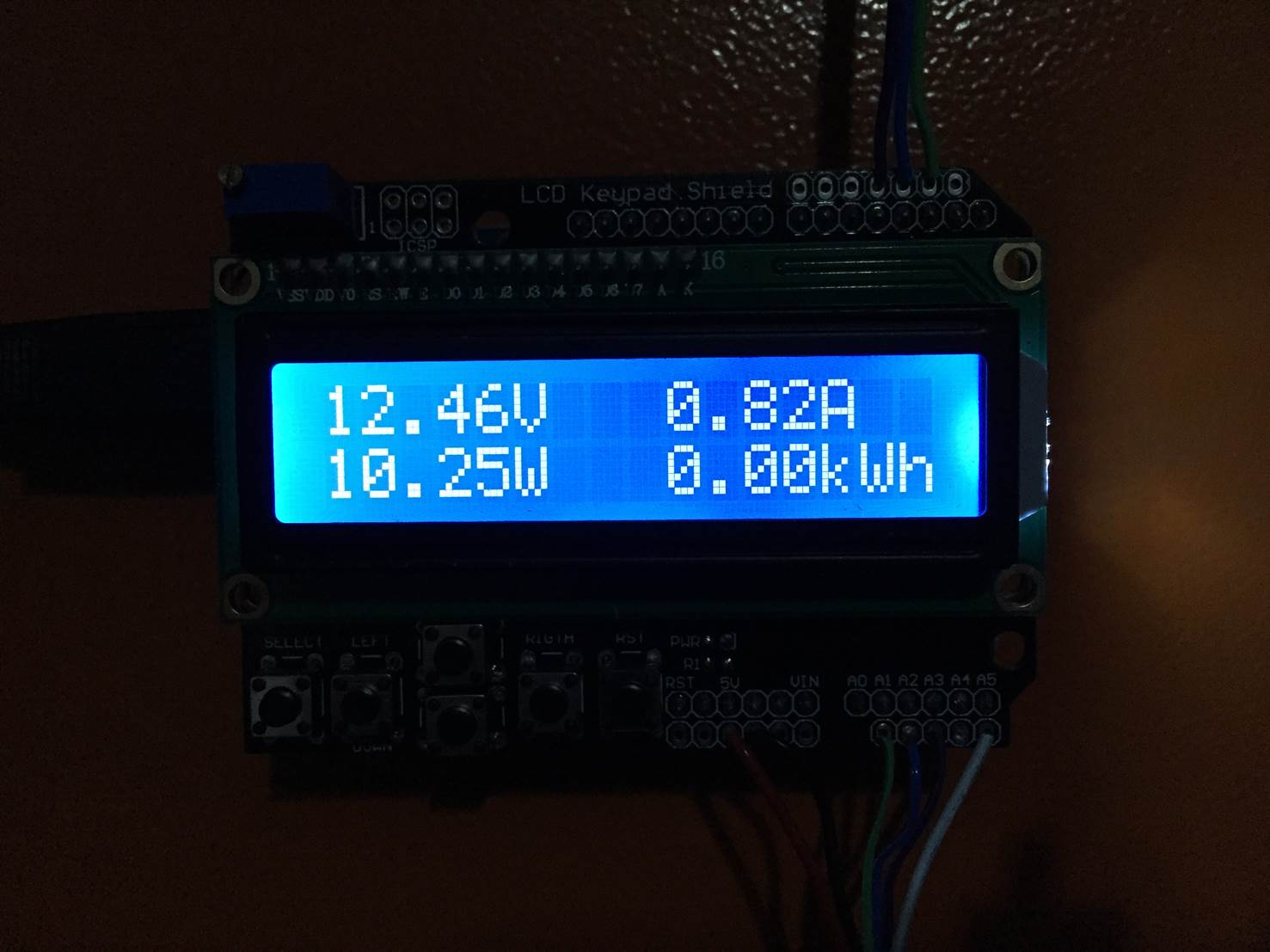
Finally, the LCD is updated by cycling through three different displays. The first displays the battery status and shows the battery voltage, current being drawn, power being used and finally the kilowatt hours consumed since start up.
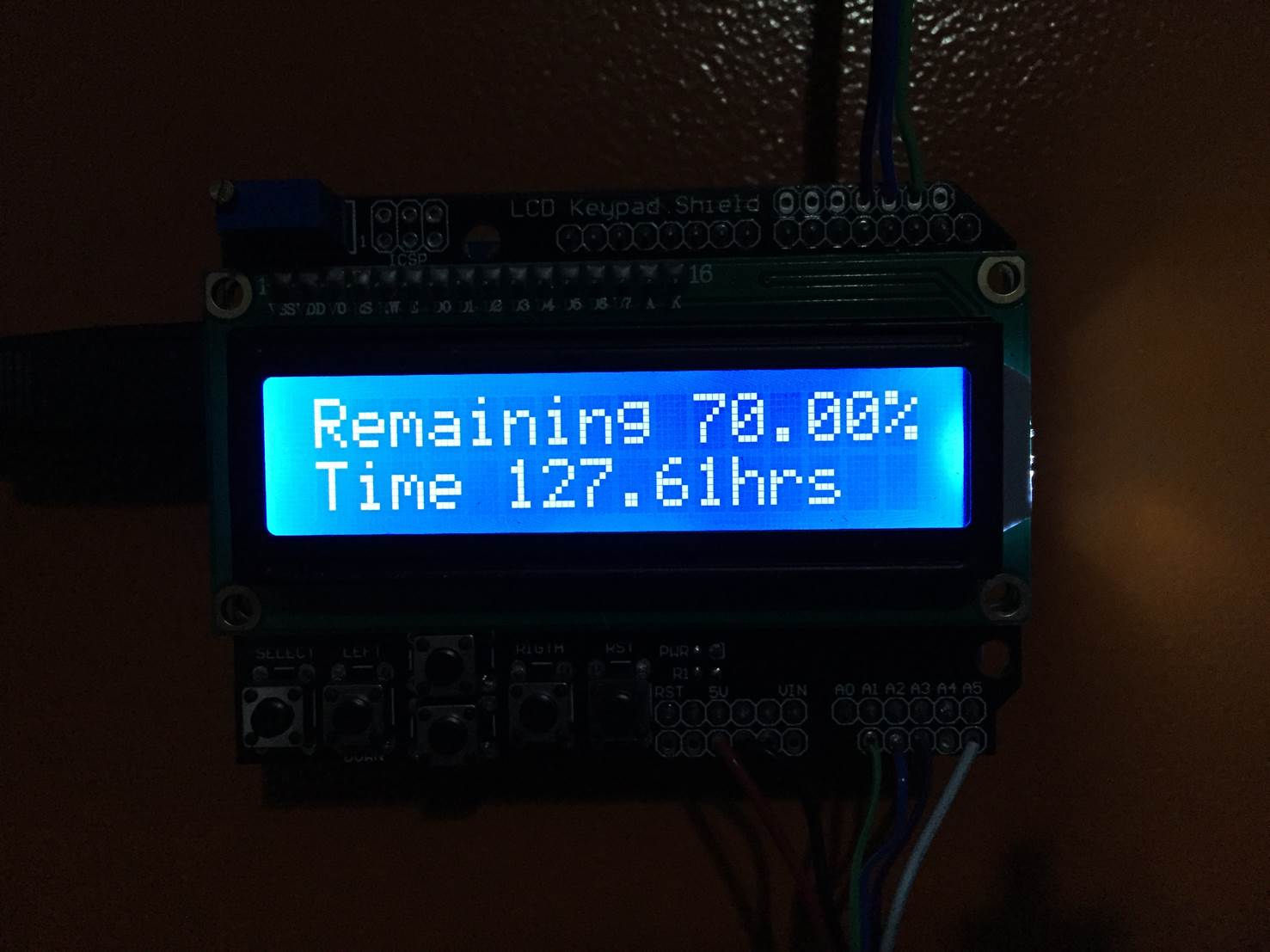
The second screen displays the battery life remaining as a percentage and then in terms of time in hours remaining at the current power consumption. This information is only displayed if the battery is not being charged. If the battery is being charged then obviously the time remaining won’t be realistic and the capacity calculation will be incorrect due to the inflated voltage measurement. In this case, battery charging is displayed instead.
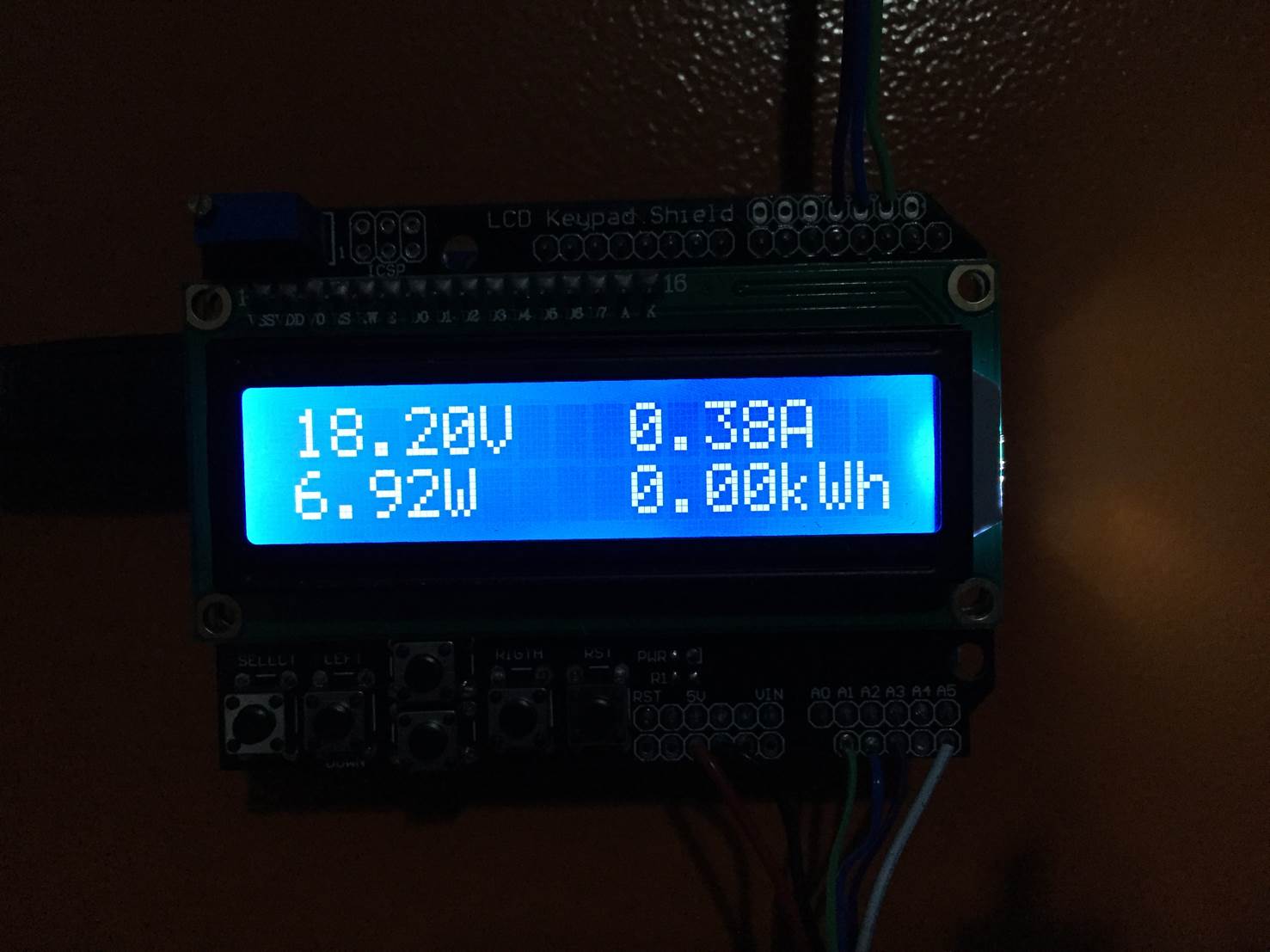
The last screen to be shown is the solar information. This screen displays the solar panel output voltage, the current being supplied and the resulting power output from the panel as well as the total energy which has been produced by the panel since startup.
Additions To The Circuit & Display
There are a couple of free inputs and outputs on the Arduino Uno which can be used to monitor a few other parameters. For example, as mentioned in the opening steps, you could separate your current measurement to your lighting, 12V DC and 100V/220V AC circuits and then create three separate displays on the LCD screen to give you information on your usage from all three.
You could also add some relay functionality to the outputs of the Arduino to cut off loads if the battery voltage becomes too low or turn off the solar panel when the batteries are fully charged etc.
If you’d like to take this guide one step further, you could also try building your own solar panels for your Van or RV. they are really easy to build and cost much less than the commercially available ones.
Have you built an energy monitoring system for your Van, RV or solar power system? Let us know your tips and tricks in the comments section below.
This guide shows you how to build a really easy and cheap 9V emergency USB charger. Its perfect to take along on camping trips or leave it in your backpack or your cars glove box. The switch disconnects the battery from the electronics so the battery doesn’t get drained over time and can last for years until you need it in an emergency.
Always check your wiring and the output of the USB socket before connecting your devices to it. Use this guide at your own risk, we take no responsibility for damage caused to your devices due to this circuit or faults with the circuit.
What You Need To Make Your Own 9V Emergency USB Charger
USB Socket (From Old PC) Or USB Extension Cable – Buy Here
3D Printer & Filament For Housing, Alternately Your Can Use An Altoid Or Similar Tin
Optional Mini 5V Solar Panel For Solar Charging – Buy Here
How To Make Your Own 9V Emergency USB Charger
Assemble The Circuit
The circuit is pretty straight forward and doesn’t require a bread board or component board to mount everything on, you can simply solder the wiring between the components and insulate the ends with a bit of heat shrink tubing or insulation tape.
To start, solder the positive wire (red) on the battery lead to one terminal on the switch. Then solder a jumper wire onto the switch which will be used to go to the input pin of the regulator. Remember to slip of piece of heat shrink tubing over each wire before soldering, it can then be slid up over the joint and shrunk with a lighter or solder iron to secure it.
Now solder the jumper onto the input pin of the regulator, this is usually the left pin when viewed from the front. Solder the negative wire (black) from the battery clip onto the centre pin of the regulator.
Next, solder a jumper lead from the output pin (far right pin) of the regulator to the 5V pin on the USB socket or the red wire on the USB cable. Then solder a jumper lead between the centre pin of the regulator and the 0V pin on the USB socket or black wire on the USB cable.
If you’re using a USB socket, the pins should be identified on the socket or on the board it is mounted on. You’ll only be using the outer most of the four pins which as the 0V and 5V pins, sometimes identified as GND and Vcc.
If you are using a USB extension cable, cut the socket side off leaving a lead the length you’d like your charger to have. There should be four wires inside, red, white, green and black. The black is the 0V, negative or ground and the red wire is the 5V, positive or Vcc wire, these are the only two wires you need to strip and solder to.
Your circuit is now complete, double check your connections and your soldering before switching it on.
It’s a good idea to check the output on the USB socket before trying to connect a device to it. Use a multimeter and check that the output on the two outer terminals within the socket is reading 5V or reasonably close to 5V |(within 0.2 of a volt).
If you are not getting any output, first check the switch, then that the battery is charged and finally check your circuit connections. If you socket is showing a constant and stable 5V then you can try connecting a device and it should start charging.
You may want to add a heat sink onto the regulator if you are going to be using your charger for long periods of time to keep it from overheating, this will dramatically extend its life. Simply place the regulator into the slot on the heat sink and use a rivet or bolt and nut in order to secure it.
Putting The Components Into A Housing
Once you’ve assembled the components, you’ll need to put them into a housing. An old Altoids tin or something similar usually works well otherwise you can 3D print your own using the models below.
The model allows enough space inside to store the 9V battery with clip as well as the regulator with a small heat sink. There are two holes on the end, one for the USB socket and the second for the switch. The opposite end is open and is closed off with the 3D printed end cap.
Using The 9V Emergency USB Charger
To use your charger, simply plug your device’s USB cable into the socket and turn the switch on.
With the switch off, the battery is disconnected from the circuit and the charger can be stored for a few years (depending on the battery quality) without running flat. It’s therefore perfect to leave in your cars glove box or your backpack for emergencies.
You can replace the battery with a rechargeable 9V battery if you use the charger regularly however after long standing periods the rechargeable battery will run flat.
Emergency USB Charger Improvements
If you’d like to improve on the USB charger and make it slightly more functional, here are a couple of modifications you can make to it.
Enable iPhone Charging
An iPhone won’t charge on this charger with the centre two pins of the USB socket left open circuit. You’ll need to add the following circuit onto the centre pins in order to “fool” the iPhone into thinking that it is connected to a proper charger.
Simply connect the GND to your black 0V wire and the +5V to the output of your regulator.
Smooth Out The Voltage
Add a 100uF capacitor across the input and a 10uF capacitor across the output of the voltage regulator to smooth out any voltage spikes or dips. This makes the chargers output a bit more reliable and protects your connected devices.
Enable Solar Charging
You can easily turn this charger into a solar charger by replacing the 9V battery with a small solar panel such as this one. Simply solder the positive and negative leads from the panel in place of the battery clip and you’re ready to start solar charging.
Make your own awesome radial engine fidget spinner, all you need is a 3D printer and a high speed bearing. The spinner can be printed in under an hour and the bearing just presses into the model afterwards. It’s super cheap and easy to make.
What You’ll Need To Make Your Own Radial Engine Fidget Spinner
3D Printer – Buy Here – Alternately Order Printed Part Online
608 High Speed Bearing – 22mm OD, 8mm ID – Buy Here
9 M3 x 8 Socket Head Cap Screws (Optional To Add Weight) – Buy Here
Spray Paint (Optional – If You Don’t Have The Right Filament Colour) – Buy Here
How To Make Your Own Radial Engine Fidget Spinner
Making this fidget spinner is super easy, all you need to do is 3D print the radial engine model and then install the high speed bearing. You can also add an optional machine screw into each cylinder head to increase its weight and speed.
3D Printing The Fidget Spinner Model
The model was designed in TinkerCAD, the STL file can be downloaded here – Radial Engine Fidget Spinner.
The fidget spinner model can be printed in any type of plastic filament. It was printed for this guide in both HIPS and PLA with the following temperatures and an infill of 30%.
HIPS
Bed Temperature 95°C / 205°F
Nozzle Temperature 225°C / 440°F
PLA
Bed Temperature 40°C / 100°F
Nozzle Temperature 205°C / 400°F
Here’s a time-lapse video of the print. It took around an hour to complete.
Adding Weight With Screws
In order to give the fidget spinner a longer spin time, it needs more weight. This can easily be added by installing a screw into the head of each piston. Drill a 3mm hole into the centre of each piston head, the hole only needs to be about 10mm deep.
Screw a screw into each piston so that the head of the screw is almost flush with the top of the piston.
You’ll need to install one into each piston in order to keep the spinner balanced.
Adding The Bearing
The 608 bearing simply presses into the hole in the centre of the engine model.
Line the bearing up with the hole, place it onto a flat surface, bearing side down and then press the 3D printed model down onto the bearing. It should be quite a tight fit and should be squared up with the edges of the model.
Paint the Radial Engine Fidget Spinner
Lastly, you can paint the fidget spinner if you don’t have the colour filament you like. If you’re going to paint your spinner, do it before installing the bearing and screws or remove them before painting.
Place the plastic model face up on a sheet of newspaper and spray it as per the directions on your spray paint can.
Once the paint has dried completely, flip it over and paint the other side. It may require a few coats on each side to ensure coverage in all the gaps and ridges.
Re-install the screws and bearing and your spinner is ready to use. I’ve brushed some silver paint onto the fins on the pistons to highlight the edges.
Do you have any cool ideas for fidget spinners? Let us know in the comments section below, we’d love to see your ideas!
Nails have formed part of handymen, tradesmen and DIY fans for thousands of years as hooks, fasteners pegs and hangers but, with a bit of creativity, they can also be used for a number of crafts and projects. Here are 12 of the most interesting projects we have found which use nails in a less traditional way.
Decorative Miniature Knives
Have you even seen miniature knives made from nails? We love this creative project which also teaches you a bit about metal working. The twisted handles look great and the guide, Miniature Knife by pennabilli, covers annealing and forging your own knife.
Nail Puzzle
This classic puzzle has been around for many years. The idea is fairly simple, bend two in such a way that they connect together and come apart in a certain way however the guide, Puzzle, is a bit trickier than it seems.
Vintage Magnetic Bottle Opener
This is a super easy project and it is certainly one of the more creative. This vintage Magnetic Bottle Opener by mikeasaurus is clean and simple, perfect for a beginner.
Nail Jewelry
Here are a couple of jewelry items which you can make using nails, Horse Shoe & Cement Jewelry, author Fikjast Scott.
Add Decorative Accents
If you’ve got some wooden objects which you’d like to add some accents to, use nails. Check out how AverageJoesJoinery made these great coasters, How to Make Drinks Coasters With Inlay.
Pin Art Toy
Here’s a guide, Pin Wall by rimamonsta which shows you how to make your own pin art toy which uses pins to produce a duplicate 3D shape on the front of the board of whatever is pressed onto the back of the board.
Calipers
After you’re done forging knives and some jewelry, you could try making your own tools as well. Here’s a small caliper made by forging and soldering. The guide, Caliper From Wire by Pricklysauce, teaches you techniques which could be used to make all sorts of tools and implements.
Games involving driving a nail into a block of wood have become a tradition in bars and taverns around the world. Check out How to Play (Stump) by smithallen_studio.
Trick Box
Similar to the nail games, can you figure out how to open this box? Small nails are an integral part of this Trick Opening Box by author Fathomlis, follow the guide and you’ll also find out how to open it.
String Art
String art is fairly well known and is also really simple to do. Here are two great examples of string art made with a wooden board, a couple of nails and some string. The techniques used to make a string artwork are pretty simple so its the perfect project for a newbie. Here is a String Art `World Map´ project by He Se.
Balancing Nails Puzzle
Here’s another puzzle/game themed project. Can you balance a handful on top of the one in the wooden block? Have a look at this project, Balance 10 on One by somebullcrap, to find out how and make your own coffee table puzzle.
And that’t it. Now you’ve got a couple of ideas to use nails in extraordinary ways. Have you thought of or seen any other creative uses? Let us know in the comments section below!
Do you have some old chairs lying around in your attic, garage or basement? Give them a new lease on life with an easy makeover. More often than not, old chairs are made from better quality wood than modern chairs so they’ll serve you better in the long run. Here’s how you can turn your old chairs into modern and usable chairs to fit into your home’s theme.
Start off by dismantling the chair, you’ll want to take apart any joints which are loose or broken. Often the old dowel joints in wooden chairs work themselves loose over time and result in a wobbly or “loose” chair.
Use a rubber mallet to work the pieces loose, protect the wood with some newspaper or an old towel to prevent the mallet from damaging the wood.
If you’re not good at remembering which piece fits where then number each joint’s pieces with the same number as you take them apart, this way you’ll know exactly which pieces go where. You’ll be painting the chair afterwards anyway so the numbering will be hidden.
Now take a mouse sander or rotary tool and clean up any old glue left on the joints, you want there to only be wood left. You can also clean up any scratches, splintered edges and scuffs while you’re busy with the sander.
Now glue the chair back together with a good quality cold wood glue. Use a couple of clamps or some rope to clamp/tie pieces together as they dry to get strong joints.
You can also add in a few pieces in hidden places to brace or support the chair for extra stability and strength.
Once the glue has dried you can start with painting. Use a brush and small sponge roller to paint a coat of good quality primer onto the frame. If your chair is in good condition and doesn’t have a dark varnish then a primer may not be necessary.
Follow the coat of primer with a few coats of your coloured latex paint. If you like the look of chalk paint, you could try making your own inexpensive chalk paint?
Finally the seat can be re-covered. If the chair is really old then the chipboard base of the seat may need to be replaced.
Cut a section of 40mm foam to cover the chipboard base. Position the fabric over the base and foam and trim it so that it generously overlaps the edges. Flip the seat over, pull the fabric tight and staple it to the underside of the seat. Pull out any kinks and staple the fabric firmly until you have a neatly covered seat.
Screw the seat back onto the chair and your chair is now complete.
Have you given a chair or other item of furniture a makeover? Let us know in the comments section below, we’d love to see your before and after pictures. If you enjoyed giving your chairs a makeover, perhaps you’d enjoy flipping some other furniture as well?
This post is based on Chair Makeover by donc146 and has been modified and used under the Creative Commons license CC BY NC SA 2.5.
Greenhouses are a great way to look after plants or germinating seedlings. They help to increase humidity and temperature, shield plants from pests as well as to moderate temperature changes. In this guide, we will show you how to easily create a convenient mini greenhouse that can be placed on a window sill, using only scavenged items that everyone has access to. It has lots of space and height for plants to grow in, and can be customized to accommodate more or different types of plants.
What You’ll Need To Build Your Own Windowsill Greenhouse
To start off, you’ll need to assemble the frame. The frame is made up using kebab sticks. Two sticks placed length ways make up each vertical post with on placed horizontally for support.
In order to join the sticks, the sticks are split using a craft knife and slid into one and other. The numbers on the above sketch indicate the type of joints, these joints are shown up close below.
To optionally strengthen the joints, drip any kind of glue, like superglue all over the joint, and wrap thread or string around the joint, knotting it to keep it in place.
Finally, to complete your greenhouse, find a clear bag which is big enough to pull over your frame. If you can’t find a big enough bag, another option is to cut plastic sheeting or bags and glue them to the structure instead. Try to tuck the bag underneath the greenhouse to help seal it properly to keep heat/moisture in and pests out. The roof area of the greenhouse will be strong enough to allow a LED light to rest on top if you want to add light, but be sure that the temperature of the light stays cool so that it does not melt the plastic.
Now place your homemade greenhouse on a sunny windowsill, insert your favorite plants or veggies and watch them grow!
Have you tried to make your won mini greenhouse? Let us know your tips and tricks in the comments section below.
This post is based on No-Budget Windowsill Greenhouse by lsadwdwadw and has been modified and used under the Creative Commons license CC BY NC SA 2.5.
Have you got a couple of old pallets lying around or have you seen some stashed at your local grocery store? With some effort, you can easily turn an old pallet or two into stylish furniture and decor for your home. The guys at fix.com have some great ideas for your next upcycling pallet furniture project, have a look at some of their ideas below.
How To Prepare A Pallet For Your DIY Project
Pallets are great, but you have to make sure the wood isn’t chemically treated – especially if you’re building something like a raised vegetable garden bed. Also, ask someone if the pallet was used to haul hazardous materials. If so, stay away. But if it was hauling orange juice, furniture, or otherwise nontoxic items, you’re good to go.
Almost every project you do with pallets will require you to disassemble the pallet, remove nails, and sand down any rough edges. You’ll need a crowbar or pry bar, a hammer, and a power palm sander for these parts. This would also be a good time to give your boards a thorough cleaning with some basic soap-and-water solution.
Projects You Can Build Using Wood Pallets
Build an Awesome Table
You can use pallets to create a whole bunch of different style tables from scratch, or you can use pallet wood to update some sad outdoor furniture.
If you’re building one from the ground up, you’ll probably want to pick up a few extra supplies for the legs and supports and stick to using your pallet wood for the table top. To create your table top, determine the dimensions of your table and cut your boards (if you need to) down to size.
Lay them down on a flat surface and secure them on the underside using two parallel 1” x 3” boards and strong, long wood screws.
For the table legs, you can go industrial chic and use piping from the hardware store, order some retro hairpin legs, or use 4” x 4” wood pieces to create a more traditional X-leg trestle table. Stain or paint the top if desired – just make sure you seal it well if it’s going to be used outdoors.
Create a Cool Rustic-Industrial-Style Desk
This might be one of my favorite ways to re-purpose a pallet, especially if you’re in an urban setting. The good news is if you want to make a cool pallet desk, you don’t have to disassemble the pallet!
First step is to decide on the depth of your desk. The typical depth for a small-space desk is anywhere from 17” to 22” deep. Using a level, draw a line down your pallet at your chosen measurement and then cut straight through both pallet layers with a circular saw.
Using the wood left from the smaller piece, create a wall brace about 4” below your ideal desk height. Secure it to the wall using screws driven into the wall studs.
Next, you’ll want to add legs to the front of your pallet desk. I definitely recommend those cool hairpin legs for this project.
Place the back of your desk over your secured wall support and attach it using wood screws.
Boost Your Wall Storage
Often, if you tweak a pallet just a tiny bit, it can be used for awesome wall storage in all areas of the home.
A smaller pallet can be painted or stained in fun colors, mounted to the wall using screws into studs, and then used as book storage in a playroom or kids’ room.
Use the same basic principle in the kitchen or dining room but, instead of books, use the pallet to store large or long serving dishes. Add small hooks to the front of the pallet for visual interest and to display pretty tea towels or even coffee mugs.
Now head to the shed or garage! Hang a few pallets on the wall side-by-side and make sure they are level with the floor. Paint them a fun color if desired. Now add all your long and awkward lawn care tools! Rakes, brooms, garden hoes, and more will all stand propped up in your new vertical storage unit. Add hooks or baskets to the front of the pallets for your smaller garden essentials such as spades and gardening gloves.
Amp up Your Foyer With Pallet Bench and Shoe Storage
If you hit the motherlode and find a bevy of free pallets, this might be the right project for you. Just like with the wall desk, you’ll want to first determine the depth you’d like your combination bench-shoe storage cabinet to be. Make sure it doesn’t overtake your whole front-door area, but also ensure that it will be deep enough to sit on comfortably – 18” is probably a nice place to start for depth.
Use a circular saw to cut down your sanded and cleaned pallets to 18”, but do not discard the leftover wood!
This is the stage where you’ll want to paint or stain the pallets your desired color. Once they are dry, place one 18” pallet on top of another and secure with wood screws. Keep stacking and securing your pieces together. Once all your pallet pieces are stacked, cut down the leftover pallet boards to match the depth of your bench and use them to plank the top of your bench.
Stain the top the same color or a different color for added interest! Your shoes will sit in the pallet slats! Add a pillow for comfort and some coat hooks above your bench and you’ll have a stylish, rustic, DIY entryway solution.
As you can see, there are a ton of ways to use pallets in your home, both indoors and outdoors. Next time you’re out and about, keep your eyes peeled and your creativity dial turned up and you might just find yourself the proud owner of something DIY and fabulous.
Let us know in the comments below if you’re tried any of these or other projects involving upcycling wooden pallets in your home! If you’re looking for more project ideas, have a look at fix.com, they have a great range of projects and home improvement ideas for you to try.
3D Printing is great for producing cheap customised plastic parts, however, the surface finish is usually quite rough due to the rounded plastic extrusion building up each layer. Here are some techniques which can be used to produce a smooth surface which can then be painted to produce a professional looking part.
What You’ll Need To Get A Smooth Surface Finish
Sandpaper – 100, 180 and 320 grit
Polyester body filler or putty
Plastic Primer
Spray Paint
3D Print Surface Finishing Techniques
Start out by sanding the piece with the 100 grit sandpaper for 5-10 minutes.
Then do the same thing but with the 180 grit sandpaper and after that, repeat the same step but with the 320 grit sandpaper. By sanding you will give your piece smooth surfaces without any imperfections or excess plastic.
If you happen to damage an edge or corner then don’t worry, you’re piece isn’t ruined yet. You can fix any imperfections easily with polyester potty.
First, take the piece of wood and mix the polyester putty.
Take the plastic piece that came with your polyester putty and scoop a little bit and spread it on the damaged edge or corner. Don’t be afraid to put a lot of putty on the damaged part, the more putty the better.
Repeat the sanding steps starting from the course grit and working to the fine grit after the putty has dried.
You are now ready to paint the object. In order to get good paint adhesion we will have to spray primer made for plastic surfaces on the piece we’re working on.
Clean the surface with a brush to remove any dust that may be left on the piece.
Some tips to avoid dripping:
– Spray carefully in strokes from left to right
– After applying one layer, wait 30 minutes until the primer is dry
Now apply the spray paint. Give the piece a couple of layers until you reach the result you desire.
You can also use putty to fill voids in a 3D printed shape.
Apply a coat of paint to cover up the body filler.
Now you’re able to 3D print models and get a professional surface finish. Do you have any tips and tricks for finishing off your 3D printed models? Let us know in the comments section below.
This post is based on 3D Surface Finishing Techniques by robrechtv and has been used and modified under the Creative Commons license CC BY NC SA version 2.5.
Mould developing on your bathroom or kitchen ceiling is generally as a result of poor ventilation. Steam and water vapour get trapped in the bathroom and eventually condense on the ceiling causing a damp spot which is perfect for the growth of mould and bacteria. You should try to treat patches as soon as they appear as the longer they have to grow, the larger the patch that needs to be cleaned and the more difficult it is to get rid of it. If you leave it too long, you may even have to replace a portion of your ceiling board.
A patch on your ceiling may also be as a result of a leak in the ceiling or walls above. It is worth checking the area in the ceiling above the mould spot for possible leaks.
What You Need To Get Rid Of Mould On Your Ceiling
Paint Scraper
Household Bleach or Hydrogen Peroxide
Spray Bottle
Scrubbing Brush
Gloves & Safety Glasses
A Ladder
How To Remove Mould From Your Ceiling
Before treating the mould, open all of the doors and windows to allow adequate ventilation. If you have wallpaper or polystyrene crown moulding near the area to be treated, cover this up with plastic sheeting before working near it so that you don’t damage it with the bleach or peroxide solution.
Scrape away any loose or flaking paint and mould.
If you are using bleach, dilute it with five parts water and put it into the spray bottle. Hydrogen peroxide can be used neat. Spray the solution directly onto the mould patch on the ceiling and allow it to work for 10 minutes.
Scrub the area lightly with your brush, rinsing the brush occasionally to prevent the mould from spreading and discolouring the surrounding area.
Once your have worked away all of the loose bits, repeat by spraying the area and allowing it to stand for 10 minutes again before re-scrubbing. These steps should be repeated until the mould has all been removed.
The ceiling may require a fresh coat of paint once you have finished cleaning the mould in order to cover up any discoloured areas. High cover primer is usually the best for covering up stains on white ceilings, apply one or two coats, allowing drying time between coats.
Preventing Mould In Future
Now that you have finished cleaning and restoring your ceiling, you need to look at preventing it from growing back again. The most likely cause is poor ventilation, keep the windows and doors open for a few minutes after using the bath or shower to allow the steam and moisture to escape. If you don’t have windows or they are too small to open, consider installing a small extractor fan to assist with removing the moisture.
Have you managed to restore a section of your ceiling? Let us know your tips and tricks in the comments section below.