Home Blog Page 51

5 Gardening Tips & Tricks That Everone Should Know

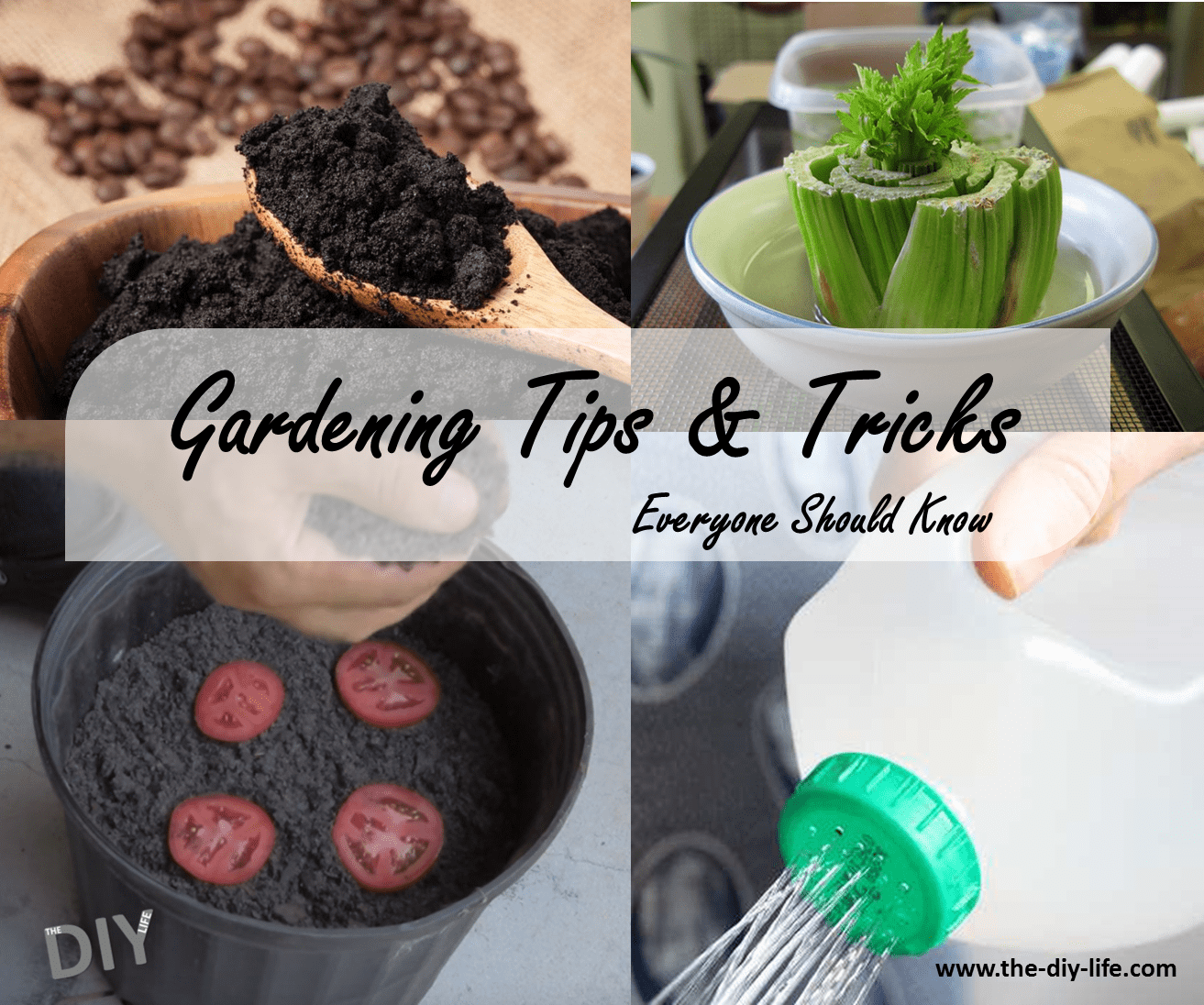
A home is not complete without its garden. Gardening should be something you look forward to, it should be fun and enjoyable and these 5 tips and tricks help to do just that.

Regrow Veggies From Kitchen Scraps

regrow veggies from scraps

Do you do a lot of cooking with fresh produce? You should be, and now its even easier to make sure that you always have a fresh supply. Instead of throwing away your kitchen scraps, there are a number of vegetables which can be easily regrown, some just with water! Its that easy. Here is a full guide to regrowing veggies from kitchen scraps.

Use Old Coffee Grounds For Gardening

use coffee grounds in the garden

Instead of throwing out your used coffee grounds, recycle them by using them in the garden. There are a number of things you can used your old coffee grounds for including fertilizer, pest repellent and compost. Have a look at this article for ideas on using coffee grounds in the garden.

Grow Tomato Seedlings From Tomato Slices

This has to be the easiest way to grow tomato seedlings. Simply cut a tomato into slices, lay them out in a pot or bucket filled with potting soil or compost and then lightly cover them. Have a look at the video above for the full instructions.

Make A Watering Jug Out Of A Milk Bottle

milk-jug-watering-jug

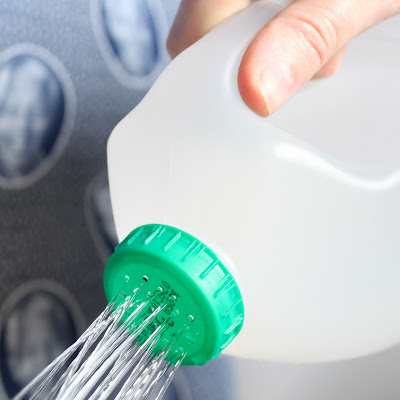
This is another easy way to recycle and reuse some waste from around the home. Simply poke some holes into the lid of a milk carton to make a watering jug. The best part is that you can make a fine spray with smaller holes made with a needle or a stronger spray using larger holes made with a small screw driver. Follow this link for the full instructions.

Pest Control With Egg Shells

Lastly, if you are not an avid coffee drinker and do not have the used coffee grounds mentioned above, you can sprinkle crushed egg shells around the base of your plants and veggies to prevent pests from reaching them. Simply sprinkle a continuous ring of crushed egg shells around the base of the plant to protect it.

Do you have any gardening tips you’d like to share? Let us know in the comments section below.

Pin these tips:

gardening-tips-and-tricks

Cover Image: Garden by Nick Kenrick used under CC BY 2.0
How to Repair Dips and Bumps in Paving Yourself

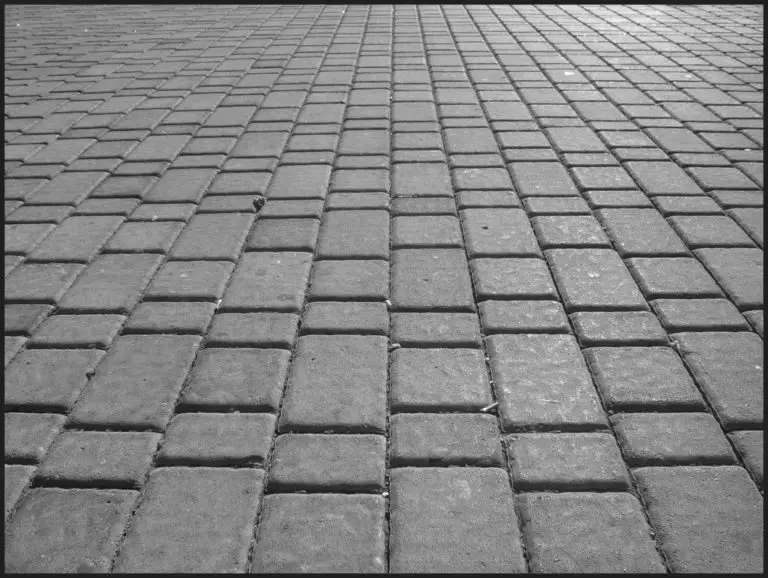
Dips and dumps in paving form for a number of reasons, sometimes the ground underneath the paving is not properly compacted when it is installed, organic matter such as roots or stumps may decay and collapse or water may erode the soil away over time. Repairing your paving is not difficult and although it may take a while, it is actually quite a cheap fix.

What You’ll Need

  • Course River Sand
  • Screw Driver
  • Rubber Mallet
  • Wire Brush

How to Fix Your Paving

Firstly you need to remove the paving over the dip or bump. To do this, wedge the screw driver between two of the bricks and and lever out one of the bricks. You may have to do a few smaller movements rather than levering the whole brick out in one go. Now remove all of the paving on top of and a little way around the dip of bump. Brush each brick off with the wire brush as you remove it to remove any excess sand and dirt and stack them neatly to one side.

You now need to level out the area. Either remove or add soil to the area in order to raise or lower it to the same level as the surrounding bricks. A flat pole or piece of wood may help you to read which areas need soil added or removed.

Once the area is level, it needs to be compacted. Compacting can be done by hand with a stamper or with a mechanical tamper. If you have a large area or the area is part of your driveway and sees vehicles driving over it then you should always use a mechanical tamper, these can usually be hired from hardware or tool hire stores.

After compacting the area, you need to lay down a 20mm (1″) bed of river sand to provide good drainage and bedding for the bricks. River sand is also available at your local hardware or building supplies store.

Now begin re-bedding the paving. Use a rubber mallet to lightly tap each brick into place and ensure that it is level with the surrounding bricks. It is important that you have brushed the old sand off of the bricks before re-bedding them otherwise they probably won’t all fit back together.

Once all of the bricks have been laid, brush or sweep a mixture of fine sand and cement over the bricks and into the joints. This will act as a grout and prevent the paving from moving around. When you are done, lightly wet the area so that the cement in the grout is activated. Try to avoid traffic over the area for a day or so to allow the sand to settle and the grout to cure.

Remember for next time, professional pavers will ensure that the ground under your paving is properly level and free from voids. You should also avoid paving over area where trees have been planted as their roots and stumps will eventually erode away and the ground will collapse around them.

While repairing your paving, you may have noticed one or two tiles which have cracked? Here’s how to replace a cracked or damaged tile without damaging the tiles around it.

Have you tried repaving an area in your home? Share your tips and tricks with us in the comments section below.

Cover Image: Pave by Alex & le temps qui passe used under CC BY 2.0

How to Place your WiFi Router for the Best Signal

These days, almost everyone has a WiFi router in their house and yet the majority of us suffer from poor WiFi signal strength. Where you have your router placed and how it is placed may be causing you a lot of problems with the speed and strength your devices receive. It’s worth noting that you need to have a good provider and a good quality router as well, however, improving on what you already have can go a long way towards improving your internet experience.

Location For Best Signal Strength

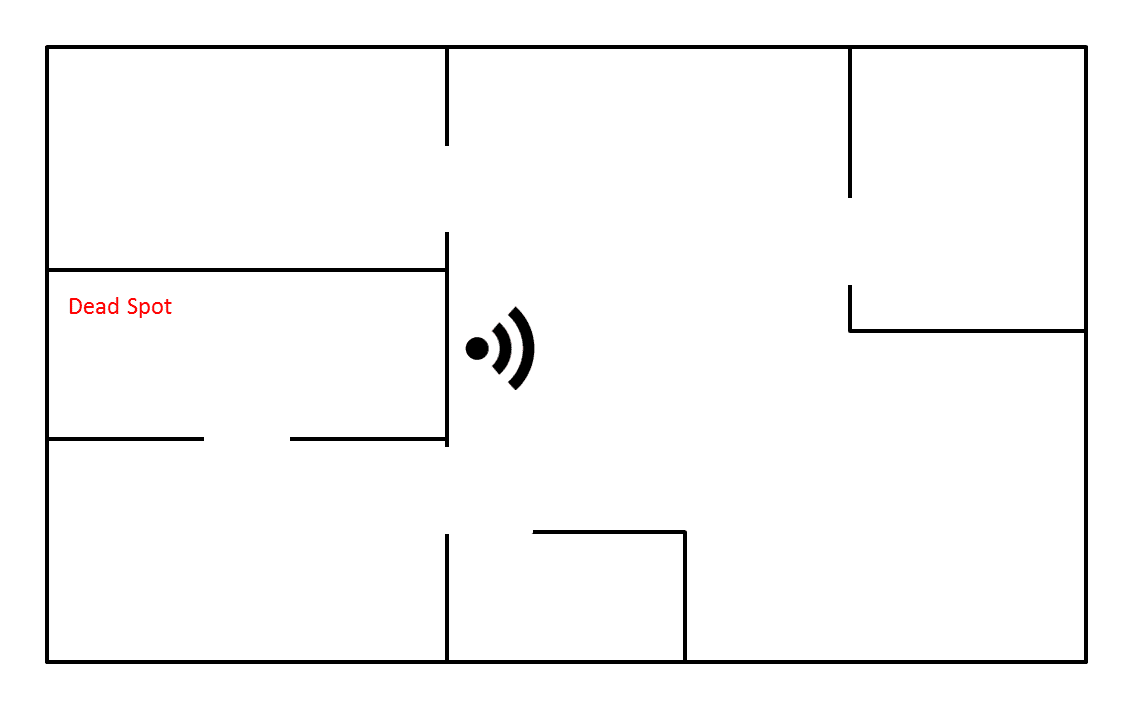
Firstly and possibly the most obvious is the location. You need to place your router in the most open and most central part of your house so that the waves are able to reach each side of your home. If you have a home with all of the bedrooms on one side and the living spaces on the other side then you want to install your router in the closest living space to the bedrooms so that the signal is able to reach all of the rooms and living spaces.

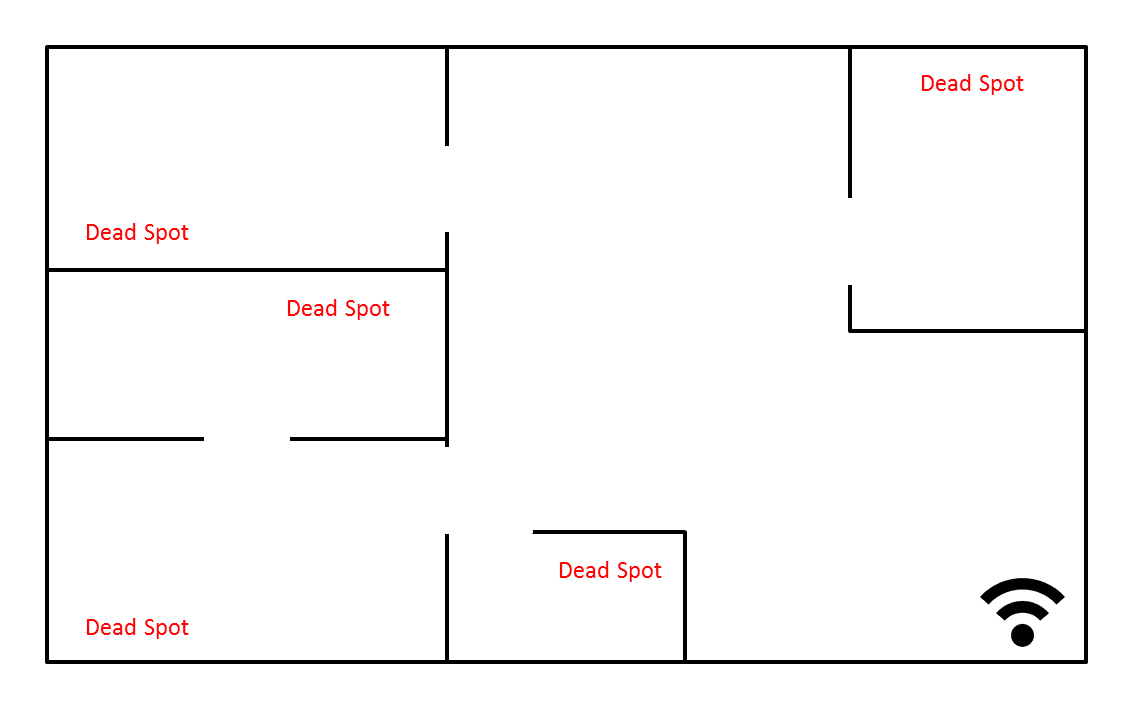
Most people place their router near the kitchen or entrance to their home and unless this is near the centre of your home, it has a negative effect on your WiFi signal.

Bad Router Placement:

wifi map bad router placement

Good Router Placement:

wifi map good router placement

You will also get the best results from your router if it is placed out in the open and not in a cupboard or on a cramped up shelf. An ideal location is mounted high up on a wall in an area where there is not a lot of furniture or decor. If you can’t mount it on a wall then an open counter near the centre of the house is the next best option. A router can broadcast through walls but at the cost of signal strength so always consider placing your router such that there are the least number of walls between your router and where you usually connect to your WiFi.

Distance From Devices

WiFi uses radio waves to transmit information, they do this at a fairly short wavelength of around 12cm (4 1/2″). In general, you shouldn’t expect a single router to broadcast more than 45m (150ft) and that should be further reduced if you live in a concrete building or a house with many walls and rooms.

If you need your router to transmit further than about 30m (100ft) then you should consider connecting a range extender to your network in a location midway between your router and the location you need signal.

Router Antenna Direction

Your router has two antennas for a reason. The antennas transmit stronger in a certain direction therefore two are provided and are meant to be pointed in different directions in order to maximise coverage. Point one of the antennas vertically and the other horizontally for the best signal coverage.

Use an App To Improve Your Wifi Signal Strength

Finally, there are a number of apps available to measure your WiFi signal and help you find sweet spots, position antennas and position the router for the optimal signal strength. WiFi SweetSpots is a great free app to do this, here is the iPhone link and the Android link.

Connect to your WiFi network, open the app and then use it to map out your WiFi signal. Play around with different antenna directions and different router locations until you find the optimal solution for your home.

Do you have any other tips and tricks to get the most out of your WiFi router? Let us know in the comment section below.

Cover Image: Unwired by delta_avi_delta used under CC BY 2.0

 

How to Calculate the Slope of your Drain Pipe, Prevent Clogging

The slope of your drain pipe is an important part of any new plumbing installation. If the slope is too gradual then your drain will be prone to clogging, if it is too steep then the water drains away from the solids and again becomes prone to clogging. Typically, this range is from 1.5° to 18° which equates to 20mm to 250mm drop in a meter or ¼” to 3” drop in a foot.

Measure the Drain Length

The first thing to do is measure the drain length. This is the distance from where the drain connects to the basin/sink/tub/shower etc to the point where it connects to the main drain or existing plumbing. Make sure you measure the total length if it needs to go around walls, corners or pillars. If you have difficult areas to measure then try run a pieces of string along the line you wish to run the drain and then measure the length of the string. Take the measurements horizontally along the same height.

It sometimes helps to map out your drain route on a pieces of paper. Mark each small distance on the paper and then add them all up to get the total drain length. This drawing will also assist you when you go through to the hardware or home store to buy plumbing fittings and piping.

Calculate The Drain Slope

There are two methods to calculate the drop that you need to get to the correct slope, one involves trigonometry and one straight multiplication.

Trigonometry

You know that you want your drain to be in the range of 1.5° to 18° so choose a value around the middle, say 10°. Multiply the length by tan of the angle and that will give you the required drop.

For example, if your length is 5m (5000mm) or 200″ and you want an angle of 10°:

5000 x tan (10) = 882mm

200 x tan (10) = 35″

So the drop you need is 0.88m (882mm) or 35″.

Multiplication

The multiplication method also uses the length of the drain along with the ranges we gave you in the beginning.

Say your drain length is 5m (5000mm) or 16′. In the introduction, we said that the drop of the drain needs to be 20mm to 250mm drop in a meter or ¼” to 3” drop in a foot.

5 x 20 = 100mm and 5 x 250 = 1250mm

16 x 1/4 = 4″ and 16 x 3 = 48″

So your drain needs to drop between 100mm and 1250mm or 4″ to 48″. Choosing a value in the middle of these gives you 675mm or 26″.

When installing your drain pipe, you can either use a digital level in order to measure that each section of pipe you fit is at the same angle (10° or so in these examples) or you can measure the drop out and make sure that between the beginning and end of your drain, you reach the required drop.

Cover image: Sink Drain by Mark Lea used under CC BY 2.0.


6 Things You Should Buy At A Thrift Store

0

Have you ever given the thrift store a chance when shopping for these items? Thrift stores often have great deals on products which are in almost new condition so save money by buying these items, they are often less than half of their new price. Here are six of the best items to buy from your local thrift store.

Here’s What You Should Buy At A Thrift Store

DVD’s

thrift store dvds

DVDs by Kim Bach

While you’re not going to find the latest movies, thrift stores usually have a huge collection of older DVDs. These include kids movies and some of the good old classics. Always have a quick look through the DVD section, you may be surprised by what you find.

Games

Does your family love to play games? These are also sold in abundance at the thrift store. Stock up next holiday season or keep some new ones at home for a rainy day. Just make sure to go through any games briefly to check that all of the cards or pieces are there before you buy it.

Books

thrift store books

Books by Kirrus

Why pay retail prices for something you are going to read once and put on a shelf for the rest of its life? Books are often one of the cheapest things you can find in a thrift store and they don’t really age. Next time you are going on vacation or a weekend away, take a turn past the thrift store for your next read.

Designer Clothes

Especially for children. Designer clothes are well below half of their retail price at thrift stores and are usually quite new in the case of children’s clothes. These items usually sell out quite quickly but if you regularly go past, you’ll probably find a good deal here and there.

Furniture

thrift store old furniture

Old French Furniture by French Finds

If you’ve read our article on flipping old furniture, you’ll know that its easier than it looks. There are some tips to consider when buying old furniture but you can usually turn a piece into a feature for a fraction of the price of a new one. It doesn’t always require a lot of hard work either, often a coat of paint is all that is needed.

Picture Frames

While we’re on the topic of home decorating, picture frames are another bargain to find at thrift stores. Picture frames are usually in good condition, after all they are only hung on the wall. Older ones are also ideal for a distressed or farmhouse theme.

What are some of then other items you like to buy from thrift stores? Have you ever found a real bargain? Let us know in the comments section below.

Cover Image: ThriftStore by Steve Snodgrass. All images in this post are used under CC BY 2.0.


5 Secret iPhone Codes You Didn’t Know About

8

Try out these secret codes for additional functionality on your iPhone! All you have to do is go to the phone screen, type in the numbers and press call.

Hide Your Caller ID

Type #31# and then the number you are trying to call. This code temporarily hides your caller ID so that the person you are calling will not be able to see that it is you calling them.

Get Your IMEI Number

Type *#06#. Your phone has a unique serial number which is programmed into it as an identifier. The number is especially useful if your phone is stolen and you wish to block it from being used.

Get Your Signal Strength As A Number

Type *3001#12345#*. This will bring up a list of options. Don’t select any of the options but rather push and hold the power button. When the slide to power off option appears, push the home button. Your signal strength indicator will now be replaced with a number in decibels. The number is negative so the lower the number, the higher the signal strength. Around -40 is full strength while anything below -120 is very low strength, You can toggle between the number and the circles by tapping on the signal strength.

Call Forwarding

Type *#21#. This will allow you to check to see if you are forwarding calls and to the number they are  being forwarded to.

Call Waiting

Type *#43#. This will show you if you have the call waiting service turned on or off. To turn it on, type *43# and to turn it off again type #43#. You will probably have to pay for this service so check with your carrier first.

Do you know how you should be charging your iPhone? Extend your phones battery life by following these iPhone charging tips.

Have we left out any codes that you know about? Let us know in the comments section below.

Share These Codes With Your Network

5 iPhone Codes You Probably Don't Know About

Effortlessly Clean a Blocked Shower Head

Has your shower head started spraying in different directions or have some holes become blocked. This is due to mineral deposits which have built up and stopped the water from being able to flow freely. Fortunately, there is an easy way to get rid of these mineral deposits which doesn’t require the head to be removed or scrubbing and brushing.

What You Will Need To Dissolve The Mineral Deposits

  • White Spirit Vinegar
  • Plastic Sandwich Bag
  • Rubber Band or Zip Tie

How To Remove The Mineral Deposits From Your Shower Head

If you are using a rubber band then slip this over the shower head first. You may need to loop it around the stem of the shower head a few times so that it is snug. Next fill the sandwich bag halfway with the vinegar. Slip the bag over the shower head so that the head and especially the holes are completely submerged in the vinegar. Slide the rubber band down around the bag to hold it in place. If you are using a zip tie then zip it around the neck of the back onto the stem. Leave the bag around it for a few hours or overnight. Remove the bag and wipe the head down with a soft cloth.

If That Doesn’t Work

If it is still not spraying correctly then there may be dirt trapped inside the head. You’ll have to remove the shower head with a plumbing wrench by unscrewing the nut on the arm. Place a cloth between the wrench and the nut so that you do not scratch the chrome finish. Now spray water backwards through the shower head nozzle. Hold it under a faucet and try to rinse any debris out of each hole. You want the water pressure to be as high as possible. Once this has been done and the head is rinsed out, screw it back onto the stem.

Follow this guide if your  shower head is leaking from the stem, it is usually a quick fix. You can also easily fix a loose stem.

Share this tip on Pinterest:

cleaning a blocked shower head

Your shower head should now be clean and working as well as when it was new.

6 Plants Which Naturally Repel Mosquitoes

As with our other natural ways to get rid of ants, mice and other pests around your home, there is also a way to control mosquitoes. These plants should be planted in the areas around where you and your guests relax as well as near windows and doors for the best results.

Get Rid of Mosquitoes With These Plants & Herbs

Citronella

Citronella is the first and possibly the most obvious. We’ve all seen Citronella candles being used to repel mosquitoes and other insects, why not try the actual plant. It is a decorative plant which does well in pots and can be moved around into the area it is needed.

Basil

basil

Basil by Arifm

Basil is easy to grow on a sunny windowsill or in the garden. It is also a useful herb to use in the kitchen for pasta sauces and fresh summer salads. You can also use basil essential oils to make a natural repellent for your skin.

Mint

Mint is a really easy to grow plant which can be grown from seeds or clippings. Mosquitoes and most other insects hate the smell and taste of it so it is great to use in the garden as an all-round pest control. It is best to plant mint into pots as it can be quite invasive if it is given place to grow.

Rosemary

rosemary

Rosemary by Stuart Kalleske

Like basil, rosemary is also a dual purpose repellent and herb. It is a hardy plant which just requires a little water and an occasional trimming in order to thrive. It can also be used in a number of chicken and lamb dishes.

Lavender

Lavender has a very distinctive smell; it is used in a number of soaps, creams, balms and oils and has amazing natural properties. Plant Lavender as a decorative feature along walls and pathways and your home will be free of mosquitoes. You can also use lavender products and oils as a great natural repellent.

Geraniums

Lastly, Geraniums. You get a variety of Geraniums which are citronella scented. Plant these in and around your patio, porch and areas of your garden where guests would be likely to sit. The leaves can also be crushed into lotions and used as a skin repellent.

Have you used any of these plants or any other plants to naturally repel mosquitoes? Let us know in the comments section below. If you enjoyed this post, have a look at these 8 easy vegetables which can be grown at home.

Cover image: Geranium by Ruth Hartnup. All images used in this post are used under CC BY 2.0.

LCD Screen Connection to an Arduino

In this project, we will connect an LCD screen to an Arduino and use it to display some basic text. This covers both the physical connections and the programming required to get an LCD to work. If this is your first project then we recommend that you familiarise yourself with programming an Arduino first.

This project consists of two parts, one which prints Hello World, The DIY Life and a second which prints The DIY Life and then prints a seconds since start-up counter on the second line.

The screens we are covering in this project have 16 pin parallel interfaces, meaning that the Arduino has to send data on multiple pins at the same time in order to change the screen text. Fortunately, the Arduino has a built in library for LCD screens which are compatible with the Hitachi HD44780 driver so we can make use of the built in function library and do not have to manually code functions to control the screen.

To understand the basic on how the screen is operated, there are three pins which control the registers (RS, RW and E), then 8 data transfer pins (D0-D7) and finally a set of pins to provide power, control the contrast and turn the backlight on and off. For displaying general text you only need to make use of 4 of the data transfer pins as the screen will be running in 4 bit mode.

What You’ll Need To Connect An LCD Screen To An Arduino

  • Arduino (Uno Used in this Example) – Buy Here
  • LCD Screen (Compatible with Hitachi HD44780 Driver) – Buy Here
  • Thin Gauge Insulated Wire
  • 10K Potentiometer (To change contrast) – Buy Here
  • 220Ω LED Backlight Resistor – Buy Here
  • Soldering Iron and Solder Wire – Buy Here

Firstly you need to connect the screen up as shown in the diagram below. This can be done in one of two ways. You can solder a wire ribbon onto the screen and then pins on to the ends of the wires which then plug directly into the Arduino or you can solder a pin header onto the screen and plug it into a breadboard which you can then connect to the Arduino using jumpers.

lcd-screen-connection-diagram

The 10K pot is used to adjust the contrast of the screen. The 220Ω resistor is connected along the positive supply for the back light in order to limit the current.

The pin connections to the LCD screen are as follows: Pin 10, 11 and 12 are used to control the registers and are connected to the E, RW and RS pins respectively. Pins 2,3,4 and 5 are the data transfer pins and are connected to d7, d6, d5 and d4 respectively. Be careful when connecting the pins as the numerical sequence on the Arduino pins is the opposite to the screen pins.

Arduino LCD Screen Pin Connections

Connected LCD Screen

Upload the Code to Control the LCD Screen

Displaying Static Text

Now you can begin the coding. For the first example, we will only be using the setup loop as we just need the screen to display “Hello World” and “The DIY Life” on the screen without any further changes.

// Michael Klements
// LED Screen Example
// 25 August 2016
// www.the-diy-life.com

#include <LiquidCrystal.h>

LiquidCrystal lcd(12, 11, 10, 5, 4, 3, 2);

void setup()
{
  lcd.begin(16,2);              // Defines the number of characters and rows
  lcd.clear();                  // Clear the screen
  lcd.setCursor(0,0);           // Set the cursor to first character, first row
  lcd.print("Hello World");     // Display this text
  lcd.setCursor(0,1);           // set cursor to column 0, row 1
  lcd.print("The DIY Life");
}

void loop()
{

}

Here is a link to the Hello World code.

We begin by importing the Liquid Crystal library. This enables us to use short functions to control the screen instead of having to manually code each letter or cursor movement.

Next we create an object called lcd as an instance of the Liquid Crystal library. Here we also need to assign the pins which we have setup above.

Now we move on to the setup code method. We first tell the lcd object how many columns and rows or characters our screen has. In this case the screen size is 16 x 2. We then clear the screen to ensure that it is blank, set the cursor to the first row and first character, then begin sending the text “Hello World” to the screen. We then tell the cursor to move to the second row of characters and print “The DIY Life”.

arduino lcd screen text display

If you have connected everything correctly then the screen should now display Hello World on the first line and The DIY Life on the second line. You may need to play around with the contrast adjustment on the 10K pot to make the text visible, this adjustment is shown in the video below:

Displaying A Counter

Now we can move onto using the loop function to constantly change information on the screen.  First we remove “Hello World” and move “The DIY Life” to the first row, this is all done in the setup function.

// Michael Klements
// LED Screen Example
// 25 August 2016
// www.the-diy-life.com

#include <LiquidCrystal.h>

LiquidCrystal lcd(12, 11, 10, 5, 4, 3, 2);

void setup()
{
  lcd.begin(16,2);              // Defines the number of characters and rows
  lcd.clear();                  // Clear the screen
  lcd.setCursor(0,0);           // Set the cursor to first character, first row
  lcd.print("The DIY Life");     // Display this text
}

void loop()
{
  for (int i=0;i<=100;i++)
  {
    lcd.setCursor(0,1);           // set cursor to column 0, row 1
    lcd.print(i);                 //Display the number i
    delay(1000);
  }
}

Here is a link to the Timer code.

We now create a loop in the loop function which counts from 1 to 100 seconds and displays this in the second row of the screen.

When you run this code you should see The DIY Life in the first row and a counter which updates every second in the second row and runs until 100 seconds. The counter in operation is shown in the video below:

You have now covered the basics on connecting an LCD screen to the Arduino and using the built in control functions to change the text displayed on the screen.

Would you like to learn more about this project? Are you interested in projects similar to this one? Then Practical Arduino Projects is the book for you, available now on Amazon as an eBook or in Print form.

Practical Arduino Projects

Homemade Coffee & Brown Sugar Body Scrub

A sugar scrub is really easy to make and can be made into a beautiful gift. The coffee makes it smell delicious, the sugar helps exfoliate and the coconut oil leaves your skin feeling amazingly soft.

Consider making a mini pallet as a base to turn a jar of coffee and brown sugar body scrub into an amazing homemade gift.

What You’ll Need to Make 1 Jar of Sugar Scrub

  • 1/2 Cup of Cocnut Oil
  • 1/4 Cup of Almond Oil
  • 1 Cup of Granulated Sugar
  • 2 Tablespoons of Ground Coffee

Mix all of the ingredients together in a mixing bowl. The recipe can be easily doubled or tripled to fill more jars.

mixing sugar scrub

HomemadeSugarScrub by Nina Nelson

You may wish to adjust the amount of coffee you add depending on how course it is. If the coffee is a similar grind to the sugar granules then you can increase the amount of coffee a bit. If it is finer then you may want to use less coffee.

The coconut oil tends to solidify when it is cold, the almond oil helps to keep the mixture liquid but if it does go solid, some warm water in your hand will help to melt a teaspoon of the scrub. If you live in a cold region then consider adding a little bit more almond oil to the mixture and it will assist with keeping it soft.

Be careful when using this scrub in the shower or bath tub as the oil will make the floor and sides very slippery. This sugar scrub will keep for about three to four months so it makes a great gift for a birthday, Christmas or mother’s day.

If you often have coffee grounds left over, why not recycle them? Have a look at these uses for coffee grounds in the garden.

Share with your Pinterest Followers:

coffee and brown sugar scrub

Image modified from SUGARSCRUB BY KIM LOVE
Cover Image: SugarScrub by Kim Love. All images in this post are used under CC BY 2.0.