Home Blog Page 25

What Your iPhone’s Battery Health Means

If you’ve got a newish iPhone which is running iOS 11.3 or later then you may have seen the Battery Health Tool. This was an update which Apple made after people expressed their frustration with Apple throttling people’s iPhone performance, to prevent accidental shutdowns and battery problems without telling them. They also launched a battery replacement scheme which allowed you to replace your iPhone’s battery with them at a reduced cost, this was however discontinued in December of 2018.

So lets have a look at what this tool can do and what some of the information which it provides actually means.

What Is The Battery Health Feature?

If you’ve got iOS 11.3 or later then you can access the Battery Health feature by going to Settings > Battery > Battery Health.

On this screen, you’ll see information about your battery’s Maximum Capacity and Peak Performance Capability as well as an option for Optimised Battery Charging on newer models.

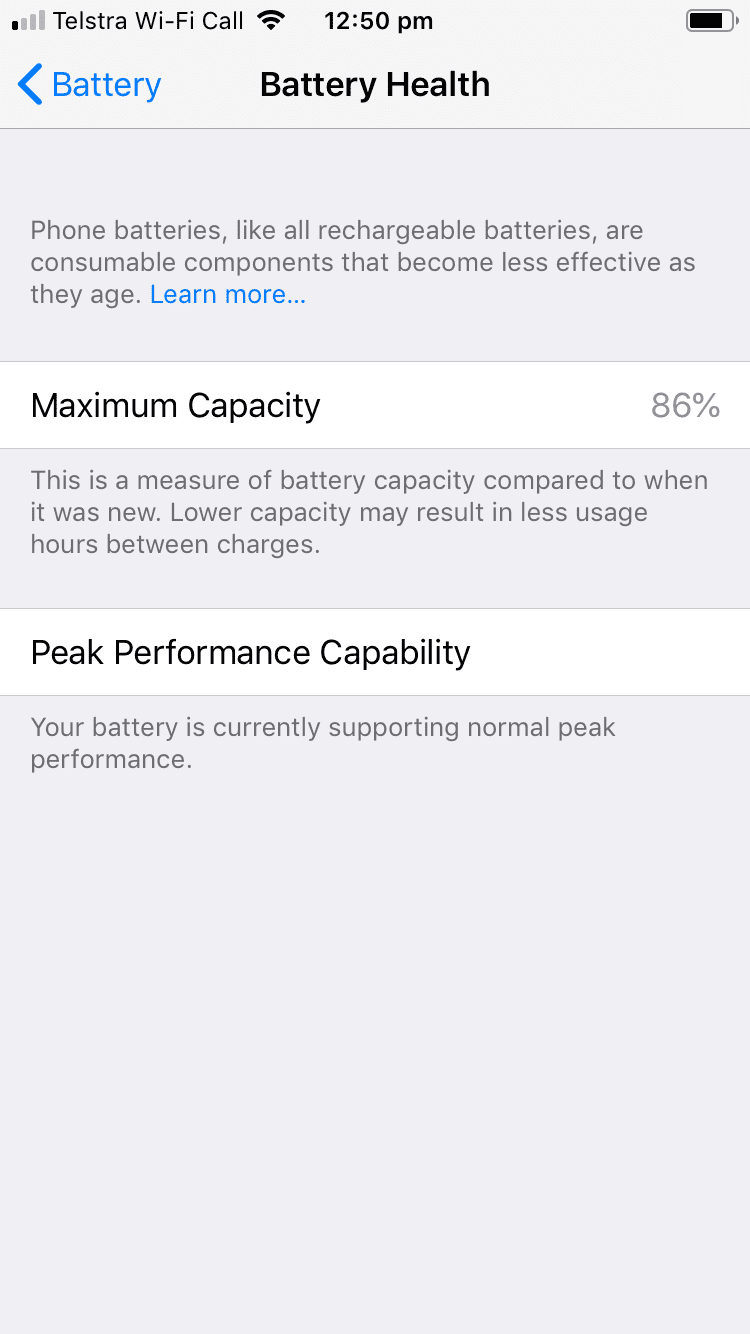
iPhone 6 Battery Health Screen

On my old iPhone 6, it says that the battery has a Maximum Capacity of 86% and under Peak Performance Capability that the battery is currently supporting normal peak performance, meaning that the phone is not throttling performance in order to prevent damage to the battery or unexpected shutdowns.

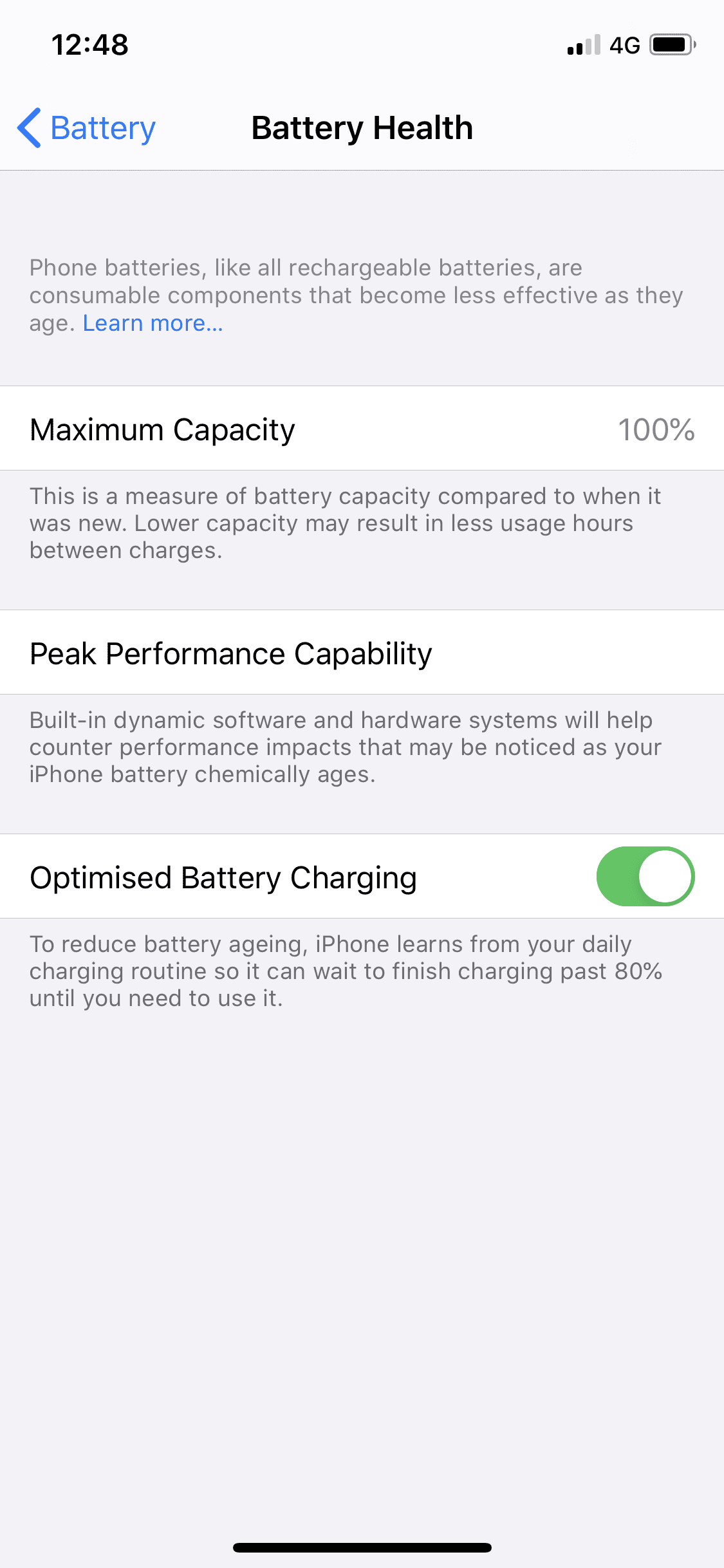
iPhone 11 Pro Battery Health

On my iPhone 11, it is still showing a Maximum Capacity of 100% and it says under Peak Performance Capability that built in dynamic software and hardware systems will help counter performance impacts that may be noticed as your iPhone battery chemically ages. This doesn’t really give you any information on whether the performance is being throttled or not, it just says that it may be – not particularly useful information.

The newer iPhone models do however give you an option for Optimised Battery Charging which essentially learns from your average daily usage and charging behaviour to prevent the phone from charging over 80%, which places stress on the battery and reduces battery life, during normal daily us in order to prolong the battery life. There are also a number of things you can do when charging your iPhone to protect the battery and ensure that you get longer battery life out of it.

Your iPhone battery should start at 100% capacity when it’s new and will slowly degrade, depending on how you use it, over the next few years. According to Apple, a normal battery is designed to retain around 80% of its capacity for 500 completed charge cycles when operating under normal conditions. If you’re running your iPhone through a near full cycle every day then you’re likely to get just short of two years’ worth of battery life out of it.

What If My iPhone Is Performance Throttled?

If your iPhone’s battery health has fallen below 80% then you’ll get a warning at the bottom of the screen saying that your iPhone’s battery has significantly degraded and it will provide you with a link to a page which tells you about how to get your phone serviced. It essentially means that you should consider replacing your iPhone’s battery if you intend to continue using your iPhone for the next few months/years in order to keep it performing optimally.

There will also be an option to disable the throttling although this has been put into place for a reason and is probably not a good idea to disable it. If you iPhone experiences a power related shutdown again, it will automatically enable the throttling again and you’ll have to go back into this settings page in order to disable it again.

If your iPhone is out of warranty and you’re interested in replacing you own iPhone battery for a fraction of the cost, have a look at this useful guide:

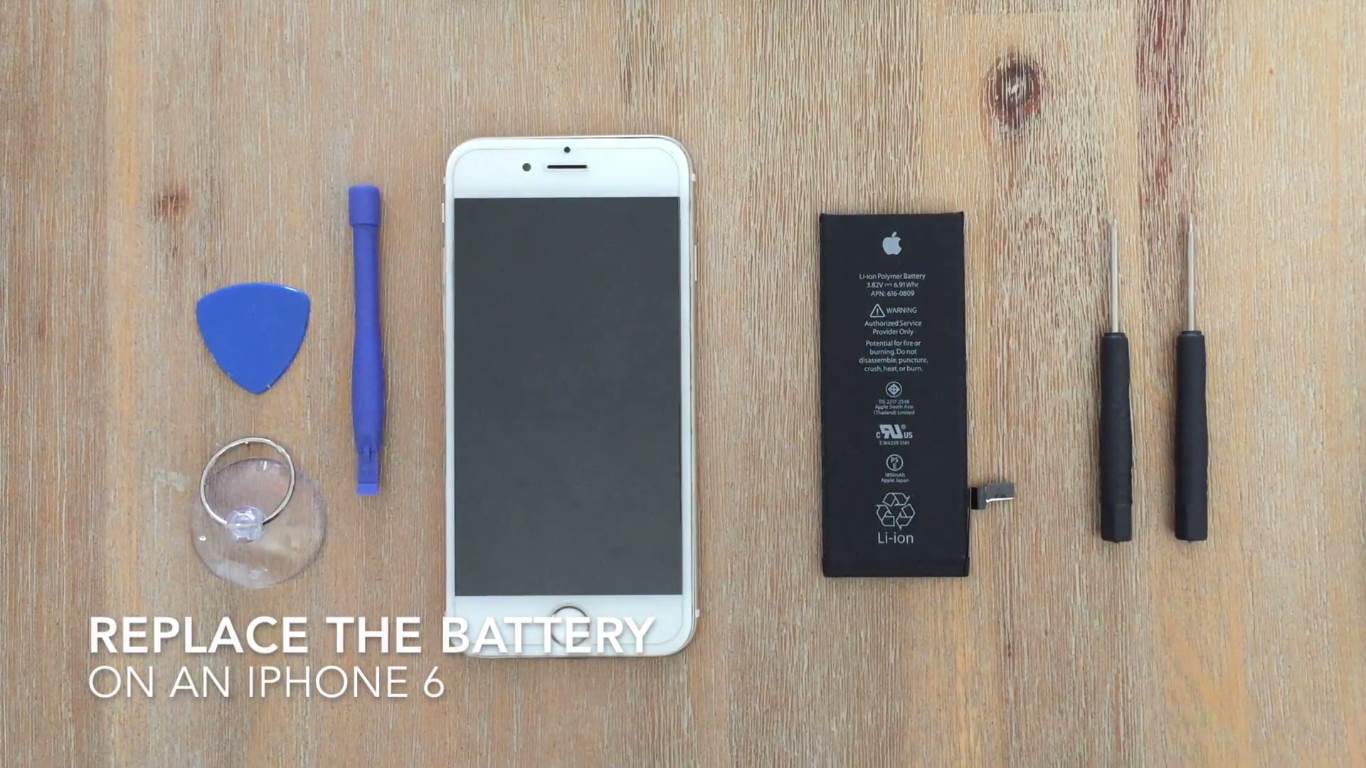
How to Replace The Battery On An iPhone 6 or 6s

Replacing The Battery In An iPhone 6

While this guide is for an iPhone 6, it is a similar process for other iPhone models as well.

Have you tried replacing you own iPhone battery? Do you have any tips for charging your iPhone in order to extend it’s battery life? Let us know in the comments section below. We’d love to hear from you.

Office Tech Trends That Are Shaping the Way We Work

A typical office used to be an entirely different place: strictly-dressed people would work under desk lamps in rows of desks with the sound of typing machines in the air. Nowadays the dress code at most offices is much leaner, meeting rooms are filled with bean bags and stress balls, while some employees work from home. Things have changed a lot indeed, and most of these changes are due to office tech advancements which allowed for more freedom in certain areas and have resulted in increased productivity in others and pushed businesses to develop in directions they haven’t perhaps even imagined.

With that in mind, here are a few ways that technology has shaped the modern office.

Moving to the cloud

Moving to the cloud

There are several reasons why you should move to the cloud if you haven’t already. For starters, you won’t need expensive hardware and additional employees to maintain your servers for the purpose of backing up data and daily business functions. This way you will save up a lot of money and make sure that your data are tended to by experienced professionals.

Also, companies that offer cloud storage services have taken the question of safety to the highest levels so your business and private customer data will be much more protected from human error and cyber-attacks. As for your employees, this change has helped them be more productive since the data can be accessed anytime and from anywhere, which means that they can prepare for business trips while travelling to the location and check a document in the middle of the night if they remember something important.

Putting employee comfort first

Putting employee comfort first

Employers have long ago realised that employee productivity greatly depends on them being well-rested and having optimal working conditions. If they don’t get enough light and if they sit in uncomfortable chairs, they will only experience back issues and headaches which will eventually cause them to take time off so it will affect their health, productivity, and perhaps even your budget if the projects aren’t finished on time.

Besides ergonomic chairs, keyboards, and wrist support additions which have been a must for some time now, human-centric industrial solutions for lighting have become one of the primary investments on the part of employers. With light being arranged properly around the floor, each employee gets enough light so their eyes don’t get tired as much, which affects their performance, and not only eye comfort and visibility. It is important to note that seating arrangements, office tech and office design are closely knitted with efficiency, so an open-floor office layout often demands noise-cancellation headsets and employees who are collaborating together to sit close, as well as to have a separate room for brainstorming sessions.

Embracing office tech, allowing for remote work

Embracing office tech, allowing for remote work

Technology has given entrepreneurs a chance to connect on many levels and to search for partners, suppliers, and employees all around the world. In fact, limiting yourself to the local talent pool can be detrimental to a business because you are depriving your business of people who can bring knowledge, experience, enthusiasm and many other vital elements to your team and in that way help your business grow and expand its customer base.

A quality internet connection and a laptop or a computer are all your remote employee needs to begin working with you, while all apps and software tools can be easily installed. Cloud storage and modern communication channels allow for real-time collaboration between team members and they also provide the employer with real-time monitoring options to make sure everything is going smooth. Even different time zones don’t have to be problematic if the workload is allocated with prior preparation.

Automating processes

Automating processes

Manual data entry, and especially management can lead to human error, which is most often the reason for data-breach problems. Mistakes don’t only revolve around data since employees are usually concentrating hard on a particular task so they omit to update a password or to double-check the source of the link they got in the email instead of clicking it right away. Different software solutions can prevent many of these mistakes by way of monitoring and sending different warnings and notifications so that the employees can focus on their work and leave the technical stuff to technology to take care of them.

Modern tools not only help employees focus but speed up many processes because the search for any necessary data is quicker, making the average employee more efficient. Needless to say, preventing errors and data leakage can save you a lot, so automating certain processes has influenced many areas of business.

Offices have changed a lot and even displaced themselves at homes and outdoors. Technology placed emphasis on efficiency and showed that strict office design is not a prerequisite for achieving business success. Creativity and productivity can originate from many places and by providing satisfactory work conditions to your employees, you are, in fact, giving them the tools to do better.

Taking care of your employees’ health with appropriate furniture, lighting, and seating arrangements can be an incredible motivator for them to achieve things even ahead of schedule and if you facilitate their work with proper software tools, your business will soon be on its way to growth. The sooner you start embracing technological solutions in the workplace, the quicker the positive results will come.

Do you manage your own workplace, team or office? What are some of the office tech advancements which you’ve made in your business? Let us know in the comments section below.

11 Baking Soda Hacks You Need To Try

Baking soda, or bicarbonate of soda is a wonderfully versatile household ingredient. Just a quick look on Pinterest will reveal hundreds, if not thousands, of uses for it, from baking to cleaning to some unlikely and surprising health benefits.

So here are a couple of the lesser known hacks which we’ve found to be particularly useful and different.

Clean your Fresh Produce

Clean your Produce With Baking Soda

Get rid of any dirt and pesticides on your fruit and vegetables by giving them a quick clean with this solution. Fill a bowl with two cups of water and a teaspoon of baking soda and give your produce a wipe with a small sponge and you’re ready to go.

Treat Bug Bites and Stings

You’ve got an itchy or red insect bite which won’t go away and you don’t have any cream around. Make a paste from baking soda a cold water and apply it to the bite or sting for a few minutes, it’ll instantly relieve the itch as well as reduce the swelling and redness.

Make Your Own Mouthwash

If you suffer from bad breath, this mouthwash receipt might be just what you need to get your mouth freshened up. Mouth wash reaches all of the places which a toothbrush just can’t get to and baking soda has a range of antibacterial and antimicrobial benefits. Simply rinse your mouth out with a half teaspoon of baking soda and a little warm water. You can also add a drop of peppermint essential oil to it for a fresh and minty aftertaste. It also helps to whiten your teeth!

White Clothing and Sheets

Use Baking Soda For White Clothing and Sheets

We’ve mentioned this one before, but baking soda is really good at whitening your underarm stains on your shirts and whitening your old linen or bed sheets. Have a look at these two guides to learn how to use it for best results.

Baking Soda Deodoriser

Baking soda is great for getting rid of unwanted smells, it works amazingly well to deodorise smelly shoes or trainers. Simply sprinkle a generous amount into your shoes and leave them until you’re ready to wear them again. Then either dust or vacuum it out and your shoes will be great and fresh again.
Clean your Bathroom

Baking soda is a very cost effective cleaning product, with both whitening and disinfecting abilities. Create a mixture of baking soda a warm water and use it to scrub away any grease and grime built up in your tile grout lines or around the edges of your bathtub, basin or toilet.

Disinfect your Toothbrush

Disinfect your Toothbrush

Cleaning your toothbrush is probably not very high up on your priority list but it is something which you should be periodically doing. Soak your toothbrush in a cup of hot water mixed with a tablespoon of baking soda for 30 minutes and it will be clean and disinfected.

Give Yourself a Spa Treatment

If you’re feeling stressed or overwhelmed, it may be the perfect time to give yourself a relaxing spa treatment at home. Sprinkle a quarter cup of baking soda into a hot bath and you’re ready to have a relaxing and nourishing spa soak.

Polish Your Silverware

Did you know that you can remove the tarnish from your silverware or jewellery without actually having to polish it? Here is a guide to cleaning your silverware with baking soda and another for cleaning your jewellery with baking soda. These tricks are so easy you’ll be wondering why you ever bought silver polish.

Clean Your Carpets and Rugs

Clean Your Carpets and Rugs

Freshen up your carpets or an old rug by sprinkling baking soda over it, allowing it to stand for a couple of hours to absorb the odours and any moisture and then vacuuming it up. If it’s a loose piece of carpet or rug, you can move it to a sunny spot on a hard surface and add a spray of hot water over it as well to further add to its stain and odour removing abilities.

Clean a Burnt Pot

You’ve scorched the bottom of your favourite pot or pan and now you’re faced with having to clean it. Sprinkle a generous amount of baking soda into the pot or pan and add a little hot water, now use a sponge to gently scour and lift the burn marks away.

Have you tried any of these hacks? Let us know your tips, tricks and hacks in the comments section below. We would love to hear from you.

Share These Hacks:

11 Unique Baking Soda Hacks You Need To Try

Use Baking Soda To Clean Pesticides From Your Fresh Produce

Use Baking Soda To Freshen And Deodorise Your Carpet

Baking Soda Can Be Used To Disinfect Your Toothbrushes


How To Replace A Shattered or Damaged iPhone X Screen, Step By Step

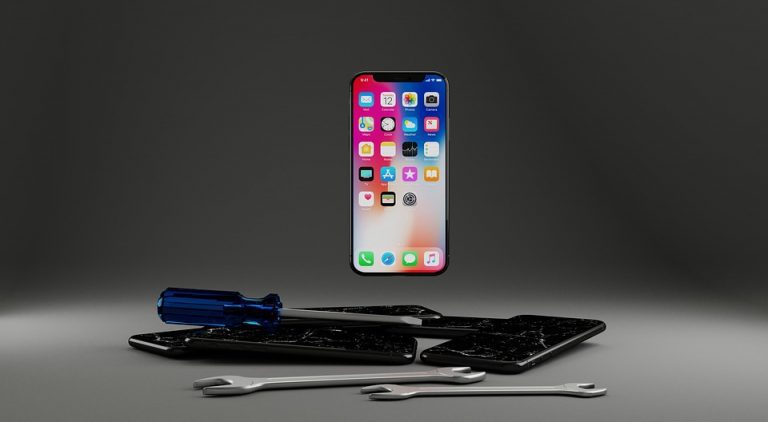
Almost everyone who owns a mobile phone has dropped it at some stage and no matter how well the cover protects it, occasionally the drop results in a cracked or shattered screen. Getting the screen replaced by the manufacturer is usually really expensive and in reality it is actually quite a simple fix, its even easier on the iPhone X than on previous iPhone models. You can buy an affordable replacement from Amazon or eBay for around $60 – $100 dollars (depending on the quality) and it takes around a half hour to an hour to do if it is your first time.

In this guide, we’ll show you step by step how to replace your screen on your iPhone X. Although this guide is done specifically on an iPhone X, the iPhone XR and iPhone XS as well as plus models are very similar inside as well.

Most of the replacement screens you’ll find on Amazon or eBay come with the tools required to do the replacement bundled together. These tools are not the best quality but they do get the job done, you’ll just need to be careful not to strip the heads of the screw drivers as they are made from low quality materials and this is really easy to do.

Have a look at these other guides if you have a different model iPhone:

What You Will Need To Replace Your iPhone X Screen

  • iPhone X Screen, Toolkit and Gasket Set – Buy Here
  • iPhone X Screen and Toolkit – Buy Here
  • iPhone X Replacement Gasket – Buy Here
  • iPhone Repair Tool Kit – Buy Here
    • Note – your replacement kit may come with a basic tool kit. This is usually good enough to get the job done but the screw driver heads often strip after a few screws.

How to Replace your Screen

The replacement of your iPhone X screen is done in three stages, you’ll first need to remove the old screen, then transfer the earpiece and sensor ribbon cable assembly over to your new screen and finally install the new screen onto your phone.

The most important thing to keep in mind when doing this replacement is to keep your screws well organised. The screws inside your iPhone are different types, sizes and lengths and it is very important that you put the correct screws in the correct place. It is easy to get confused and lose track of your screws. I like to draw a quick sketch of each bracket or component and lay the screws onto the sketch over the hole they came out of.

The next thing you may not be familiar with is the ribbon cable connectors. These are very fine connectors which simply “snap” into place, similar to Lego. To separate them, you can slide your pry tool underneath the connector and pop it off. To connect them again, make sure that they two are correctly lined up and simply pressed down on top of the connector and you’ll feel it snap into place.

Here is the complete video guide to replacing the screen, with steps outlined below:

Here is a summary of the steps involved in replacing your iPhone screen:

  1. Start by switching off your iPhone. On the iPhone X this is done by pressing volume up, volume down and then holding the lock screen button until the shutdown slider comes up
  2. Use your pentalobe driver to remove the two screens at the bottom of your iPhone around the charging port
  3. Next place your suction cup onto the bottom of the screen, you’re going to use it to pull the screen away from the body in order for you to fit your pry tool between them
    1. It helps if your phone is warm as this softens the tacky gasket between the two which is used to waterproof your iPhone. You can warm it up by placing it in front or on top of a heater, on your vehicles hot dashboard or heating it up with a hair dryer. Do not overheat it as this may damage the phone, you should still be able to comfortably handle it
    2. If your screen is shattered or cracked near the bottom area, put a few pieces of clear packaging tape over the damaged area to keep the glass in place and allow the suction cup to stick to the display
  4. Pull up on the suction cup to lift the screen and then insert your pry tool into the gap between the two
  5. First pry the bottom side up and then slide your pry tool up each side to unclip it and break the adhesive
    1. Do not push the pry tool in too deep or separate the screen too far from the body as there are delicate ribbon cables between them which you may damage
  6. The top side slides in underneath the edge of the body, gently pry it downwards and it should then come free. Again, don’t pull it down too far or you may damage the Face ID ribbon cable
  7. Once your display is free, open it up from the left side, the opposite way to a book. There are three ribbon cables along the right side which need to be disconnected
  8. Now use your tripoint screwdriver to remove the five screws securing the connector cover plate. Keep track of which screw goes into which hole as they are different lengths
    1. I usually draw a quick sketch of the bracket and place the screws onto the sketch in their positions
  9. Remove the cover plate
  10. Now use your spudger to gently pry up on the underside of the ribbon cable connectors to disconnect them. They simply snap into place and so are easy to connect and disconnect
    1. Try not to touch any of the surrounding components or damage the black spongy strips around the connectors
  11. Start with the battery connector to ensure that power is disconnected from the phone
  12. Next, disconnect the two display ribbon cable connectors
  13. Lastly, disconnect the FaceID and forward facing camera connector
  14. There is a small adhesive strip near the top keeping it in place, gently pry this away from the below ribbon cable, being gentle and careful not to tear it
  15. The display is now free from the body of your iPhone
  16. You now need to move the FaceID, earpiece and camera assembly over to your new display so that you keep your FaceID functionality
  17. There are three screws holding it in place
  18. Start with the centre screw which also has a small bracket attached to it
  19. Use your tripoint screwdriver to remove the screw and put it aside with its bracket. Remember to make a note of which screw goes where on this assembly as well
  20. Now remove the two remaining tripoint screws
  21. Use your spudger to pry the earpiece assembly down and away from the speaker and sensors
  22. You’ll now need to pry the remaining components away from the screen.
  23. The earpiece should come away quite easily
  24. The remaining sensor ribbon cable assembly is quite firmly glued into place buy works free with a spudger. Be careful not to damage the ribbon cable
  25. You can now install the assembly onto your new display
  26. Peel off any protective stickers on the back side of the screen before assembly, these are usually blue or pink if installed
  27. Install the components in reverse, starting with the earpiece speaker and then proximity sensor
  28. Make sure each component is properly seated before moving onto the next
  29. Finally, fold the remainder of the ribbon cable assembly up over the secured components
  30. Do a final check to see that all of the components are correctly located and are not being crushed or bent
  31. You can now use your tripoint screwdriver to replace the outer two screws
  32. Then replace the middle screw and bracket. It helps to orient the bracket and screw onto your screwdriver beforehand to make sure that it is the correct way around
  33. Once secure, make sure that the flat edge is parallel to the top of the display
  34. You can now reconnect your display
  35. If you are going to replace your iPhone’s waterproof gasket, do it now. Remove any pieces of the old gasket from the edges of the iPhone body. Then stick the new gasket down along these edges, be careful not to touch the gasket until you’re ready to install the new display
  36. Start by pressing the top FaceID ribbon cable connector into place
  37. Make sure that the connector halves a properly aligned before pressing them into place to avoid damaging the terminals. They should easily snap into place and don’t require much force if correctly aligned
  38. Now connect the two display ribbon cable connectors
  39. Finally, replace the battery ribbon cable connector
  40. Once this is done, it’s a good time to check that your new display is correctly connected and functions.
  41. Try powering your phone back on and checking the functionality of the screen, touch and front facing camera
    1. If this all works then you can proceed with replacing the cover plate. If something does not work, try disconnecting the ribbon cable connectors and re-connecting them. Also check all ribbon cables for any tears or bends
    2. If the display or touch functionality still doesn’t work, you may have received a faulty display. Try contact the supplier for assistance
  42. Replace the cover plate
  43. Replace the five tripoint screws
  44. Fold the display down and slide the top into place. If you have a new gasket which you’re installing, make sure the edges are aligned before touching the display to the gasket as it is difficult to re-position or move
  45. Press the top edge into place
  46. Now press down along the edges to snap them into place
  47. Press the bottom edge down and into place
  48. Replace the two bottom pentalobe screws

Your iPhone X’s screen has now been replaced. Remove the protective film and install a tempered glass screen protector to protect it from future drops or scratches. Good luck with the repair and let us know how it goes for you in the comments section below.

If you enjoyed this guide, you may be interested in these 5 Secret iPhone Codes You Didn’t Know About or find out how to Charge your iPhone Battery the Right Way. Also be sure to have a look at our other iPhone repair guides on replacing your iPhones charging port, home button, volume button assembly and camera assembly, or simply type your iPhone model into the search box on the top right of the page.

Should You Consider Wooden Window And Door Frames?

There are a number of different opinions on which material is best suited for window frames and people are often quick to discard wooden frames as an option due to their perceived high price and high maintenance. We’ve done some investigating, and it turns out that wooden window and door frames are actually a great choice, often marred by myths and misconceptions.

Here are some of the things we’ve found…

Wooden Window and Door Frames Are Not High Maintenance

This is perhaps the biggest misconception when it comes to wood / timber window frames and it seems to be a problem of the past. In the past, there were a limited number of wood treatment options available and they were not the greatest quality products. As a result, people were left having to sand down their window and door frames annually in order to re-apply varnish or other wood treatments, which can be costly, time consuming and messy.

Fortunately, we’ve come a long way since then. Modern wood treatments are often water based and are a lot easier to re-apply and dry quickly. An annual wash down with soapy water and re-application of sealant, simply by wiping it on with a cloth or sponge, is all that is needed.

Although we prefer the natural wood textures and finishes, you can also easily paint wooden window and door frames to suite your home’s decor theme.

Whats even better is that modern water based sealants often pack a number of other useful benefits as well, such as improved UV resistance, fungus resistance and durability as well as being non-flammable, water resistant and environmentally friendly.

wooden door frames

They Are Very Energy Efficient

Wooden window frames are available in both single and double glazing, ensuring that you can still have beautiful natural wooden frames and still keep your home warm in winter and cool in summer.

More than just with the glass, wood is an excellent insulator and the actual frames are far better at insulating your home around the edges than traditional steel or aluminium frames.

Lastly, wood has the lowest environmental impact as it is carbon neutral, completely recyclable and fully sustainable if sourced from sustainable forests or plantations.

Wooden Window And Door Frames Are Not Overpriced

If you’re buying good quality timber window and door frames, they may seem expensive upfront. But since they can last well over 50 years if properly treated and regularly maintained, they can actually turn out to be a cheaper alternative in the long run. Wooden frames also don’t typically have the complex rubber sealing components which come with aluminium or steel frames and need periodic replacement, which can be an expensive exercise.

If you also consider than wood is an excellent insulator, helping you save money on electricity, and has great aesthetic appeal, which means you’ll be adding substantially to your property value, offering you great return on your investment.

wooden window or door frames

Have you got wooden window or door frames installed on your home? What has your experience been and do you have any tips or tricks you’d like to share? Let us know in the comments section below, we’d love to hear from you.

Share These Tips

Are Wooden Window Frames Still A Good Choice

Renew Your Old Patio Furniture Set And Cushions – Make Them Look Brand New Again

Your patio furniture set has to stand up to the worst of the weather conditions your home sees, often in sunny and rain exposed areas of your home. This can quickly lead to the colours being dulled and your furniture looking old and dirty. In this guide, we’re going to be looking at how you can update your old faded furniture and make it look almost new again without spending a fortune, all with the correct paint or varnish.

When it comes to outdoor furniture, prevention is always better than cure and usually a lot easier to keep your furniture protected from the environment to ensure that it’s kept looking new, rather than trying to fix up your old patio furniture at a later stage. This is easily done with some inexpensive furniture covers or by packing your furniture away into a storage room or locker.

In renewing your patio furniture set, paint is your most powerful tool. Buying and applying the correct type of paint to your furniture and cushions, yes your cushions as well, can instantly make your set look brand new again.

Once you’re done with renewing your furniture, have a look at these 5 Decorating Ideas for your Patio.

What You Need To Renew Your Furniture Set And Cushions

  • Varnish or Paint To Match The Furniture Type and Colour
  • Sandpaper – Buy Here
  • Paint To Match The Cushion Colour(s)
  • Paint Brush Set – Buy Here
  • Or Foam Rollers – Buy Here
  • Water

How To Renew Your Old Patio Furniture

We’re going to start with the actual furniture, which may be wood, metal or plastic. Depending on how old and how much sun damage your furniture has experienced, this step may be as simple as just washing it down and re-applying a coat of paint or varnish or it may involve a bit more work and require sanding any flaking or rusty areas. Whichever yours is, make sure that you start out by giving your old patio furniture set a good wash, you don’t wanting to be painting over dirt or dust. A home high pressure washer system works well for deep cleaning and removing layers of built up dirt in the corners.

Once you’ve given it a good wash and allowed it to dry completely, you need to asses the damage. If your set is plastic, a good quality metal or hasn’t experienced too much rain damage, it may be good to be painted right away. If there are any signs of rust, flaking paint or bubbling varnish then you’ll need to give those areas a good sand to remove the damage before you start painting. This may sound like a lot of work now, but it will be well worth it to see the final product. A simple handheld electric sander can also make this job a lot easier and quicker to manage.

You’ll need to select the correct type of paint or varnish for your furniture’s material type, be it wood, metal or plastic. Go down to your local paint store and ask them what they’d recommend for outdoor use on your furniture set, they’ll likely be able to get you the best suited paint for your job.

For some tips in selecting a paint type:

  • More expensive is not always automatically better, there are loads of more affordable paints which are just as good as the premium products.
  • If your base coat is still good, primer is not necessary. Also look out for self priming plastic paints, these actually work quite well for DIY jobs.
  • Water based is much easier to work with, you don’t have to worry about solvents for cleaning and you’ll save yourself a lot of brushes and rollers, and its better for the environment.
  • Get a little bit extra, you may need more than you think and you can use the extra paint to touch up your furniture in a year or two’s time.

Paint Your Old Patio Furniture

Once you’re done with the furniture, it’s time to move onto the cushions, which usually fade the quickest. Some people have tried dying them, with mixed results. We have a better recommendation, give them a coat of paint as well! Now, there are obviously some limitations in what you can do with paint. You won’t be able to repaint intricate patterns or pictures, but it does work well for plain colours or simple two-tones or stripes.

Which paint works? We’ve tried out a few different techniques and have found that most water based acrylic paints work well, you just need to get the consistency right. When painting cushions, you don’t want to apply a thick layer of paint. You want the paint to be as thin as possible while still achieving the colour you’re looking for. We found that with most paints, its best to water it down in a ratio of 1 cup of water to 2 cups of paint, so however much paint you use, add half as much water to it before you start. You’ll obviously need to re-mix the paint in a larger container in order to water it down. You want the paint to be thin enough to not leave brush streaks and you should still be able to clearly see the weave pattern of the fabric. If the paint is too thick then you’re going to land up with firm and rigid cushions which make crack when you sit on them.

Use a brush for very soft cushions or a foam roller for larger and firmer square and rectangular cushions. Apply a thin coat of paint and allow it to dry before deciding on whether to paint a second coat. Remember that with painting your cushions, less is always better!

To waterproof and seal your cushions after your paint job, you can apply a coat of clear wax, the types sold for use over chalk paints. This will bring out the colour and make them a bit more water resistant. Just make sure that the paint is properly dry before applying the wax, perhaps leave them to dry overnight. Waxing your cushions afterwards is completely optional, it is perfectly fine to leave your cushions just as they’ve been painted.

Have you tried repainting your old patio furniture set and cushions? Let us know how it went for your in the comments section below, we would love to hear your tips, tricks and advice.

Share This Guide

Renew Your Old Patio Furniture Set And Cushions, Make Them Look New Again

5 Ways to Turn Your Home Into a Cozy Oasis

When you’re huddled up in blankets during wintertime, you need all the comfort you can get. Cold weather necessitates an extra level of coziness for your day-to-day living. Achieving this isn’t all that difficult, all you need is a bit of cozy décor to add to the comfy atmosphere of your home. If you’re strapped for ideas, here are some of the best ways to make your home look and feel a lot cozier.

1. Add a couple of pillows to the mix

Add a couple of pillows to the mix

As we all know, pillows are the epitome of comfort. They’re nice to look at and you get to use them to stay comfortable while you sleep. Decorative pillows are great for lounging around the couch, but you can use them for so much more.

With a couple of well-placed pillows, you can make your entire living room into a comfortable oasis. Throw them on the floor and call it extra seating. Even if you have a carpet, adding a couple more pillows on the ground will make your room feel a lot cozier. Guests can have a seat wherever they please and enjoy the atmosphere of your room. Moroccan poufs make for affordable and gorgeous pillow seats for any kind of floor.

2. Throw on some faux fur

If there’s anything that can give your home a luxurious feel, it’s fur. It’s a material that gives you equal parts luxury and comfort. There’s nothing quite like the feeling of fur on your skin. Drape it over the arm of a sofa and you’ll never want to leave your cozy spot ever again. The plush texture of fur makes it great for covering furniture, as it adds a pillow-like texture over the whole piece.

There isn’t much reason to get real fur, though. Faux fur gets the job done just fine. You can get a lot more bang for your buck with a good faux fur purchase. With more material at your disposal, you can get even more creative with your comfortable décor. Provide some physical and aesthetic warmth with your fur choices and you’ll enjoy comfort like never before.

3. Let some natural light in

Let some natural light in

When it comes to lighting options, natural light should always be a priority. During the day, it’s best to take advantage of the light that mother nature gives us to illuminate our homes. Natural light provides you with the warmth and comfort that you need throughout the day. Now, night time is a different story.

You’re probably going to have to turn on the lights come the night, but they’re not your only option for increasing visibility. For that extra bit of comfort, you can always turn to candles. They’re a wonderful source of natural light that also brings a bit of coziness into your space. There’s a reason why all the coziest home designs feature candles. They look nice, they smell nice, and they’re as cozy as can be.

4. Keep it warm and cozy

The best way to add some more comfort to your home would be to better regulate the temperature. Even when your home is kept at an even temperature at the mid-twenties, you can still have some issues with the insulation. Parts of your home might be colder than others. You can’t have a drink and read a good book by the window if it’s always several degrees colder when you get near it.

This is why it’s so important to keep your home’s weak points well-insulated. Start with the doors and windows. If you own an older home, you should consider installing triple glazed windows in place of regular ones. The air between the layers of glass helps keep temperature changes to a minimum. Doors should be reinforced with additional insulation to help prevent leaks at the edges. This way, your whole home will be equally cozy.

5. Use books to add flavour

Use books to add flavour

Books are a wonderful portal into the world of art and imagination. Getting cozy and reading a good book will always put you in a good mood. When it’s raining outside and there’s not much else to do, you can always get lost in your thoughts with some literature. However, books are also an aesthetic element that can add some flair to your home.

Books are a great décor addition for several reasons. For one, they’re pretty cheap for their aesthetic value. Plus, you probably already have a bunch of books that you enjoy, all you need is to place them in the right spots. Adding a wooden shelf to your room and filling it with books would give your home the collected feel of a library. If that weren’t charming enough, the storage option will let you move your books and declutter parts of your home.

Conclusion

Everyone wants to live in a cozy and comfortable home. Counteract the cold outside temperatures by adding some warm aesthetics to the inside of your home. A big part of your home’s comfort factor is the décor. If it looks warm and comfy, you can be sure that it will feel that way as well. Throw in some practical solutions and you’ll be well-prepared for the colder seasons.

Driving A DC Motor With Arduino Using An L293D Motor Driver

In this tutorial, we’re going to be looking at how to use an L293D motor driver to drive a DC Motor for your Arduino projects. This has some great applications for projects such as balancing robots, smart and autonomous vehicles and other moving systems.

The L293D chip is a very versatile and affordable chip, you can get a pack of them for less than a dollar each and they’re able to control up to four solenoids, two DC motors or a uni-polar stepper motor with up to 600mA per channel.

This project assumes that you know the basics of Arduino programming, otherwise follow our guide on getting started with Arduino.

What You’ll Need For This Project

Information on the L293D Motor Driver

Before we start with the circuit and programming your Arduino, let’s have a look at the L293D motor driver chip and some of its functionality and limitations.

L293D Motor Driver Chip

The pin descriptions are as follows:

  • 2, 7, 10, 15 (In 1, In 2, In 3, In 4)
    • Each of the four channel’s digital signal input pin
  • 3, 6, 11, 14 (Out 1, Out 2, Out 3, Out 4)
    • Each of the four channel’s output pin
  • 1 (Enable 1)
    • Channel 1 & 2 enable pin
  • 9 (Enable 2)
    • Channel 3 & 4 enable pin
  • 4, 5, 12, 13 (0V)
    • Power GND
  • 16 (+V)
    • Power supply for the driver, positive input 4.5V to 36V
  • 8 (+Vmotor)
    • Power supply for load (motor), positive input 4.5V to 36V

In order to use the L293D motor driver to drive a DC motor, there are two available connection options. The first is a simple connection between the output of the driver and ground which enables the speed of the motor to be controlled but rotation only in a single direction. The second is to connect the motor between two driver outputs, which enables both the motor’s speed and direction to be controlled.

Connecting The Motor Driver To Your Arduino

We’re going to be setting up two circuits to control the motor. One to take an input from a potentiometer so that you can adjust the potentiometer to control the motor speed and direction, and a second to interface the motor and motor driver with the Arduino.

This is how the two circuits should be set up on a breadboard:

L293D Motor Driver DC Motor Circuit

L293D Motor Driver On Breadboard

The potentiometer circuit is a straight forward analogue input circuit with the potentiometer wiper connected to the Arduino analogue input 0. This is going to be used to control the motor’s direction and speed. The potentiometer’s midpoint corresponds with zero speed and turning it clockwise moves the motor forward with increasing speed and anti-clockwise moves it in reverse with increasing speed. You could also wire up a push button to control the motor direction if you’d like and this will give you the full potentiometer range to control the motor’s speed.

Unless your motor is really small, you’ll need to power it separately, not through your Arduino’s on-board supply. This is easily done using an external battery pack or power supply. This can be the same supply as you are using for your Arduino if it is able to provide adequate voltage and has enough capacity. Make sure that your nattery is the correct voltage for your motor, use a small battery pack (one with 2 x 1.5V AA batteries) for lower voltage motors and a larger 9V battery for larger motors, check your motor data sheet if you are unsure.

The remaining connections to your L293D motor driver are quite simple.

The motor is connected to pins 3 & 6 (Out 1 & Out 2) on the driver, they can be connected either way around and this will only affect the motor forward and reverse directions in relation to the potentiometer movement.

The motor driver’s control pins 7, 2 & 1 (In 2, In 1 & Enable 1) are connected to Arduino pins 9, 10 and 11 respectively.

The Code to Drive A DC Motor Using an L293D Motor Driver

Now that you’ve made the connections between your components and your driver and Arduino, lets have a look at how to program your Arduino to control the motor.

Here is the code:

//The DIY Life
//4 November 2019
//Michael Klements

int in2Pin = 9;       // Define pins used for L293D
int in1Pin = 10;
int enable1Pin = 11;

int dir = 0;  // Define variables for motor direction and speed
int spd = 0;

void setup()
{
  pinMode(in2Pin, OUTPUT);	//Define pin modes
  pinMode(in1Pin, OUTPUT);
  pinMode(enable1Pin, OUTPUT);
}

void loop() {
  int potInput = analogRead(A0);  // Read potentiometer value
  spd = map(abs(potInput - 512), 0, 512, 0, 255); // Calculate motor speed, pot travel from midpoint
  if (potInput > 512) // Compare to potentiometer midpoint to get motor direction
    dir = 0;
  else
    dir = 1;
  driveMotor(); //Call function to drive motor at calculated speed and direction
}

void driveMotor() 
{
  if (dir)
  {
    digitalWrite(in1Pin, HIGH);
    digitalWrite(in2Pin, LOW);
  }
  else
  {
    digitalWrite(in1Pin, LOW);
    digitalWrite(in2Pin, HIGH);
  }
  analogWrite(enable1Pin, spd);
}

Download the code here: L293D DC Motor Driver Code

We start by defining the three output pins which are required to drive the L293D motor driver. We then create two variables which are the parameters required to define the motors movement, its direction and its speed.

The setup loop simply defines the identified pins on your Arduino as outputs.

In the loop function we start by reading in the potentiometer set point using the Arduino’s analogue input A0.

Since we are using the potentiometer’s midpoint as zero speed and movement away from the midpoint in either direction as the speed, we need to take the absolute value of the speed after adjusting the midpoint from 512 to 0, since the analogue input will read a value between 0 and 1023. In addition to this, we need to map the speed to a range between 0 and 255, as this is the range of the Arduino’s PWM outputs. We now have the required motor speed stored in a variable spd which is between the value of 0 and 255.

Next we need to determine the direction. We know that 512 is the midpoint, so any value higher than this is the forward direction 0 and any value lower than this is the reverse direction 1.

We now call up the function which we’ve created to drive the motor. This function sets the two input pins HIGH or LOW as required for either the forward or reverse direction and then sets the speed using a PWM output according to our calculated speed value.

Upload your code and your Arduino motor driver is ready to run. You should now be able to drive your motor in either the forward or reverse directions by turning your potentiometer clockwise or anti-clockwise from its mid-point.

Have you tried using an L293D motor driver to drive a DC motor? Let us know in the comments section below, we would love to hear which projects you’ve used this driver in.

Thrift as a Family Trait and How to Practice It

Any fully independent adult, especially one with a spouse and children, is well aware of all the expenses that await each month. Even when both spouses are employed, it does get difficult from time to time to tackle all the financial challenges. Still, comfort and rescue can be found in the fact that there are multiple ways to boost your budget and save money through seemingly minor, everyday decisions and behaviours. Let’s have a look at some ways to make thrift into a family habit.

Getting rid of harmful and costly habits

Habits like regular smoking and alcohol consumption permeate not just the physical, that is, health aspect of one’s life, but they also present a noticeable blow to a family budget. Though it seems like it’s not more than just a few dollars here and there, it stops looking that way once you put on paper just how much you spend on such harmful treats. Over a longer period of time, these costs add up and reach a small fortune that could have instead been put toward wiser or more noble family causes, like vacations or college funds.

Economizing with water and electricity

Economizing with water and electricity

It is an immensely negative habit that so many of us have, yet it never stops having to be said—people are highly careless with their use of water and electricity. Teach both yourselves and your children the importance of water conservation. Turn off your faucets when you are not using water, fix any leaky faucets or sinks you may have, double dip the dishes when washing them, make your showers and baths shorter.

There are also possibilities for reducing your electrical bill: switch off all the lights and electronic devices when you leave the house, rely more on natural instead of artificial light, keep your refrigerator full and turn it up slightly, instead of tumble drying try air drying your clothes, during the heating season turn the thermostat down just a notch, use pot lids when cooking or boiling water, etc.

Smart home improvement

It has been proven time after time that wise property investment in the end reduces family costs on monthly and annual levels. It should be emphasized that this does not have to imply purchasing new real estate—specific home improvements can be significantly budget-friendly as well. The important part is that the investment you decide on pays off not just for a brief period, but for years to come.

For example, you can reduce your electricity bills by changing all the light bulbs in your home from incandescent to LED ones. Also, high-quality doors and windows not only make your house or apartment safer, but they are generally more energy efficient and provide better thermal insulation. This will inevitably result in much lower electricity and heating bills.

Bicycle as a means of transportation

Bicycle as a means of transportation

Some of the most obvious advantages of switching to bicycles instead of driving is that it is the more environmentally friendly decision and it helps keep the body healthy. But, cycling is also good for the wallet. Since you would not be using your car as often, you would be able to save a big sum of money by spending much less on petrol or gas.

Keeping an expense journal or thrift journal

Keeping an expense or thrift journal is especially beneficial for families who are just starting to develop a money-saving regimen and need to pinpoint their largest financial sinkholes. By keeping track of every occuring purchase and expense, you can analyze what your family spends most money on, detect (and then avoid) any unnecessary or excessive expenses, and have a much clearer picture of the possible ways your budget can be brought back to health.

Coupons and shopping bargains

Those who have already tried collecting coupons are aware of just how much money can be saved and put aside through coupons. Depending on the number of family members, grocery shopping can be quite expensive, but if you regularly collect and use coupons available to you, that cost can be visibly reduced.

Second hand shops are nothing to be sneezed at, either, so give them a chance. Once you get into the spirit of thriftiness, you will see that the clothes or other items you can purchase for your family here are just as good (or even better) than new ones you can get at standard stores. Far from saying that bargains cannot be found at regular stores as well. Try to avoid shopping at full prices but instead look for places where they have high-quality stock on sale.

Creating instead of buying

Creating instead of buying

Just because your financial situation has hit a rough patch, it does not mean that you and your family have to give up certain pleasures and joys. Like gift giving, for example. Situations such as this are a perfect excuse to bring your creativity to the surface.

Instead of buying a present, invest effort into coming up with your own, original, personalized present for a loved one by using what you already have in your home. If it’s an arts-and-crafts project, you can recycle things that you no longer use and transform them into a masterpiece. If you have a knack for composing or drawing, write a song or draw a portrait. There are tons of ways to employ your innovativeness, talents, and creative spark in living a frugal life.

To conclude…

Frugal living is not just a way to overcome tough financial phases, but it’s also a manner of learning how to use one’s resources wisely. The true efficiency and usefulness of thrift are most visible when responsible spending is incorporated into one’s lifestyle as a permanent trait rather than an obligation.

Do you have any thrift tips or tricks which you use to live a more frugal lifestyle? Let us know in the comments section below. We’d love to hear from you!

Great Last Minute DIY Halloween Decorations

Halloween is only three days away, so we’ve put together a list of some of our favourite last minute DIY decorations to get your home prepared in time for your trick or treaters. All of these ideas are quick and easy to put together so you don’t have to spend too much time worrying about getting prepared.

Bat Wall

All you need is a pack of black card and some blu-tack and you’re ready for a great halloween feature wall for your living room or entrance hall.

Bat Wall
Source: vilabacana.com

Homemade Witches Broomsticks

If you’ve got a few dry sticks and some long grass or thin twigs around your area, you can try making these cute witches broomsticks.

Halloween Witches Broomsticks
Source: apieceofrainbow.com

Bleeding DIY Halloween Candles

Light up the room with your own homemade bleeding halloween candles.

Bleeding DIY Halloween Candles
Source: popsugar.com

Jack Skellington Door

Make a statement on your front door, especially if it is white, with this Jack Skellington door. There’s even a free printable to guide you through it.

Jack Skellington Door
Source: twindragonflydesigns.com

Floating Pumpkin Lanterns

Paper lanterns made the perfect base for floating pumpkins. These are also great for hanging in trees as outdoor lighting.

Floating Pumpkin Lanterns
Source: findinghomefarms.com

Mason Jar Jack-O-Lanterns

If you’ve got some mason jars lying around, why not turn them into decorative jack-o-lantern lighting for your mantle or window sill?

Mason Jar Jack O Lanterns
Source: about-interior-design.net

Candy Glove Treats

Pass out your treats in a creative way with these DIY halloween candy glove treats.

Halloween Candy Glove Treats
Source: craftymorning.com

Corner Ceiling Spiders

These creepy additions to the corners of your home are a great hit with the kids, and they’ll have fun helping you make them.

Corner Ceiling Spiders
Source: southernrevivals.com

Magnetic Spiders

Perfect for a metal shed or garage door, these magnetic spiders are quick to make and super cheap to buy the materials for.

Magnetic spiders
Source: deliacreates.com

Grab Some Halloween Stickers

Stickers can be a really effective way to add some character to your home last minute, and they can usually be found at your local dollar store.

Halloween Stickers
Source: secondstreet.ru

Easy Yarn Webs

If you’ve got a bit of patience to learn, these great yarn webs really fill up a wall well and they cost next to nothing to make. Complete them with a large spider from your local toy or dollar store.

Easy Yarn Webs
Source: truebluemeandyou.tumblr.com

If you’ve got a bit more time on your hands, you might want to try your hand at carving a pumpkin. Get it right the first time with this easy guide – How To Carve A Pumpkin And Get It Right The First Time.

pumpkin-at-night

Do you have any last minute DIY halloween decorations to share? Let us know in the comments section below, we’d love to hear from you!