Home Blog Page 33

Don’t Replace Your Broken iPhone – Repair It Yourself

Did you know that there are a number of common problems with iPhones which are relatively easy to repair yourself for much less than the price of a professional iPhone repair? Although your iPhone looks like it’s a well sealed unit, it’s actually quite easy to take apart and there are a number of suppliers of cheap generic parts to get your iPhone back up and running as if it were new.

Even if you’ve replaced your old damaged iPhone, its probably worth fixing it and selling it rather than just leaving it lying around until you throw it out one day.

So here are some of the most common iPhone problems and step by step guides to repair them.

The Most Common iPhone Problems And How To Fix Them

Cracked or Shattered Screens

By far the most common problem with iPhones, and most other smart phones, is a cracked, shattered or otherwise damaged screen, usually caused by a drop. Since the release of the iPhone 5, Apple has made it considerably easier for the screens on their phones to be replaced. The screen (with a few small camera, home button and speaker components) is a completely stand alone assembly and it simply plugs into the main body of the phone with a few ribbon connectors.

Get yourself a good quality replacement screen, which usually comes with the tools required to complete the repair and you’re ready to tackle repairing your iPhone.

Here are our guides to replacing your iPhone screen on a range of iPhone models:

Depleted Batteries

For most smartphone users, charging your battery is a daily activity. Because of this, you can expect your iPhone’s battery to lose around 20% of its capacity in the first two years (the general life of a mobile phone contract). A battery which no longer holds its charge is one of the leading reasons people upgrade their phone, not realising that it is in fact a very easy repair to carry out.

Here’s our guide to replacing your iPhone battery. Although this guide is done on an iPhone 6, the battery replacement for iPhone models 5, 5S, 6, 6 Plus, 6S, 6S Plus, 7, 7 Plus, 8 and 8 Plus are all very similar.

Lightning Charger Port, Button & Switch Problems

The last set of common problems is generally due to mechanical wear and tear on the lightning port due to daily (or more frequent) charging or the buttons around your iPhone.

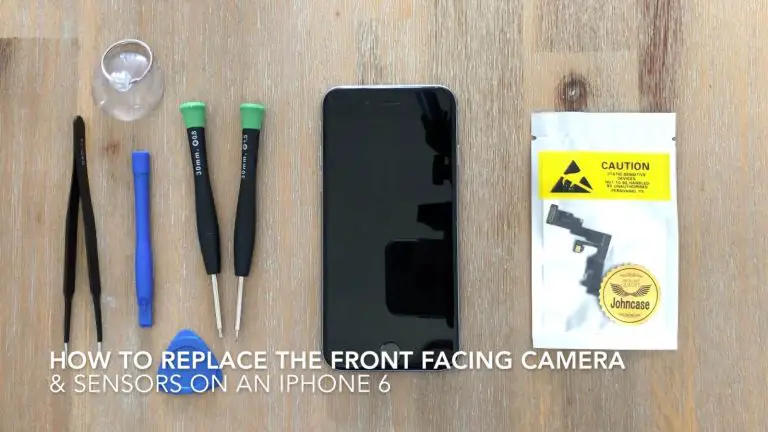
The lightning port replacement is a little more tricky than the other repairs listed here but it also one of the cheapest to carry out. If you’re experiencing problems with the charger port or your audio port, this fix will solve it. Here’s a step by step guide to replacing the lightning port assembly on your iPhone.

The volume and mute button assembly replacement fixes problems with your volume buttons not operating correctly or with your mute switch not functioning. Here’s a step by step guide to replacing the volume and mute button assembly on your iPhone.

Finally, the home button replacement. If you’ve got a faulty home button, there’s some good news and some bad news. The good news is that the button functionality can be easily fixed, usually for a couple of dollars and it shouldn’t take you more than 15 minutes to complete. The bad news is that Apple’s touch ID sensor is paired to the logic board of the phone and for security reasons it cannot be reset. So in doing this repair, you’ll lose your touch ID functionality. The home button replacement can be done by following the steps in moving the home button across to your new screen in the screen replacement guides above.

That’s it, with the guides above you should be able to fix the majority of these common iPhone problems and they’re all relatively easy to do. If you’re looking to save money instead of buying a new phone or make some extra money off of selling your old phone then it’s definitely worth trying to repair your own iPhone.

Have you tried repairing any of the above problems on your iPhone? Let us know in the comments section below.

Bosch PLR 50 C Laser Distance Measurement Tool Review

The Bosch PLR 50 C is one of their higher end laser distance measurement devices which boasts accurate laser measurement up to 50m with an accuracy of 2mm in additional to angle measurement and leveling functions. With the ability to quickly sum up lengths as well as calculate volume and area, it is an extremely versatile tool for any DIY enthusiast or contractors.

The Bosch range of laser measurement devices can be bought at most major hardware outlets, they’re also widely available online.

Here are links to a few of the laser measurement devices in the range which are available on Amazon:

  • Bosch GLM 35 Compact Laser Measurement Device – Buy Here
  • Bosch GLM 50 C With Bluetooth – Buy Here
  • Bosch GLR 825 Long Range Measurement Device – Buy Here

Lets have a look at the PLR 50 C…

Whats In The Box

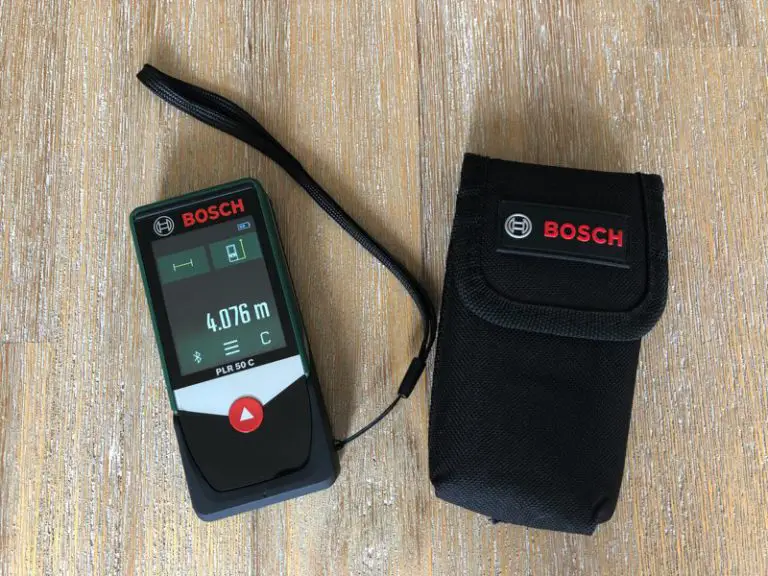
Bosch PLR 50 C

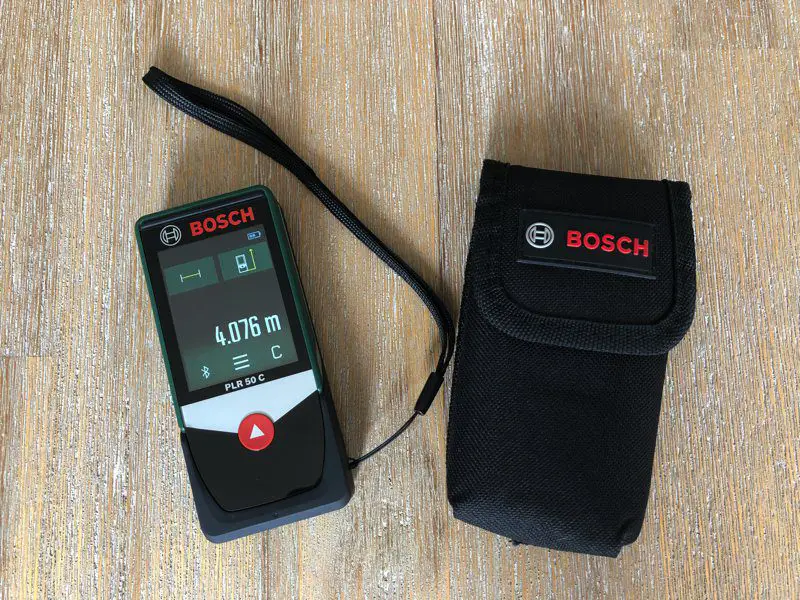
Included in the box or plastic packaging (depending on the region and model) is the PLR device, a handy cover, batteries and a small wrist strap.

Bosch PLR 50 C In Case

Technical Specs

  • Measurement Range: 0.05 – 50.00m (0.16 – 164ft)
  • Accuracy: 2mm (0.08″)
  • Weight: 0.13kg (0.28lbs)
  • Measurement Time: 0.5s
  • Batteries: 3 x 1.5V AAA
  • Laser Diode: 635nm

Basic Measurement Functions

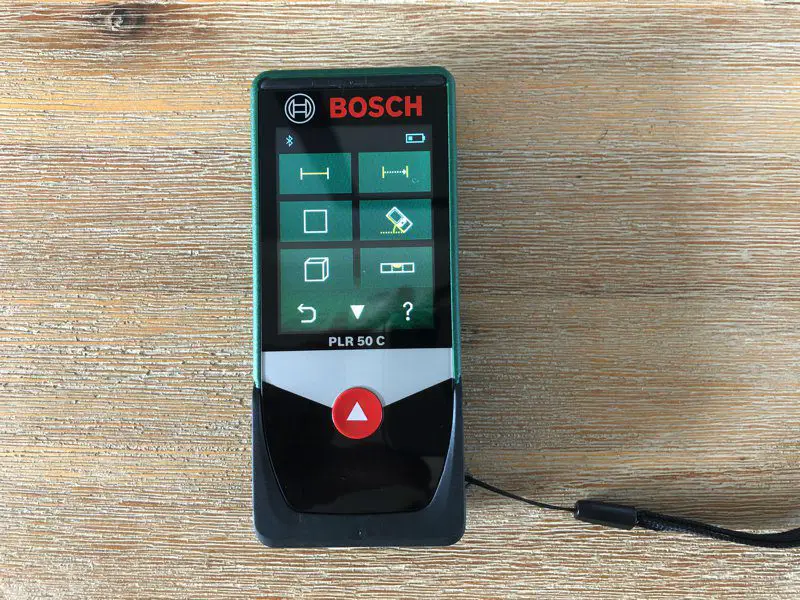
The PLR 50 C is really easy to use, it has a single button to turn on and off as well as take measurements. All other settings and mode changes are done through the colour touch screen display.

There are two primary settings for the mode, the type of measurement and the zero reference point – the point at which the measurement is taken from.

The measurement type selection lets you choose between length, continuous length (giving you maximum and minimum), area, volume, angle, level and then three forms of indirect measurement which use trigonometry to calculate heights or distances based on two distance measurements and the angle of the device.

Measurement Type Selection

Three zero reference point settings are provided. These tell the unit where to take the measurement from, the front of the device, the back of the device or from the plastic clip on the bottom used for measurements from corners or tight spaces.

Reference Point Settings

Measurements are really simple to take. Once you’ve selected your mode, you press the button once to activate the laser pointer to direct you measurement point and then press again to take the measurement.

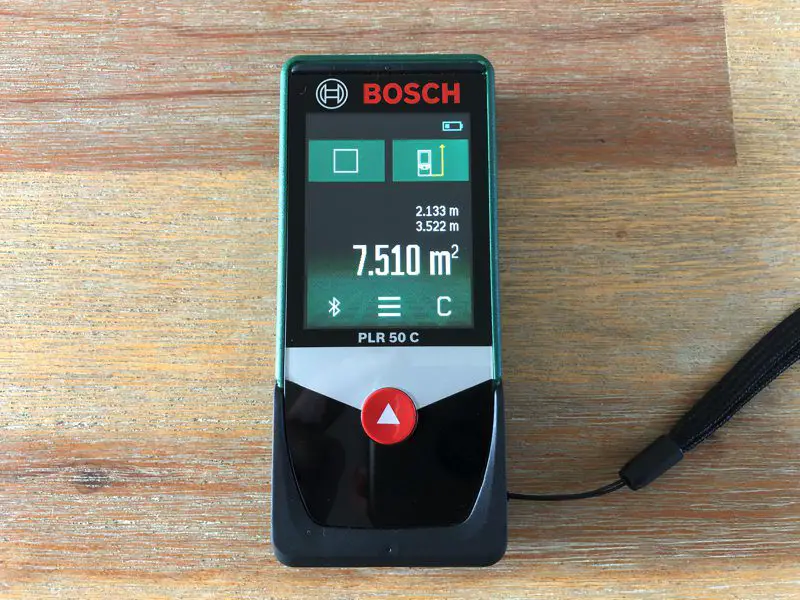
If you’ve selected the area function, the pointer will come on again after the first measurement and you’ll line up the second then push the button and the two measurements will be displayed along with the calculated area.

Area Calculation

The volume measurement works in a similar manner but with once extra button push for the third distance measurement.

Volume Measurement

Angle Measurement And Levelling Functions

Another useful feature is the inclusion of an inclinometer which lets you measure angles or alignment.

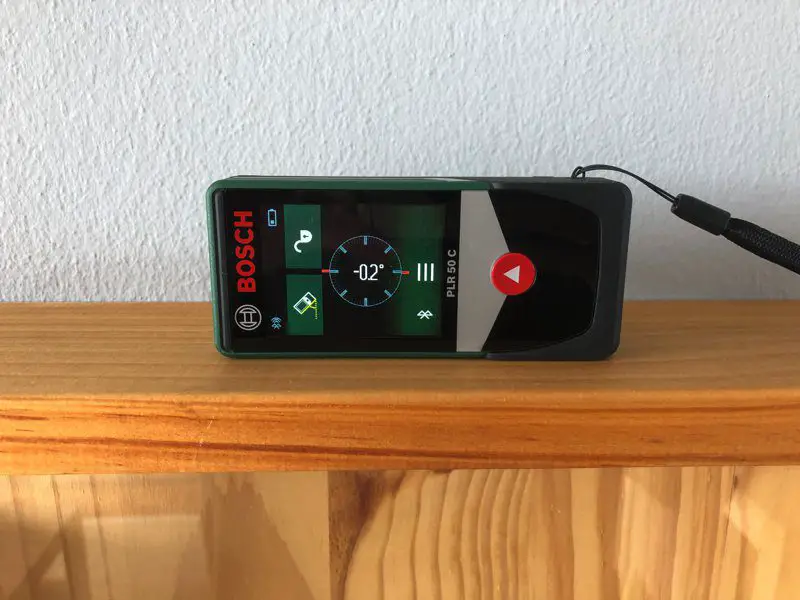
The angle measurement interface is also really simple with a display indicting the angle and a beeping tone when the device is perfectly horizontal or vertical.

Horizontal Measurement

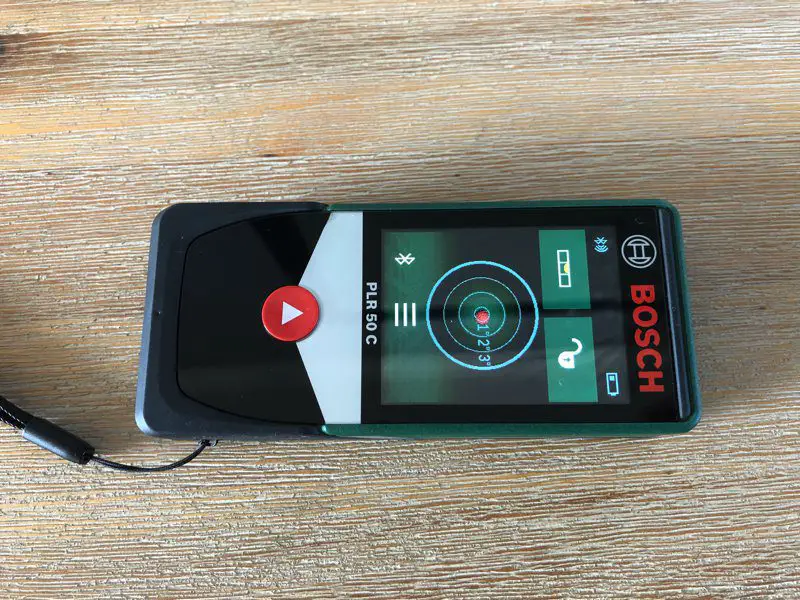
There is also a sort of spirit level function which allows the unit to lie on its back for levelling tables, counter tops or other flat surfaces. Again, the unit emits a beep tone when the ball is perfectly centred.

Bubble Level Function

App Interface

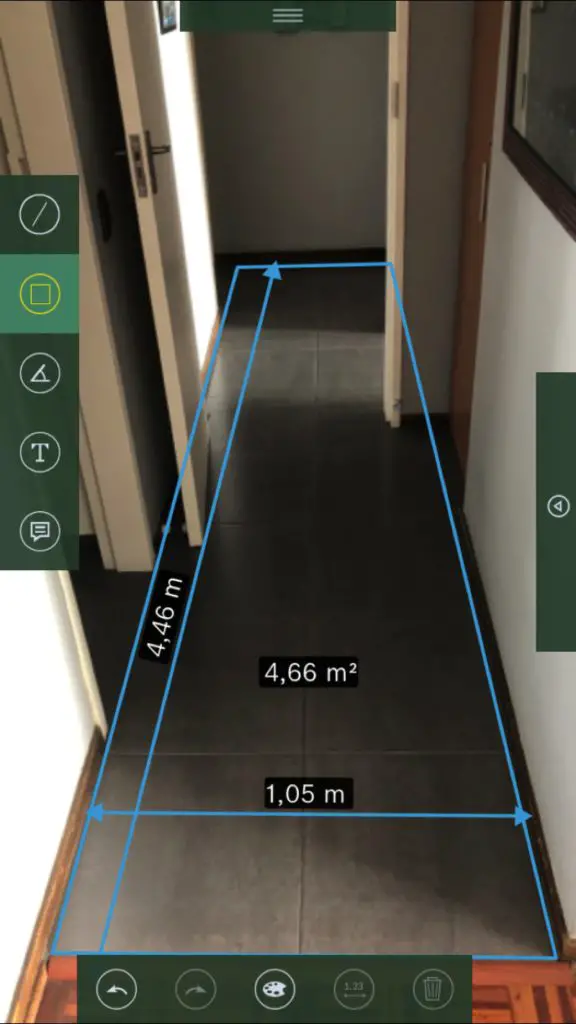
Perhaps one of the most powerful features of the Bosch PLR 50 C is the app interface. The app is a very well thought out tool which enables you to take photos of your work, organised into projects or locations, and then automatically transfer measurements from the device via bluetooth and overlay them onto the photos.

This enables you as a DIYer or a contractor to take photos of a room or area, overlay measurements and then save the sketch to your phone to take along to your DIY store or interior designer etc.. You can also automatically compile your project into a PDF file to email through to your contractor or designer.

The PLR 50 C is really easy to pair to your phone via bluetooth and pops up in the app for you to select without any further setup.

Bosch PLR Measure and Go

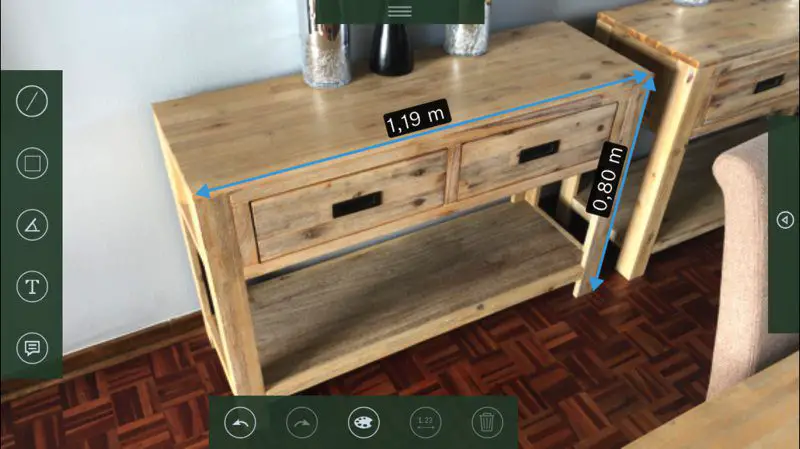
You’re then able to create a project, take a photo and begin dropping measurements onto the image. You can also add notes or text and edit dimensions as you need.

Console Measurement

You can add lengths, areas and angle measurements directly into your photos.

Area For Tiling

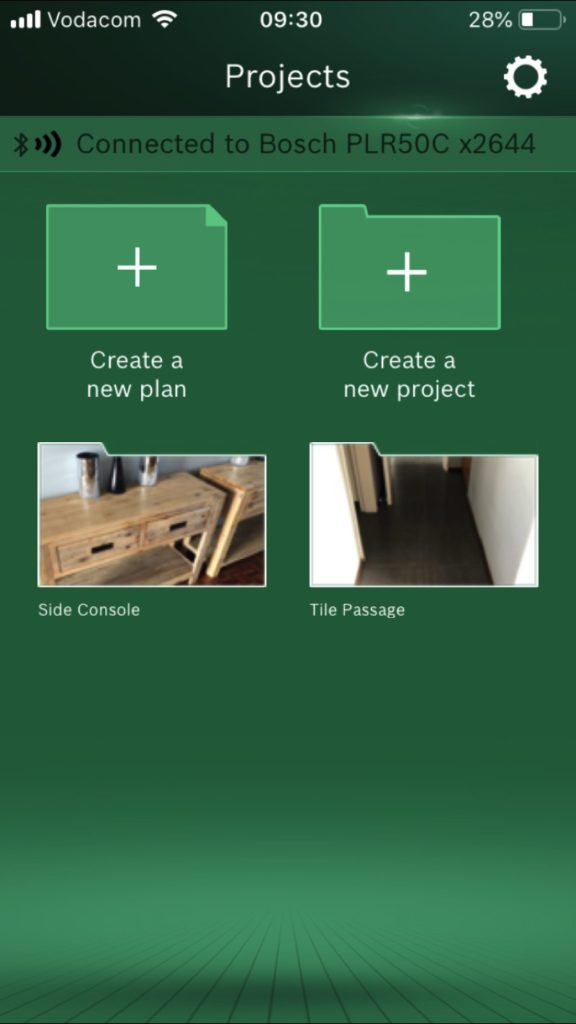
The app keeps your projects organised with customisable names and thumbnails. All of your information is automatically saved and projects can be created or deleted as required.

PLR Measure And Go App

Likes And Dislikes

Likes

  • The PLR 50 C is easy to use. All of the options are graphically represented and easy to find.
  • The device is very accurate. I compared the results to a number of physical measurements and they were always spot on.
  • The range of functions and reference point settings make it an amazingly versatile tool. This is an accurate 50m measuring tape, level, calculator, log book, and height estimator (for trig based measurements) in a mobile phone sized package. You no longer need to carry a notepad and pen around with you.
  • The app is fantastic for home projects or for contractors who need to quickly take measurements for quotations and quantities and keep them well organise.
  • It is small, reasonably durable and with its pouch it fits into your pocket or bag really easily.

Dislikes

  • The PLR 50 C is quite expensive. Granted it does do a lot and with the colour touch screen and bluetooth functionality it is the flagship model. But paying over $100 for a device which competes with a measuring tape is hard to justify unless you use it daily or at least weekly.
  • The capacitive touch screen works well and is really responsive but only works with a physical skin touch. You can’t use the back of a pencil or gloves to operate the display which is sometimes an issue when you’re busy with DIY projects.
  • It takes AAA batteries. The battery life is fairly impressive and you’ll get well over a week’s worth of work out of a set but I would have liked to have seen a USB based rechargeable interface rather than having to carry replacement batteries around.

Final Thoughts

The PLC 50 C is a fantastic tool for your DIY or contractor toolbox. It makes taking measurements a whole lot quicker and easier. It is extremely versatile and accurate and the app does away with the need to carry a notepad and pen around.

The price is a little high but it really is worth it to get the app interface, you definitely won’t be disappointed. If you feel like you can do without the app then go for the basic version and you’ll save quite a bit of money.

Let us know what you think of the Bosch PLR measurement devices in the comments section below. If you’ve enjoyed this review, have a look at these 7 power tools to make your DIY work easier.

Using The Arduino IDE Serial Monitor

The Arduino IDE serial monitor is an extremely useful tool for troubleshooting and fault finding in your code. If your code is giving you erratic or unexpected results then a good place to start is by displaying the key variables used in your code through the serial monitor tool in order to see where the problem arises. This tutorial is going to briefly take you through setting up and using it in your code.

This tutorial assumes that you have worked with and are familiar with the Arduino IDE and interface. If this is your first project then we recommend that you familiarise yourself with programming an Arduino first.

What You’ll Need To Use The Serial Monitor

  • Arduino (Uno Used in this Example) – Buy Here
  • USB A to B Cable – Supplied With The Above
  • A Computer

How To Set Up And Use The Serial Monitor

In order to be able to use the serial monitor function, you need to add a single line to the setup function of your code to initialise the serial communication.

void setup ()
{
Serial.begin (9600); // initialize serial communication at 9600 bps
}

Next, you’ll simply need to use a single line of code to display anything on the serial monitor.

Serial.println (variableValue);

You can also display static text to help organise what is displayed, such as:

Serial.println (“Temperature Sensor Value: ” + tempSensor);

Once you compile and run your code, you’ll need to open the serial monitor on your computer in order to be able to see the data being sent to it. It can be opened through Arduino IDE by clicking on Tools > Serial Monitor.

That is, it is a really simple and very effective tool to assist you with fault finding. Let us know if you have any queries or issues in the comments section below, we would love to help you out.

Why Buy Cubby Houses and Sandpits for Your Young Brood

Play is an essential component in the proper development of young children. The activity presents them with the opportunity to think for themselves or use their imagination to work out simple life dynamics.

However, due to the rise of digital technology, the brand of play that a lot of young children get into has changed immensely. They are often spoon-fed information and they do not even get to explore the world outside their home. A lot of tots even grow quite obsessed with gaming consoles, smartphones, and tablet PCs that they become so oblivious to what is going on around them.

If you are not keen on your children getting sucked into a virtual world and failing to develop good social skills, invest in traditional toys and play equipment for kids. Among the best options for play equipment are cubby houses or small house-like structures and sandpits.

Developmental Advantages Provided by Cubbies

Cubbies create a “domain” for your little ones. Although you may be in charge of filling it up with decor (toys basically), it is a place that your kids can call their own and have full control of. They can turn a cubby into anything that they want it to be for imaginative play. Also, here, they can create stories that depict their growing understanding of the world they live in.

Not only is a cubby house perfect for that kind of play but it likewise makes for a cozy, ready nook. If your kids are learning to read, you can assign their cubby as the place to enrich their vocabulary by reading books.

And perhaps, the most important function of cubbies for little kids is how they serve as a private hideout or hideaway for them. A cubby may not be too much of a secret hideout but it can pretty much perform the same job because when young children need a place to let off steam or a getaway to think without being disturbed by an adult, a cubby easily meets this need.

Developmental Advantages Provided by Sandpits

Sand is a great sensory stimulus, which is pretty much the reason why young kids can spend countless hours just playing with it at the beach.

Child development studies also reveal that sand promotes physical development. Children build strength as they work with sand as a medium. Plus, they develop eye and hand coordination as the young ones manipulate it according to the vision in their head.

Early childhood care and development specialists also point out that because sand is not quantifiable, it is an ideal toy for socialization. You can place young children in a small sandpit with fun rainbow sand and the likelihood of them fighting with each other is lower. This is because their area will always have more than enough sand for the play they have in mind.

It is worth noting as well that sand is what ECCD specialists call a “didactic” toy. It is educational because with its “manipulative” quality, children learn various concepts such as shape, texture, and the cause and effect of certain interactions between sand and other media. Best of all, sand can turn into anything — there are countless possibilities with it.

Smart Play Investments

Toys and play equipment that hone gross and fine motors skills, encourage social interaction, and creative thinking are always smart investments in ensuring the healthy development of your young brood.

These allow children to fully explore what they are physically and mentally capable of. And, when they obtain an understanding of this, you secure them an advantage in this often challenging world.

Truly, you cannot go wrong with these investments. And because your children need to use their imagination when playing with such toys or play equipment, you can have the assurance that they will not get bored easily.

As opposed to digital games whose excitement is simply concentrated on reaching a new level (which, at times, will require you to dole out more money), traditional play implements like cubbies and sandpits are guaranteed to enhance playtime and learning.

If you’ve enjoyed this post, be sure to check out these unorthodox ideas for the back yard. Let us know in the comments sections below what you’ve included in your back yard for your children to play with.

Unorthodox Ideas For The Back Yard

For people with a creative, DIY spirt, having a back yard is like having a blank canvas. That doesn’t mean the whole thing has to turn into a project, but it’s a ton of fun to think about different things you could do to enhance the space, from planting a garden, to installing a greenhouse, to building a clubhouse if there are ever kids in the picture. There’s really no end to the number of things you can do with some creativity, perseverance, and know-how. And to that point, we thought it would be fun to dream up a few unorthodox ideas for the back yard.

A Tunnel & Enclosure (For A Cat)

This is one of the strangest but neatest ideas out there, at least for those who have cats or other small pets who might like more freedom to go outside. The idea is essentially to build a wire enclosure outside, and you won’t believe how easy it is. To make it even more fun though, you can also attach what are essentially small hallways branching off of said enclosure to other parts of the yard. These tunnels might go up the side of your house, run along a fence surrounding the yard, or whatever else works in your space. Think of it a little bit like a hamster home, but supersized and built for the cat in your back yard. Just be sure that the construction is sound, both so that the cat can’t get out and so that other animals can’t get at the cat.

An Adult Sandbox

It’s strange, when you think about it, that we consider sandboxes as being exclusive to children. In the traditional sense, in which they’re meant to be crawled in, and used for sand castles and the like, perhaps it’s only logical. However, the idea of simply designing a sand pit can appeal to adults as well. You can essentially design this as its own island in your yard, either dug into the ground or raised with a stone border, and once you fill it with sand you can use it however you’d like! You could simply put some attractive chairs there, lay out in nice weather, or even set up a grill or fire pit there if you have the space.

Racing Posts

This is a strange idea, and draws inspiration from professional horse races around the world. Look to the Cheltenham Festival, one of the biggest events of the year in horse racing, and you’ll see both racing posts and, for some of the competitions, hurdles, all designed fairly simply but used effectively to divide up a course and present different challenges. A similar arrangement in your back yard can serve as your own fitness course, and can also be useful for any younger family members or visitors who might simply want to run around. It’s a little bit silly, but you can’t say it wouldn’t be unique! Plus, the construction is actually fairly straightforward.

A Roof (For A Hot Tub)

One of the worst moments a homeowner can have is making the decision to go outside to use a hot tub only to realize it’s raining or snowing. Okay, that’s overstating things somewhat, but it is quite a bummer. This problem can be completely solved if you simply built a roof – something like a permanent canopy, or even one that can be pulled back, if you prefer – to hang over a hot tub. It’s a great way to make a hot tub accessible in all seasons and weather extremes so that you can get the most out of it.

A Fire Trough

People do all kinds of things with fire pits, but you seldom hear about one designed to be elongated, and thus serve more space. Creating a stretched out fire pit – a fire trough if you will – is an awesome way to set your yard apart though, as well as to make the gathering space a little bit different. While the standard small circle around a fire is great for conversation, a fire trough can handle a bigger gathering of people, with seats along both sides. Particularly if you’re the type to do a lot of entertaining, it can be a wonderfully beneficial project.

If you enjoyed this post, have a look at these top landscaping ideas for 2018.

Design Ideas for a Functional Tiny House

If you haven’t heard about tiny houses, here’s what you need to know: tiny houses are typically no more than 500 square feet and focus on simple living without sacrificing on quality. When it comes to tiny living, it’s a good idea to incorporate designs that are also functional. Functional DIY additions that make the most efficient use of space in a tiny house can make the building process a fun, creative experience. Let’s take a look at some design ideas to help you make the most out of your tiny house.

1. Overhead Mason Jar Storage

This is the perfect DIY addition to your tiny house kitchen, or any space where you want to store small things safely. First, glue the tops of mason jars to a strip of wood. You can then install the strip of wood under cabinets or somewhere over your kitchen space. Fill the jars with herbs, spices, or pastas so when you screw the jars into the tops, you’ll have a colorful display of ingredients. Unsure where to keep things like stray earrings or paperclips? Mason jars are also a visually pleasing way of keeping track of the small stuff.

2. Pallet Bed

Recycling old pallet wood is a great way to do right by the environment and by your wallet. Building sites and companies that are in shipping often have perfectly good pallets lying around. No need to spend big bucks on a bed frame–just cut, sand, and piece the pallets together until they’re the right dimensions for your mattress. Add a string of lights on the wall and you’ve got the perfect rustic-chic bedroom.

Pro Tip: A pallet bed is also a nice addition to a sleeping loft. It can look a lot nicer than a mattress on the floor!

If you enjoy recycling old wooden pallets, have a look at these 8 creative DIY pallet projects.

3. Multi-Functional Cutting Board

Surface space is precious in a tiny house kitchen. Give yourself the gift of extra counter space and a cutting board, by using the cut-out piece to cover your kitchen sink. You’ll have a strong cutting board, as well as something to fill the space over the sink when there’s a lot of food prep to be done.

4. Storage Stairs

If climbing a ladder into a sleeping loft doesn’t sound appealing, then a multi-functional set of stairs might be the solution. When designing your set of stairs, be sure to add plenty of shelving or cubbies along the side. Although stairs can sometimes take up a great deal of space, adding storage options to your custom home design is an ideal compromise.

When it comes to designing your tiny house, it’s a good idea to first make a list of the features you know you want. Next, consider ways they can serve one or more purposes. Can a breakfast bar also be a workspace? Are the mirrors on the wall placed in an ideal place to spread natural light? If your answers are yes to questions like these, then you’re on the right track.

Streamlabs Smart Home Water Monitor Review

The Streamlabs water monitor is an innovative product which makes it super easy for almost anybody to install and get started monitoring their water consumption and protecting their home against leaks. The non-invasive monitor simply slips onto your water supply line and in a couple of steps, starts providing you with data on your water usage and habits through the app.

The Streamlabs Smart Home Water Monitor is available for purchase directly from their website https://streamlabswater.com for $199.00 including shipping. It is also available through Amazon for the same price – Buy Here.

Let’s have a look at my experience setting up and using the Streamlabs Water Monitor.

Unboxing

The Streamlabs device comes well packaged in a simple black box with the Streamlabs logo and a couple of images around the edges indicating how it is used and installed and what is required for it to operate.

Streamlabs Water Monitor Box
Streamlabs Water Monitor Box Back

Slipping off the lid, you are first presented with the water monitor, and underneath it the installation ties, power supply and manual.

Opening Up The Box

Included in the box is:

  • The Streamlabs Water Monitor
  • Power supply
  • Installation zip ties plus one extra set and anextra set of contact pads
  • An installation/operation manual booklet.
Whats In The Box

The physical water monitor has minimal user interfacing. There are two LEDs on the top surface which indicate that the unit is calibrated and connected to WiFi and there is a port for the power supply on the side along with a WiFi reset button. Apart from the sensors on the bottom, that’s all that there is to the outside of the monitor.

Technical Specs

If you’re not that interested in the technical details, skip to the next section.

  • The app is available on iOS devices runningiOS11 or later and Android devices running Android 6 or later.
  • It works on copper schedule M&L as well as PEX and CPVC piping in ¾” or 1” diameter sizes.
  • The power supply is pretty universal and operates on 100-240VAC 50/60Hz.
  • It is designed for indoor use with an ambient temperature range of 0°C (32°F) to 46°C (115°F) and a water temperature range of 4.5°C (40°F) to 26.5°C (80°F).

Installation & Set Up

To start out, I had a quick flip through the manual which is only a couple of pages long. I have to admit that I was initially a bit sceptical about how simple the manual made the installation and set-up out to be and expected to run into a few problems along the way. My scepticism was quickly put to rest, it really is this simple.

User Manual Booklet

The manual gives you a brief summary of the inputs and LEDs, the installation process and the technical specifications.

User Manual Installation

To start out you need to download the free Streamlabs app which is fairly simple to find in the App Store or on Google Play.

Streamlabs App - App Store

The app is quite compact and installs quickly. When you open it up, you’ll need to log in or register with your email address; this has become pretty standard amongst smart home devices.

The app then guides you through connecting your water monitor to your home WiFi network. It recommends doing this before you install your water meter so I just plugged it in near my desk to complete the WiFi setup.

Water Monitor With Power

The whole process, including identifying my water monitor, connecting it to my WiFi network and updating the device’s software took about two minutes and worked first time. I was really impressed with how quickly and easily it connected to my WiFi network and just started working.

You’re then presented with a screen which lets you know that you can disconnect the power from the monitor and begin the installation process.

The app then guides you through the installation process step by step and even provides an on/off button for iPhone’s torch function to help you out if you’re installing your meter in a dark spot in the basement, attic or cupboard.

Installed In Place

Once you’ve completed the installation, you plug the power cable back into the unit, wait for it to power on and reconnect to your network and then the unit automatically recognises the pipe material and size. The app asks you to verify that the detected material and size are correct but it did a perfect job recognising mine. This is just another example of how easy they’ve managed to make the installation and setup process, most devices ask you to plug information like this into the app yourself.

You’re then asked to calibrate the unit by shutting off the water supply for a few seconds and then flushing a toilet or opening a large faucet to get a high flow rate through the pipe. This also took a few seconds to complete and you’re then finally asked to set up leak alerts.

Finished Calibration

The leak alerts are broken down into two sections, one to detect slow leaks in which you set a low flow rate for a long period of time and one for major leaks (such as a burst pipe) in which you set a high flow rate for a short period of time. There are also toggles to enable or disable these alerts.

Leak Alerts

As somebody who has used a fairly wide range of smart home products, I can tell you that this product is definitely one of the easiest I have installed and set up. There is very little I could complain about throughout the installation and setup process.

If I really had to be critical, I could only come up with two things I’d prefer to be done differently. I would suggest that the choice of units – imperial or metric be included in one of the early setup steps on the app instead of a setting to be changed in the settings menu afterwards. The second is that I would allow the user to specify an internal pipe diameter if required, this obviously detracts from the simplicity of the device but providing the ability to do so, even if not during the primary setup procedure could make the meter a bit more versatile.

General Operation

In keeping with the overall simplicity of the product, the day to day operation is neat and fairly simple as well.

When you open up the app, you are presented with a summary home screen which displays your water usage for the day, a note on whether or not there is water currently being used and an indication of the status of the Home/Away mode.

After Shower

If you have multiple monitors set up in different locations then each of these summaries will be displayed one underneath the other on this home screen.

Touching the water usage for the day takes you to a detailed breakdown of your current water usage, room temperature, historic data for the past day, month and year as well as comparative usage for the past day, week and month. At the bottom of the page there is also a log of all of the leak alerts which have been triggered.

In addition to the major and minor leak alerts, there is an additional leak alert for when you are away from home. This function is particularly useful for weekends away or vacations during which the monitor will notify you if there is any water flow for longer than 15 seconds. You can turn on the away from home mode from the home screen on the app or through your smart home device like Amazon’s Alexa interface.

The app interface works quite well and seems to be stable, I haven’t experienced it crashing or hanging. It does however take a few seconds to “fetch information” when you load it or switch back to it from another app.

Additional Smart Home Integration

In addition to the WiFi connectivity and app, I noticed on the box that the monitor can be controlled by Amazon’s Alexa as well as Nest, so I thought I’d try that out as well.

The device doesn’t connect to Amazon’s Alexa platform with the traditional smart home device protocol like most universal remotes, smart plugs and smart bulbs but rather interfaces through a Skill which allows Alexa to control the state of the monitor. This essentially means that your Alexa device will not communicate directly with the monitor but rather control it through the cloud interface.

There’s nothing wrong with this interface, it is still easy to install and get running, it is just different to how you’d expect a smart device to connect to your existing smart home network.

The Skill is enabled through your Alexa app on your smartphone and you’ll then need to link your Streamlabs account after which you can start using your Alexa enabled products to control your water monitor.

Alexa Skill

The available commands are pretty basic, you can ask Alexa to put your monitor in home or away mode if you just have one monitor or ask her to put a specific monitor into home or away mode if you have multiple.

This is one area which could be developed a bit further. I’d like to be able to get feedback from the device as well as change the modes. Being able to ask whether water is running or not or ask how many gallons or litres of water have been used today would be great additional functionality.

If you’ve got an Echo, Echo Dot or other Alexa enabled device, have a look at these 35 useful things to ask Alexa.

What I Like & Dislike About The Streamlabs Water Monitor

I Like

  • It really is super easy to set up and install,the app guides you through every step and it requires no cutting of pipes or special tools.
  • You don’t need any technical experience or knowledge to set up the monitor, it detects the pipe material and size automatically and the default settings are sufficient for most people.
  • The out of home leak detection function is great peace of mind for vacations and weekends away.
  • It’s a great tool to assist you in becoming more conscious of your water usage and reducing your environmental footprint.
  • The price is right, at $199 this is one of the cheaper water monitoring devices with this level of functionality. It’s also a small price to pay for the peace of mind knowing about a major leak as it happens brings; a flood of a basement or in your apartment could easily cost thousands of dollars to repair.
  • The device retains its settings and re-connects to the WiFi network automatically when the power is interrupted. You don’t have to reconnect it and set it up if the power is out for an hour or two.

I Dislike

  • The app is a little too simple. While they’ve done a really great job at making it easy to use and understand, it would be nice to provide users with a little more information and metrics and a few more customisable settings. I’d like to be able to look at the actual figures as well as the more general graphs.

What I’d Like To See Added Or Changed

  • I love how simple they’ve managed to make the setup and interface but I would like to be able to further customise the settings, even if it’s through an “advanced” settings page or something similar. I’d like to be able to set the alert flow rates and times to customisable values, perhaps within an allowable range.
  • Further integration with Amazon’s Alexa. I’d like to be able to ask Alexa whether there is water running and how much water I’ve used in the day or this month.
  • The WiFi status LED blinks every 4 seconds to indicate that it is connected. Also not really a problem but I’m used to LEDs staying on (like the calibration LED on this device) when everything is working correctly. A blinking LED generally indicates a problem or limited functionality.
  • A smart home water isolation valve would be a great addition to this product as an optional extra. Getting a major leak alert when you are away from home is great but it would be even better if you could solve the problem from the app as well by turning off the water supply. This would obviously also require a more complicated installation.

Conclusion

The Streamlabs Smart Home Water Monitor is an incredibly easy to use and well priced device for it’s functionality. It provides users with useful metrics to keep track of their water usage and become more water conscious and it gives you peace of mind knowing that your home’s water supply is constantly being watched, even when you’re away from home.

The app is really well put together in guiding the user through the installation and setup process and while I’d like to see a bit more detail available for the historical recorded data, all of the important information is readily available.

If you’re interested in becoming more aware of your water usage or you’d benefit from the peace of mind that comes with having your water supply continuously monitored then I’d definitely recommend the Streamlabs Water Monitor.

Expensive Batteries Vs. Cheap Batteries, Which Are Better Value For Money

We all expect expensive batteries to last longer than cheaper ones but do they last long enough to provide better value for your money than simply buying a number of cheaper ones? James White from Freakin’ Reviews has put a range of different price batteries to the test to see which last the longest and which are the best value for money in terms of the duration they last and their cost. Have a look at the test below, you may be surprised by the results:

From the results its clear that the more expensive ones do generally last longer than their cheaper counterparts however, depending on your application and requirements, you may be better off buying the cheaper ones. The cheaper ones can cost almost 6 times less than the most expensive ones and yet they manage to last around half of the duration. This means that cheaper batteries turn out to cost almost three times less per hour of running time.

So next time you head out to buy batteries, remember that it may be worth your while to pick up a few packs of cheaper batteries rather than a single pack of more expensive ones.

If you’re interested in battery capacities and calculating how long they’re going to last, have a look at our post on How Long Will My Solar Batteries Last. If saving money is more your thing then make sure that you check out these 40 Frugal Tips To Save Money On Living Expenses.

Passive Housing – A Smarter Way Of Living

With so much talk about climate change and how it can and will impact on our lives in the long term, concepts like passive housing and general methods of being environmentally aware are becoming more and more popular. People want to take more of an active role in ensuring the longevity of the planet and one way to do that is to alter our way of living and how we consume every day energy.

Passive housing is said to use 90% less energy than “regular” housing but what does having a passive house actually mean? The guys at EZ Living have put together this infographic to explain the concept further to allow you to decide whether a passive house is something you definitely need!

passive-housing-a-smarter-way-of-living

As you can tell, passive housing shifts the focus in energy savings right back to the basics of home design and can generate substantial benefits in the form of utility bill savings, possible rebates and even increase the value of your home.

If you enjoyed this post, have a look at our post on taking your home off grid the smart way or switching to solar – the start of off grid living.

5 Fun DIY Projects For The Holidays

The holidays are around the corner and we thought that this would be a great time to give you 5 fun and easy DIY projects for you to do this holiday season, some of them even make great gifts.

This article by Drill Service lists 5 unique DIY tasks you can easily recreate yourself and the list of tools needed to master each one.

Pallet Shelves

Recycling pallets has become increasingly popular in DIY over the past few years, as it is not only an affordable way of creating cool things for your home or garden, but they are also extremely versatile, meaning you can make almost anything out of one. One of the simpler DIY tasks you can undertake using pallets, is to create shelving, which looks beautiful painted in your choice of colour and can be used to store plants or flowers.  Why not be extra creative and make a wine rack style shelf? The opportunities are endless!

If you love pallets, try making these super cool mini pallet coasters.

Tools Needed:

  • Paint and brush
  • Two pallets that are more than 3ft in length each
  • A measuring tape
  • A ruler
  • A wood saw
  • Files and sandpaper
  • Drill driver
  • 3mm drill bit and counter sink tool
  • 4mm wood screws

A Christmas Wreath

With Christmas fast approaching, what better way to get in to the festive spirit than by making your very own Christmas wreath? You can be really creative with this task and tweak the wreath to suit your own taste or to fit your personally preferred colour scheme. You can use faux flowers, pine cones, glitter and fabric as well as countless other decorative items.  To make this task a little easier, you’re best off buying a foam wreath ring online or alternatively you can make your own using wire. The foam wreath will save you time and means you can simply pin and glue fabric and greenery to it.

Christmas Wreath

Tools Needed:

  • Floral pins
  • Foam wreath ring – Buy Here
  • Hot Glue Gun
  • Fabric
  • Faux flowers and greenery
  • Scissors
  • Wire trimmers

Personalized Scrabble Picture

A personalized scrabble picture is a super easy and affordable way to create the perfect gift for a loved one, or to simply hang in your own home. You can either create an inspiring quote using the scrabble pieces, or make note of a significant date and then decorate it as you wish. For a rustic effect, stick to a wooden frame and wooden scrabble letters, this will fit perfectly into any vintage themed décor. Personalized Scrabble Pictures are almost effortless to make and the results are incredibly effective.
Tools Needed:

  • Large wooden or plastic scrabble letters – Buy Here
  • A photo frame
  • A blank canvas
  • A glue gun or strong craft glue
  • Decorative embellishments

A Suitcase Dog Bed

Why settle for a standard dog bed when you can create a unique and stylish suitcase one instead? This quick and easy DIY task allows you to recycle an old, unwanted suitcase and use cushions and patterns of your choice to upscale it into a comfortable and quirky bed for your furry friend.  A vintage suitcase works really well for this, as it not only looks expensive but it also looks of a higher quality. To learn how to make a suitcase dog bed click here.

Suitcase Dog Bed

Tools Needed:

  • Hard shell miniature suitcase – Buy Here
  • Hammer and drill ribbon
  • 4 wooden ‘feet’
  • Heavy duty glue
  • Pillow
  • Pillow cover

 Sharpie Mug

Looking for a cool way to create your own personalized gift that doesn’t cost a fortune? A sharpie mug is a quick and easy way to draw your own design or write a message onto a plain white mug, and then simply pop it in the oven for 30 minutes so that the writing doesn’t smudge or come off; genius! Get creative as you like with this task using coloured sharpies or stick to just black for a simple, sleek look.

Tools Needed:

  • An oil-based paint permanent marker – Buy Here
  • A plain white mug

Have you tried out any of these fun DIY projects? Let us know in the comments sections below, we would love to hear your tips, tricks and ideas.